



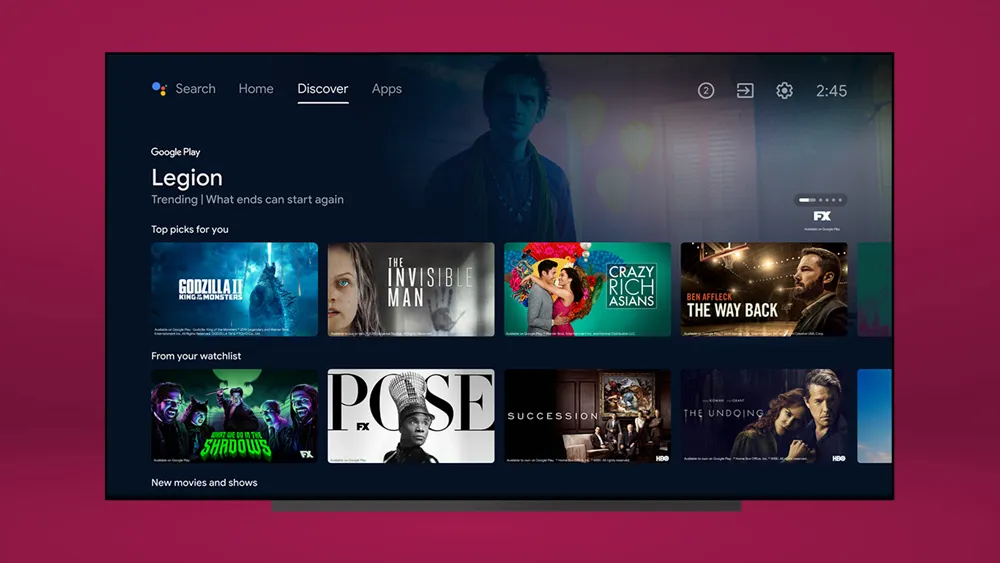
Starting this week, Android TV's getting some new features that you should keep an eye out for, as they should help you get more of what you want and cut down the time it takes to find new stuff to watch. And they're coming to the Chromecast with Google TV — one of the best streaming devices.
Our favorite change brings the recommendation tuner (previously seen in the Chromecast with Google TV's Settings window, under Content Preferences), to the Discover tab. This feature never should have been buried so deeply to begin with, so its move is a welcome change.
- We've tested the best streaming services
- What's new on Netflix this month
- Plus: Samsung’s new The Wall is a 1000-inch micro LED marvel
Once you see this setting, you'll get a chance to tell Android TV what you want, by tapping left (Less like this) or right (More like this). It's a very Tinder-y feature, and will let you make sure Android TV isn't throwing recommendations at you that you don't want. After you're done, the Discover tab should refresh to match what you've taught it about yourself. Maybe now you'll stop getting the HGTV recommendations you didn't ask for.

Up next, Android TV is adjusting where and how you use your Watchlist — so you can save stuff for later. Now, a long-press on an item in the Discover tab (or clicking Watchlist buttons on a show or movie's Details page) will give you the ability to file it in a Watchlist queue. You'll find this list of things to watch on the Discover tab — though we really think it should be on the home screen. The Watchlist is editable from your phone or laptop, via the Google TV mobile app and Google Search.
Android TV's also finally bringing trailers to the Detail pages for shows and movies. That said, they're going to play automatically unless you turn them off (go to Settings, then Device Preferences, then Home Screen and turn off Enable video previews).
These features are coming to Android TV sets and devices, such as the onn Android TV UHD.

