It’s official — the macOS 27 Golden Gate public beta has just launched, and with it we’re getting a slew of new features! Not that you’d know, because back at WWDC, Apple couldn’t stop talking about the new Siri AI that’s deeply integrated into everything here.
So while I’ll leave the hands-on impressions of the OS and its big features to my boy Tony, I want to tell you about the lesser known additions that you should definitely be trying out first. Because this new version is about a lot more than just AI.
Refining Liquid Glass - improving the UI

Let’s be real. Liquid Glass had a rough start. Personally, I thought it was kind of cool, but I can totally understand how it impacted readability and consistency of design across the OS. Apple’s addressed this with some small but impactful changes that bring it all together nicely.
First, there’s now a Liquid Glass slider to adjust how see-through the glassy elements are — great for improving legibility. Then there’s uniformity across macOS toolbars for more logical use, and the rounded corners of all the app windows match up now.
Like I said, it’s all small tweaks. But put them all together (as well as smoother animations for Mission Control and Spaces), and the end result is a nicer-feeling UI to get around.
Faster AirDrop

There’s been general performance upgrades across the board, as it seems Apple has gone all “Snow Leopard” on this version by looking under the hood and tweaking the efficiency of tasks.
But the real feature here is that AirDrop is going to get a turboboost. How much faster? I don’t know — but by optimizing the underlying network protocols, wireless file transfers are speedier. For someone who has a Final Cut Pro workload between my iPhone and MacBook Pro, this is huge for high capacity files.
Beyond this, Apple says you can look forward to faster app opens and JavaScript improvements to make Safari browsing a whole lot smoother. Speaking of Safari…
Safari’s big upgrade

Safari is catching up with the likes of Chrome and Opera with some AI-powered features like automatic tab organization, but Apple’s browser facelift goes deeper than that.
First up is probably a significant one for those who has gig tickets to buy or want to wait for a price drop. With Notify Me, you can set some conditions to get a notification whenever the content on a webpage changes.
Second, with a little help from Apple Intelligence, you can use natural language to describe a browser extension, and Safari will build it. So whether it’s a Recipe Keeper like in Apple’s example or maybe a Tom’s Guide story feed, you’re not limited to the developer range of extensions.
Oh, and shout-out to one of the underrated game changers here — swipe down to refresh. Just like in iOS, you can scroll up on a webpage to trigger a page refresh, and bringing that intuitive piece of UI design to the desktop experience feels so natural in a “why didn’t they think of that before” kind of way.
Drawing in Messages, Notes and Freeform

On iPhone and iPad, you can draw directly into Notes and Freeform, and this feature is now (finally) coming to Mac too. Using the touchpad as a canvas, you can sketch out your mini masterpiece — plus this drawing app is also being added directly into iMessage too for a huge upgrade over the handwriting feature you used to get.
Now, this is definitely an understated feature that you may only use once or twice (depending on what your use cases are of course), but I see this as something different. Apple has snuck in a couple of things that I think may be setting the stage for some new devices coming in.
Having expanded drawing capabilities in your OS? To me, that feels like something more purpose-built for a touchscreen device…maybe the MacBook Ultra?
iPhone mirroring that teases a foldable
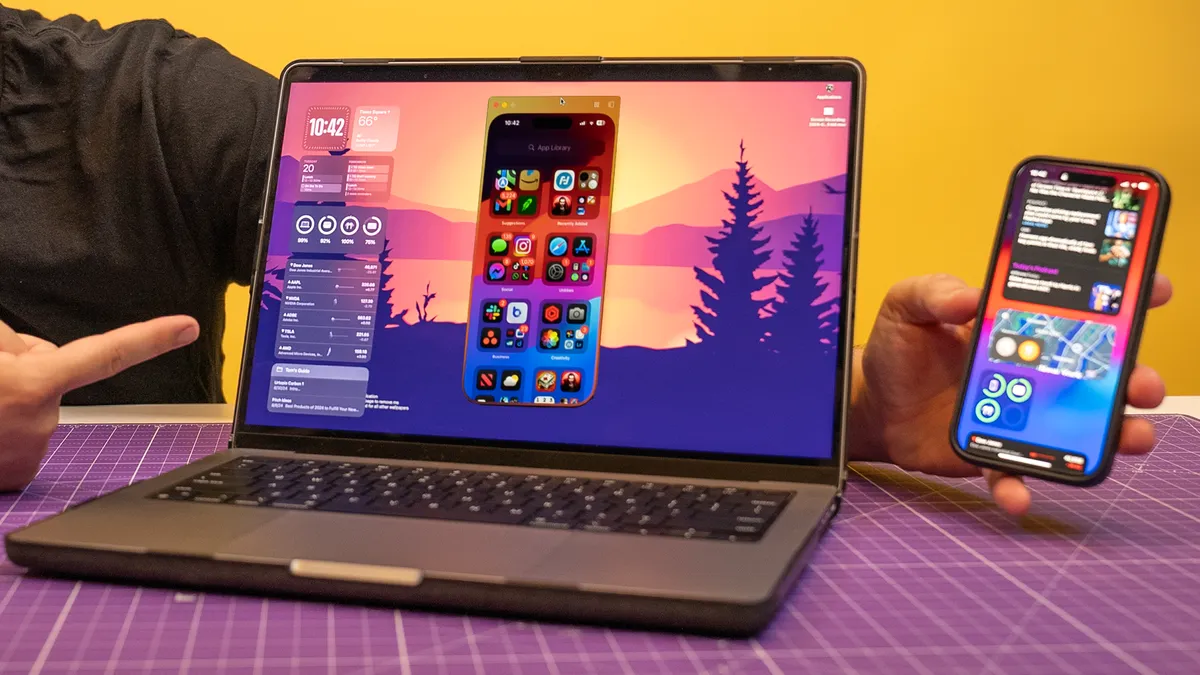
And this is the other feature that I believe is teasing a new device. iPhone mirroring has been one of the biggest features since its debut for me — giving me rapid access to my phone’s apps without needing to break my focus on my MacBook screen to pull out another device (and inevitably go down a TikTok wormhole).
With Golden Gate, you can watch DRM-protected video on your big screen now (Netflix content for example), and you can get into your iPhone’s Control Center.
But biggest of all, you can resize the app’s screen to be bigger and see more content on the screen.
Now again, this seems to be a weird addition. Why put that demand for responsive app design in iPhone mirroring? Well, you may have heard about this new foldable iPhone Ultra coming up…this seems too convenient to me.
Outlook

All-in-all, this isn’t necessarily the most feature-packed macOS update, but Golden Gate does sharpen some things up while also giving us what I feel are some future hardware teases.
These alongside a complete rebuild in the way search works across Spotlight, Photos and Mail, the tweaks here will be felt throughout by both casual and pro users alike.

Follow Tom's Guide on Google News and add us as a preferred source to get our up-to-date news, analysis, and reviews in your feeds.
More from Tom's Guide
- Haptic vs. Mechanical trackpads: I put them both through a gauntlet, and one almost made me throw my laptop into the sun
- Exclusive: I asked Lenovo’s GM to predict the future of monitors, and it's the end of our chaotic, cable-cluttered desks and monitors that fry your retinas
- Which MacBook should you buy in 2026? I ranked the 5 best Apple laptops for every need