





Tom's Guide Verdict
The Epomaker Glyph is the most fun mechanical keyboard I’ve had the pleasure of testing. Packing responsive, light Wisteria V2 linear switches and boasting a creamy and buttery sound profile, the Glyph puts the joy back into typing. The keyboard sports a charming typewriter-like design with dual screens and customizable RGB lighting, and build quality is solid too. While stock switch choice is very limited and the battery life isn’t the best, the Glyph’s pros easily outweigh its cons.
Reasons to buy
- +
Outstanding design
- +
Solid build quality
- +
Lovely sound profile
- +
Fantastic (and fun) to type on
- +
Dual screens for GIFs and vitals
Reasons to avoid
- -
One stock switch choice
- -
Screen and RGB eat into the battery
Why you can trust Tom's Guide Our writers and editors spend hours analyzing and reviewing products, services, and apps to help find what's best for you. Find out more about how we test, analyze, and rate.
As someone whose bread and butter revolves around typing, I need one of the best mechanical keyboards to get the job done. Mech decks can be fun, but few are as fun as the Epomaker Glyph — and after testing this keyboard for a week, I don’t want to go back to the one I was previously using. The Glyph is a beast, sporting a charming typewriter-like design, while offering a wonderful typing experience and creamy sound.
With dual screens, pleasing RGB lighting, solid build quality, and user-friendly companion software to boot, the Glyph is easily one of the greatest keyboards you can buy right now. While it isn’t without its flaws — namely, limited stock switch choice and poor battery — as you’ll soon see, the Glyph’s upsides easily outweigh its shortcomings.
For the complete breakdown, read my full Epomaker Glyph review.
Epomaker Glyph review: Specs
Price |
|
Switches |
Epomaker Wisteria V2 (linear) |
Keycaps |
Double-shot PBT |
Construction |
ABS plastic |
Mount |
Top |
Layout |
75%, 83 keys |
Operating system |
macOS, Windows |
Backlighting |
Per-key RGB |
Polling rate |
Not specified |
Paired devices max |
3 |
Connectivity |
Bluetooth, 2.4GHz dongle, wired |
Battery |
8,000mAh |
Measurements |
13.66 x 8.14 x 2.24 inches |
Weight |
2.59lbs |
Colors |
Retro White |
Epomaker Glyph review: Cheat sheet
- What is it? A 75% typewriter-like mechanical keyboard with dual screens, and linear switches
- Who is it for? Those who type for a living and want a fun keyboard to do so
- How much does it cost? The Epomaker Glyph is available for $139 / £103
- What do we like? So much! The outstanding design, solid build quality, lovely typing experience, creamy sound profile, user-friendly companion software, and more
- What don’t we like? The poor battery life and limited stock switch set choice
Epomaker Glyph review: The ups
From its gorgeous typewriter-like design and solid build quality, to the awesome typing experience and creamy sound profile, the Epomaker Glyph is a winner.
A typewriter-like design done right

The Glyph is Epomaker’s first venture into the world of typewriter-like keyboards. The only other typewriter-esque keyboard I’ve personally tested is the Logitech Pop Keys ($99) — which the Glyph blows out of the water with ease — although we’ve also reviewed (and loved) the Lofree DOT ($99), which is a great deck if you want to save $40.
Featuring rounded keycaps and a poppy sound profile, the Glyph emulates the experience of typing on a typewriter, and I’ll discuss these in detail shortly. First, I want to talk about the keyboard’s design. Blending retro aesthetics with modern features, the Glyph adds a flair to your desk and is sure to draw eyeballs (in a good way).

The south-facing RGB lighting doesn’t look loud or garish, and there’s an ambient light strip that lights up in the colors of the rainbow, with the light falling on the surface the keyboard is sitting on. I love the glossy finish on the retro white body, which feels soft and premium to touch (and look at).

The Glyph sports a 75% layout with 83 keys, and it measures 13.66 x 8.14 x 2.24 inches so doesn’t take up too much space. It weighs 2.59lbs, so while it’s heavier than the likes of the Hexgears Immersion A3 TKL ($129, 1.67lbs) and the NuPhy Air75 V3 ($139, 1.65lbs), I haven’t had any trouble carrying the Glyph in my backpack, to and from work.
Adding to the Glyph’s charm and typewriter-like design is a return lever located in the top-left corner, which as the Enter key when pushed up; and Backspace when pulled down. It feels a little gimmicky, I know, but it’s a harmless fun element, and I’ve been using it every so often while typing. In the top-right corner, you’ll find a rotary knob for adjusting the volume or swapping between display items (by holding down Fn).
Useful dual screens

Screens on keyboards are becoming more and more popular as we’ve seen on the Epomaker RT100 ($115) and the Razer BlackWidow V4 ($299). The Epomaker Glyph is no different.
Located above the keys are dual displays: one of which shows the date, month and year, and the other which shows the keyboards vitals, such as battery life, connection mode, active operating system, CPU usage, and more. You can also display a GIF or static image on the bigger display, if you like.
I like being able to quickly see the battery status, for instance, as it saves me from going into my laptop’s Bluetooth settings and wasting a couple of minutes.
Comfortable wrist rest included

This is something I don’t see with a lot of mid-range keyboards: the Epomaker Glyph comes with a wrist rest included in the box, and it’s wonderful. The CloudGel wrist rest is made of high-quality silicone and PVC materials, and it feels soft to rest my wrists on. It provides good elevation so my wrists sit flush against the keyboard’s length, and the gentle cushioning has elevated any pressure I would have felt otherwise — or without a wrist rest.
The Glyph’s wrist rest makes it ergonomically-friendly, as the slow-rebound gel deforms according to the pressure and shape of your wrists, so your hands feel comfortable. Having used the keyboard extensively for a week’s worth of typing, I can confirm that I haven’t felt any discomfort. The good news is that you can buy the wrist rest separately too, for $24 / £18, to pair with any other keyboard you own. I’m just happy that it doesn’t feel as hard as the Corsair K55 RGB Pro’s ($59).
Excellent build quality

A common issue I’ve faced with a few Epomaker keyboards is the shoddy build quality. Some of the brand’s all-plastic keyboards, like the Cypher96 ($89) and the TH99 ($82), have had some flex in their bodies, and their keys have dipped too far into the PCB (even for gasket mounted decks). The Glyph, on the other hand, boasts fantastic build quality, even though it’s made entirely of plastic.
I didn’t notice any flex in the Glyph’s body even when I tried to twist it by holding its sides, and the keys didn’t dip as deep into the PCB either, although this is primarily due to the Glyph using a top mounted PCB. Tapping the keyboard with my fingernails didn’t reveal any hollow-sounding parts. Rest assured that you’re getting bang for your buck here.
Just so much fun to type on

I’ve tested nearly 100 keyboards, and while many of them have been great to type on, some have been downright awful. The Epomaker Glyph falls into the former category, and it’s the greatest keyboard I’ve ever typed on. It comes fitted with pre-lubed Epomaker Wisteria V2 linear switches which require 38g of force to activate, and have a pre-travel distance of 2mm (total 3.6mm). This means that you don’t need to press them all the way down to activate them, so you can type quickly.
I love linear switches, and 38g of force is very light. I didn’t find the Wisteria V2s fatiguing to type on, and even after an eight-hour workday, my fingers didn’t feel tired at all. The switches sound lovely too, and I’ll talk about the Glyph’s sound profile shortly.
The Glyph features double-shot PBT keycaps which are more resistant to wear-and-tear and are oil-resistant, making them far more durable than the ABS keycaps used on the typewriter-like Logitech Pop Keys. They feel soft and comfortable and I feel like my fingers are gliding across the keyboard.
Keyboard |
Type test speed (WPM) |
Type test accuracy |
|---|---|---|
Epomaker Glyph |
109 |
93.2% |
94 |
90.4% |
|
99 |
95.03% |
|
102 |
94% |
|
99 |
91% |
|
105 |
96.5% |
|
Nikita’s rolling averages (all keyboards) |
92.73 |
91.21% |
As I do with every other keyboard I test, I took a typing test at 10fastfingers.com, and then compared the Glyph’s results to other mechanical decks I’ve reviewed. Straight out of the box, I achieved 109 words per minute with 93.2% accuracy — a new personal best. Seeing those stats on paper has made the Glyph a permanent fixture on my desk.
Seriously addicting sound

The Epomaker Glyph features a top-mount design which means that the switch plate is screwed directly to the case’s top half. Because each keystroke vibration travels directly into the case, this results in a louder, sharper sound profile. Given that the Glyph is a typewriter-like keyboard, this makes sense — and boy does the keyboard sound downright beautiful.
I’d best describe the Glyph’s sound profile as somewhere between creamy and clacky, and it feels like the perfect blend of the old and the new. The Glyph packs five layers of sound-dampening and noise-absorbing foams, and I didn’t notice any unnecessary or immersion-breaking metallic pings while typing. While it’s loud, it isn’t too loud and doesn’t disturb those around you — unlike the Logitech Pop Keys, which was replete with plasticky echoes and light metallic pings.
User-friendly companion software


To customize the Epomaker Glyph, you’ll need to download Epomaker Driver 3.0 which is available for free on macOS and Windows. It sports a clean interface with no intrusive pop-ups or ads, and I found it responsive and lag-free in my testing, having tested it on both operating systems.
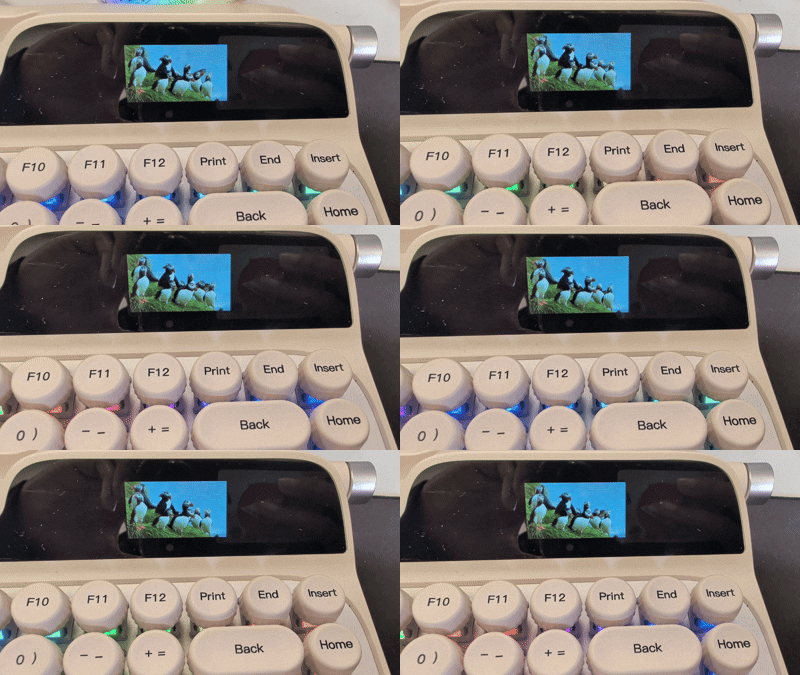
Via Epomaker Driver, you can remap the Glyph’s keys, record macros, adjust the RGB lighting’s colors and effects, and upload your own GIFs or static images and display them on the screen. You can update or flash the board’s firmware too.
I do, however, wish that Epomaker had its own web-based software, like Keychron does with Keychron Launcher and NuPhy does with NuPhy.io. That would save users downloading third-party software or bloatware on their machines, and would make customization easier. One can dream.
Epomaker Glyph review: The downs
Though the Epomaker Glyph is an excellent keyboard, it isn’t without its shortcomings, and its limited stock switch choice and poor battery life are quite disappointing.
Very limited stock switch choice

Limited stock switch choice seems to be a recurring theme (and issue) with Epomaker’s mechanical keyboards, and the Glyph is no different. Just like the TH99, P65 ($119) and Cypher96, to name a few, there aren’t many stock switch options available. In fact, there’s just one available, and that’s the Wisteria V2 linears that I naturally tested. The switches are no doubt fantastic, but those who prefer tactile or clicky ones may be left feeling shortchanged.
The good news is that the Glyph is hot-swappable, and it’s compatible with 3- and 5-pin south-facing mechanical switches. If you have extra switches lying around, or you simply buy some, you can replace them without de- and re-soldering them to the PCB.
Of course, you may want more switch choices at the time of purchase, and if that’s the case, I’d recommend the Hexgears Immersion A3 TKL ($129), the Lemokey P1 Pro ($129) or the Keychron V1 Ultra 8K ($114). None look as unique as the Glyph, though.
Screen and RGB eat into the battery

As you can probably glean from what I said earlier, I love the Epomaker Glyph’s screens and RGB lighting — but they really eat into the battery. The Glyph is fitted with an 8,000mAh rechargeable battery which should last you a month or so, depending on RGB and screen settings. I’ve been using the Glyph with these settings turned all the way up, and I’ve already had to plug it in for charging once (after about 20 hours of use).
I’m not saying this is entirely the keyboard’s fault. Many decks with extensive lighting systems and screens don’t last nearly as long. For instance, I was able to get only 20 hours of runtime out of the Corsair Vanguard Air 99 Wireless ($259) — nine hours fewer than Corsair’s claim. I sorely wish the Glyph lasted longer because the dual screens are delightful, and I don’t want to turn them off.
Epomaker Glyph review: Verdict

I can’t remember the last time I had so much fun testing a keyboard. The Epomaker Glyph is one of the best mechanical decks you can buy right now. Featuring responsive and light linear switches that are a joy to type on, and offering a creamy sound profile, the Glyph is perfect for those who type for a living.
The Glyph is chock-full of goodies. Its typewriter-like design is great to look at, and its dual screen setup as well as gorgeous RGB lighting add a colorful flair to your setup. User-friendly companion software makes customization a walk in the park, too. While it would have been nice to have more than one set of stock switches and better battery life, neither of those are dealbreakers, all things considered.
At the end of the day, the Glyph is the ultimate keyboard for typists. It’s one of the best gadgets I’ve reviewed so far, and it puts the fun back into typing.

