When you enable full path tracing in a modern game, the lighting looks stunning — but the illusion is often broken by visual artifacts like smudged reflections, ghosting details, light trails that fade weirdly and dark corners that “boil” with digital noise.
Nvidia is attempting to eradicate those issues for good with DLSS 4.5 Ray Reconstruction, and I’ve spent a few days with this tech to see if the company’s new gaming AI model can finally clean up path tracing’s messy edges.
The truth of it is the same as I’ve felt about ray tracing and path tracing at large. If you stop to pixel-peep, the visual upgrade is undeniable. But if you’re expecting a massive paradigm shift in the middle of a frantic firefight, you need to temper your expectations.
Sorry for the reality check, and credit to Team Green for managing to make trash bags shinier and more reflective in Alan Wake 2, but this is definitely an iterative upgrade.
How to activate DLSS 4.5 Ray Reconstruction

Just like a lot of Nvidia’s gaming features, you’ve got to go into the overrides. Pop into the specific game that supports DLSS 4.5 Ray Reconstruction, open the DLSS overrides window, click the dropdown on Ray Reconstruction and select “Model F.”
At that point, you’re off to the races. The only game I noticed any weird glitching on with the override turned on is Portal RTX, which I’m sure will be ironed over with an update. But everything else worked without a hitch.
What is Ray Reconstruction?

Well, the demands of path tracing are starting to outstrip the raw hardware capabilities of consumer GPUs. Calculating the real physical light paths for millions of pixels every second is just too much to do.
Instead of painting every single pixel, the game flings a handful of dots of paint across the canvas — just enough to capture rough reflections, colors and shadows. The end result is a noisy, static-filled mess of dots. Something is needed to join the dots.
The old fix was a technique graphics cards used called “denoisers.” I can go into the specifics about these hand-tuned technologies, but think of it like taking a wet sponge and smudging those paint dots together. It does the job in filling the gaps, but fine details get blurred out and subtle lighting can flicker and “boil.”
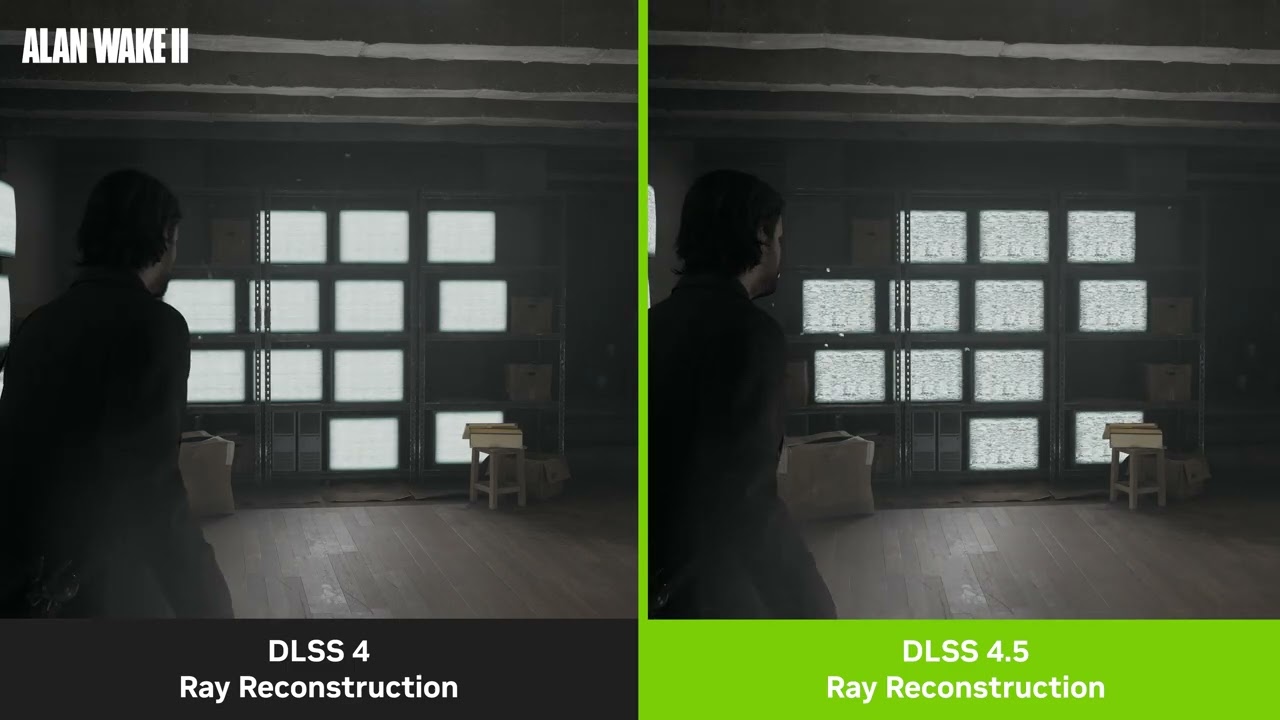
So instead, Nvidia’s DLSS Ray Reconstruction hands that unfinished canvas to an AI network trained on supercomputers with millions of flawless images. Think of it like an expert art restorer with a photographic memory — looking at the scattered dots of light, recognizing the 3D geometry of the scene, and predicting how the light naturally behaves.
The end result (as you’ll see) is crispier puddle reflections, detailed textures without blurring or ghosting and shinier, less smudged light bounces. It takes this taxing work off the GPU, so it can focus on rendering the game, while AI pattern recognition does the heavy lifting of calculating the true light data.
The faster, smarter engine in DLSS 4.5

To understand what DLSS 4.5 Ray Reconstruction is actually doing, you have to look at the math. Nvidia has replaced its own on-board denoiser with a new 2nd generation transformer model. This AI brain processes 20% more parameters and delivers a massive 35% boost in compute capability.
That means this hypothetical art restorer is now able to more deeply analyze the space, and intelligently use game engine pixel sampling and motion data to improve the accuracy and stability of lighting — doing so millions of times a second.
And the best part? Nvidia claims this massive increase in AI compute comes with a negligible performance impact.
Testing that claim, my RTX 5080 setup saw no frame rate penalty whatsoever, and for lower-end hardware in Nvidia’s 50-series family (like the RTX 5060 Ti (16GB) and the RTX 5070 Ti-armed Asus ROG Zephyrus G14 that I’m testing), the frame drops are negligible (average drop of 2 FPS).
Of course, that should extend to the RTX 40 and 50 series GPUs. But if you are running an older RTX 20 or 30 series card with the older architecture, limitations mean you may see a more noticeable performance penalty.
The pixel-peeping test
So since this is one for those that just want to scrutinize the specifics of a frame, let’s dip into this with a few games on my RTX 5080 monster rig — putting DLSS 4 and DLSS 4.5’s Ray Reconstruction head-to-head. And I’m not going to lie, when you stop to take a beat and look around, the differences in still frames are striking.


In Cyberpunk 2077, the bright red glow from the “Livepunch Booze” neon sign washes over the floor in a softer, blurrier spread with DLSS 4. Enabling 4.5 shows off the tighter light bounce and higher-contrast, which casts sharper, concentrated red and cyan reflections on those polished floor panels.
Throw in much sharper, more cohesive specular highlights and a deeper contrast in darker areas without that fuzzy noise that plagued the older denoiser, and the tweaks are small, but significant.
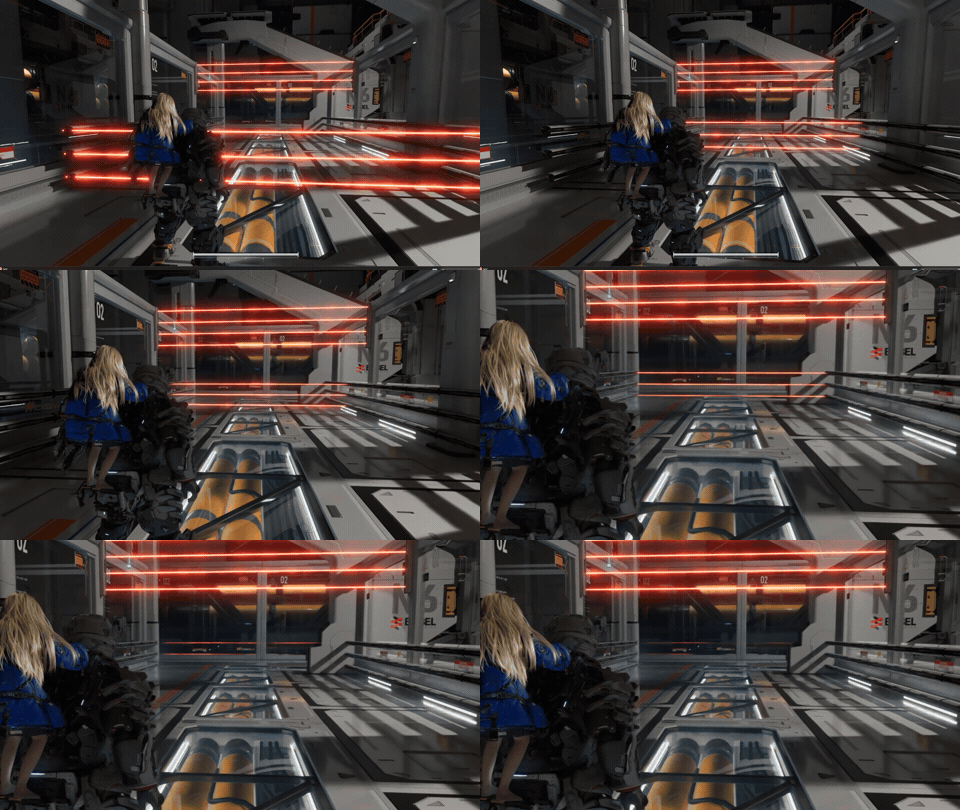
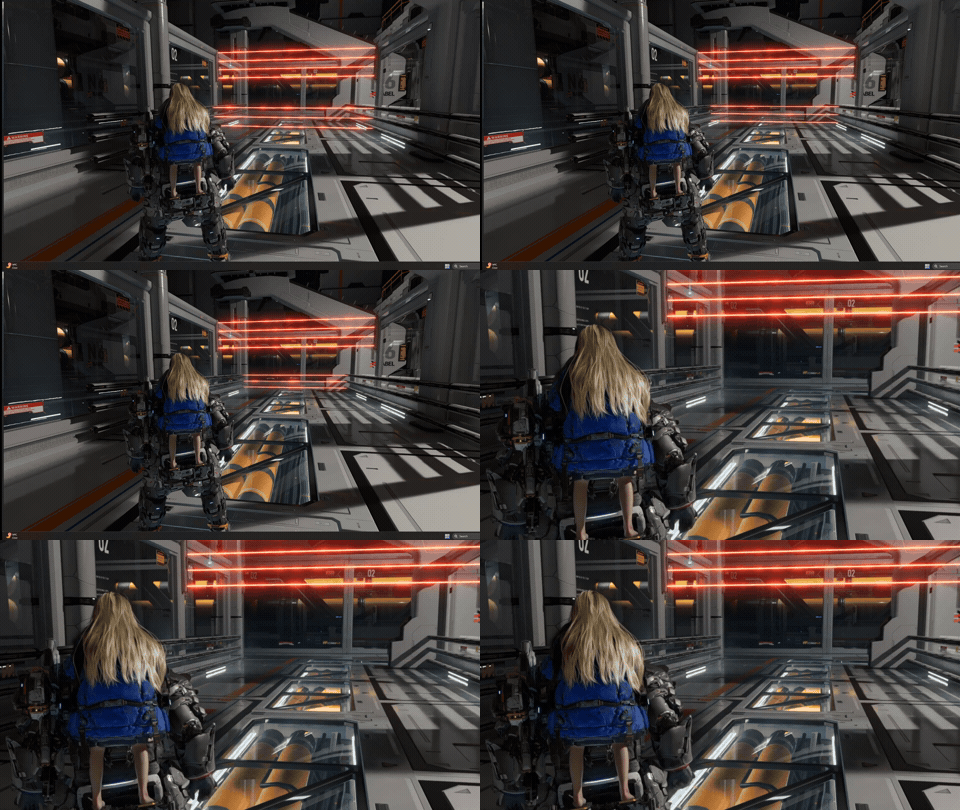
Moving over to Pragmata, the moving neon makes DLSS 4.5 Ray Reconstruction much more noticeable. There’s a moving laser jumping puzzle that makes it so much more obvious — seeing the lasers just fizzle away on the older model vs immediately snapping away.


Finally, in Alan Wake 2, Nvidia showed me a demo of shinier trash bags. But if anything, they’re doing the tech a bit of a disservice. This has always been a showcase game for Team Green, and something as simple as walking around a safe room shows off small detail improvements that come together to make quite a difference.
Saga’s hair, coat and surrounding surfaces are much better defined with smoother, natural lighting bouncing off them. The grain of the wood paneling goes from slightly blurred to no blur whatsoever, lighting sources bounce more tightly off surfaces, and mirror reflections are a lot sharper.
My verdict

Full credit to Nvidia here — improving image fidelity by running an AI model with 20% more parameters without tanking frame rates on modern hardware is a genuine engineering triumph.
Of course, I say that specifically about the RTX 50-series gear I tested this on. Nvidia told me that it’s not expected to meaningfully impact performance on older GPUs. I can’t test that, but we’ll find out soon enough as some of my friends in the industry dish their thoughts.
But DLSS 4.5 Ray Reconstruction is an iterative polish. It cleans up the edge cases and makes your photo mode captures look absolutely spectacular. But during actual, fast-paced gameplay, the difference between DLSS 4 and DLSS 4.5 effectively blends into the background.
That being said, for the average gamer in motion, you’ll be hard pressed to notice the differences in the midst of gameplay. For the players, this is just a nice, quiet cleanup job. A small upgrade that will become more significant as we head into a world of path traced games.

Follow Tom's Guide on Google News and add us as a preferred source to get our up-to-date news, analysis, and reviews in your feeds.
More from Tom's Guide
- 5 beginner PC building tips from the mad genius who built a $34k, 353-pound desktop with not one, but two RTX 5090s
- Best graphics cards in 2026: I've tested every GPU to find the best bang for your buck
- Exclusive: I asked Lenovo’s GM to predict the future of monitors, and it's the end of our chaotic, cable-cluttered desks and monitors that fry your retinas