In just the past few years 3D printers have come a long way and aren't just more affordable, they're shockingly begginer friendly, too. I’ve been testing the Elegoo Centauri Carbon for a few months, and now instead of dropping $10 to $15 on Amazon every time I need a basic accessory or doodad, waiting two days for it to ship to my door, and then realizing it isn't what I actually needed, I realized I could oftentimes print it myself for a couple of cents.
But it’s not just about the money; because let’s be fair, this has an upfront cost of $359 at Amazon. More importantly, Carbon has helped me create customized prints for things that not only can’t be found in a store, and has actually inspired me to be a bit more creative with my problem solving by re-sparking my interest in 3D modeling.
Why this caught my attention
It’s been about five years since I last owned a 3D printer. My introduction started with the Lotmaxx SC-10 Shark V2, a dual 3D printer and laser engraver, that while very capable, was a nightmare to use. It was time-consuming to set up, switch between modes, and honestly was more trouble than it was worth for my smaller prints. It also had an open-frame / very industrial design that was a total eyesore in my home office. I eventually gifted it to a relative — who did in fact add it to their woodworking workshop. But that's where I lost interest in 3D printing. I just didn't want the hassle.
That is until I saw a live demo of the Elegoo Centauri Carbon a few months ago which caught my attention for two reasons. They claimed no prior 3D printer experience was required, while it has features typically reserved for printers that cost twice as much. So I thought, 'what the hell, maybe this could get me back into the hobby.'
It's ready to go out of the box

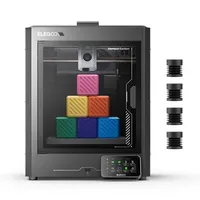
I had this printer set up in under 10 minutes. I pulled it out from the packaging, removed a few retaining screws from the bed, attached the front touchscreen control panel, slapped on a filament spool on the side, powered it up and was ready for the first print. It took a few more minutes to connect it to my home wifi, update its firmware, and install the Elegoo Slicer app on my computer.
With its clean lines and space-gray die-cast aluminum frame — which, yes, is very big and requires a good amount of desk space — it looks like a modern appliance rather than something that belongs in your garage. Speaking of its design, this is a fully enclosed 3D printer, which alone is a huge advantage over many competing models at this price point that typically are open-frame. The enclosure keeps the temperature stable inside the chamber allowing you to print materials like ABS, ASA, or even PC-based filaments that can struggle to print with open printers.
Why this $359 printer feels like a steal

I’m still surprised that this printer retails for just $359 at Amazon, and as low as $299 from Elegoo. The Centauri Carbon uses CoreXY kinematics. Essentially, the motors stay stationary and only the light print head moves, allowing it to hit speeds of 500 mm/s without shaking itself apart. It features a 121-point automatic leveling system where it taps the nozzle against the plate to map out the surface, meaning you should never have to mess with the old piece of paper trick for fine tuning like I had to with the Lotmaxx.
I’m also a big fan of the built-in camera. Even though the printer is only a few feet away from my desk, it lets me monitor how well the prints are going remotely. It can also save time-lapse clips of every print which is pretty sick. Even my most boring models look like a work of art when you watch it grow in 15 seconds.
With a little help from AI — this is a powerful tool

Who says AI is only for making slop? With the help of Google Gemini and OpenSCAD, I’ve been creating custom prints from scratch. While I have a bit of experience with Blender3D, I'm not confident enough to create functional prints.
So here's what I've been doing. Because OpenSCAD is code-based, I can describe my new idea to Gemini like "design a bracket for my pegboard which measures 10cm between holes that can display my 1/24 die-cast cars at a 15 degree angle" and it generates the script for me. It starts off very basic, often doesn't really understand what I need, and needs quite a few follow up prompts to get the idea. But since I am taking that code and visually seeing it in the CAD program, I can more easily provide feedback for what needs to be changed. It's not perfect but this has opened up an entirely new world of creativity that I highly recommend trying.
What I've been printing so far

Mostly, I’ve been running smaller, handy prints that solve specific problems. One I'm most proud of is a custom designed pegboard accessory for my Cougar E-Oddyssey standing desk that perfectly holds my 1/24 die-cast model cars. This took a lot of trial and error to get the measurements and balance right, but because of how easy it was to just drop each of my revised models into the splicer and print, I really enjoyed the process and felt like a little inventor.


I also found this be a great tool for creating custom gifts for friends and family. My fiancée — who is a nurse — really appreciated this 3D model of a heart wall art and this heart shaped pen holder. The heart wants what the heart wants, what can I say? Puns aside, these are both relatively complex prints, which yes, almost took 4 hours and 7 hours respectively, but the printer had no issues handling it.

One of my more practical prints was a mic stand for the DJI Mic 3 so that I could pass it between guests during my video shoots. The finish was so smooth that I actually had people asking me where I bought this from and they were surprised when I told them it was a print!
This printer won't let you down
I'm still in no way a 3D printer whizz, but for the money, the Elegoo Centauri Carbon has been a surprisingly fun addition to my creative setup. It’s fast, mostly automated, and reliable enough that I can just hit print and know I'm going to get pretty impressive results. So if you're looking to bridge the gap between a digital idea and a physical object, this has a very small learning curve and won't break the bank.

Follow Tom's Guide on Google News and add us as a preferred source to get our up-to-date news, analysis, and reviews in your feeds. Subscribe to Tom's Guide on YouTube and follow us on TikTok.
More from Tom's Guide