



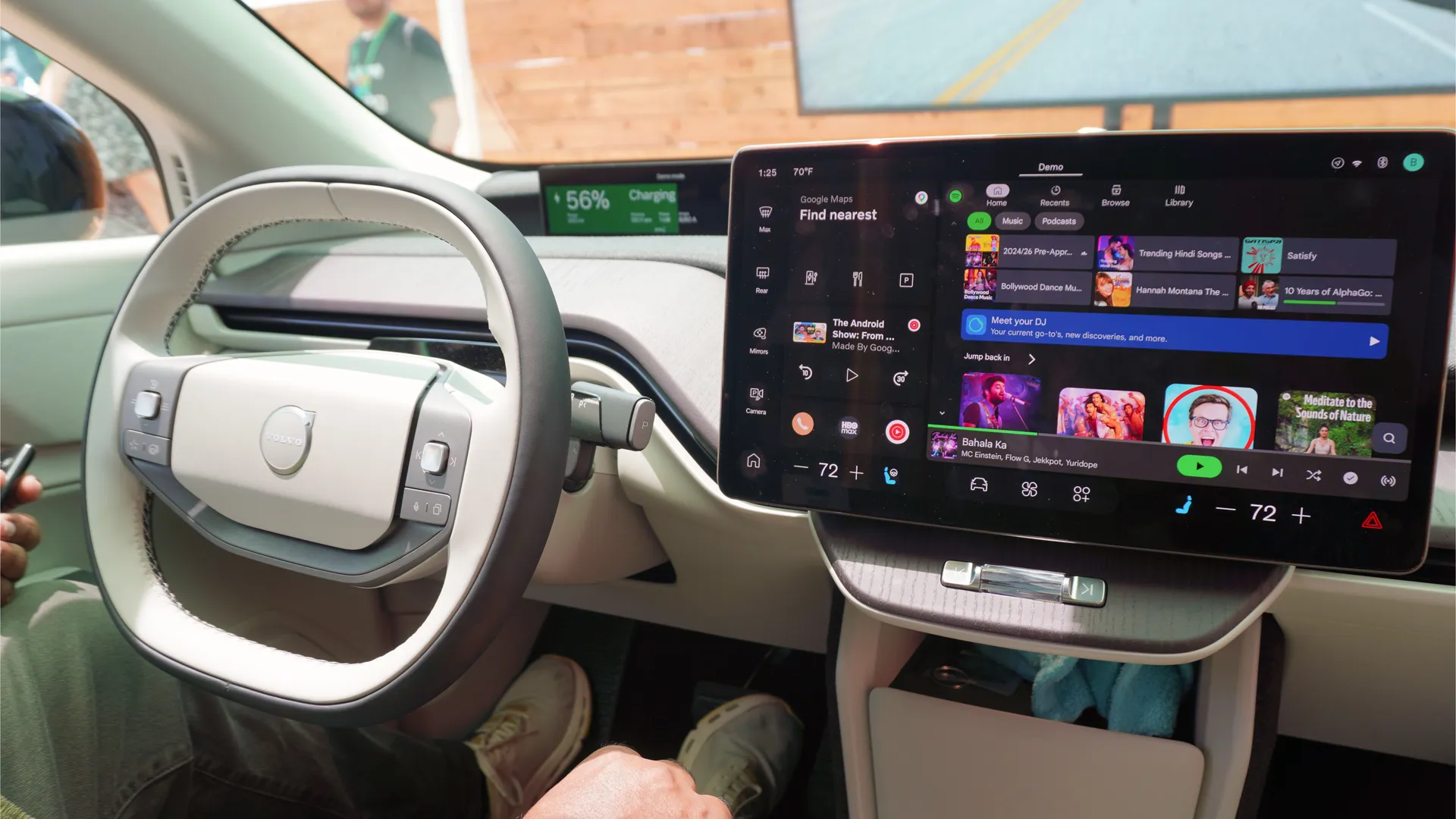
The next generation of Android Auto was announced at the Android Show, and I got to properly test it at Google I/O. In short: Apple CarPlay feels washed in comparison — let me explain.
It takes the car from simply being something you go from Point A to Point B in, and adds an additional layer of making it a central hub for navigation, productivity on-the-go and entertainment. And with Gemini thrown in, Cars with Google built-in just took an evolutionary agentic AI step too.
So I took a (simulated) ride in the Kia EV9 with Android Auto and the full Google built-in Volvo EX60 to see what the upgrades bring to the table.
On-the-go

It all starts with the biggest update to Google Maps in over a decade — Immersive Navigation provides a nice 3D view with a huge increase in details like lanes, traffic lights and stop signs. Being able to see everything with greater clarity like this is a huge step forward for getting around.

Then there’s the multi-widget layout of the new Material 3 Expressive design, which creates a really nice, refined UI for the car and multiple app widgets for quick glance interactions.
Top it all off with Gemini and even agentic actions like ordering a meal on Doordash for when you get home (and even adjusting Google Home controls), and it simplifies the idea of multitasking while you drive with the power of your voice — all in a way that Apple CarPlay has never been able to do.
Stuck in traffic


But if there’s one thing I’ve learnt while out here at Google’s campus, it’s that you spend most of your time in California stuck in traffic not really doing much at all. The standstills are painful, and if you’re in an EV, you could be spending up to 30 minutes sat in your car waiting for it to charge.
That’s where the redesigned audio experience in apps like Spotify come in, and most importantly, support for full HD video up to 60 FPS on the center console. Throw in Dolby Atmos support and the surround sound experience was beefy and all-encompassing. But of course, this is only when you throw the car in park — once you start driving, that video vanishes in favor of an audio-only overlay.
Given the explosion in video podcasting on YouTube, I can see this being a hugely-adored feature for the moments you’re parked in traffic for the full visual experience, and switching on the fly to audio when you start crawling forward.
Your own personal car butler

But things get really interesting when you move over to Cars with Google built-in. For those uninitiated, most cars support Android Auto through connecting your phone to the car and project the content of it on-screen.
Cars with Google built-in are natively-built on an Android Automotive operating system — operating entirely as standalone devices that don’t require a phone to be connected to it. They’ve been around since 2020, and now we’re getting the biggest updates to these models since the launch.
The big thing here is Gemini is able to tap into your car’s controls and onboard sensors. No, that doesn’t mean it’ll drive the car for you, but what it actually means is Google Maps can be far more accurate and give real-time advice by using the car’s sensors to identify which lane is needed for your exit.

On top of that, you can ask Gemini to adjust pretty much all the settings in your car, like making the sun roof transparent, changing the climate control, and altering the mood lighting of the cabin. Rather than getting lost in the many panels of settings, having an AI assistant that can actually take action means less time looking at the screen and more time watching the road.
And even better, it’s got some conversational powers too to help you make sense of the world around you. For example in the demo I took part in, we had a first-person video of a drive through San Francisco, where we asked Gemini to identify the big tall building ahead. Google then went straight to the cameras, identified it and gave me an answer in seconds.
Outlook

So far, I’ve always felt that smartphone-enabled in-car experiences have always been a mask over the frankly terrible software that carmakers subject you to. They’ve always been handy, but only so far and you had to be ripped out of the experience elsewhere.
And while that’s still the case with Android Auto from your phone, Cars with Google built-in finally feel like the revolution that’s needed in this space to make car software actually fun to use — and the secret to it is Gemini intelligence.
Taking the confusion out of your car settings is a huge step forward alongside Immersive Navigation, a new cleaner Material 3 Expressive design and the ability to play full HD video for making your motor a central hub wherever you are.
It’s yet another massive step forward for Google that’s leaving Apple’s CarPlay in a serious need of catching up. All eyes on WWDC 2026!

Follow Tom's Guide on Google News and add us as a preferred source to get our up-to-date news, analysis, and reviews in your feeds. Subscribe to Tom's Guide on YouTube and follow us on TikTok. Finally, you can visit our dedicated Tom's Guide Savings Squad hub for expert help on getting the best products for less.
More from Tom's Guide
- I hate that I love Google’s new AI-powered search bar — it makes the internet easier to digest, but my career is cooked now
- I tested Google’s “Intelligent Eyewear,” and found the smart glasses that will defeat Ray-Ban Meta
- I just tested Xreal’s Android XR glasses, and they are an early glimpse of my dream future smart glasses

