Presented by

I finally found an affordable golf launch monitor with deep club data and no annoying stickers

Supported software: E6 Connect and E6 Apex
Number of courses: 27 courses plus Driving, Chipping, and Putting Ranges
Price: $2,999
Type of tracking: Two high-speed cameras
Golf modes: Stroke Play, Scramble, Best Ball, Stableford, Closest to the Pin and Long Drive
Metrics tracked: On-screen without additional software: Carry Distance, Ball Speed, Back Spin, Side Spin, Vertical Launch Angle, Horizontal Launch Direction. In-game: Total Distance, Club Head Speed, Smash Factor, Deviation, Apex, Descent Angle, and Shot Type
Dimensions: 9.53” H x 7” W x 5” D
Weight: 2.7 lbs
I've tested a lot of golf launch monitors. I've tried the most expensive models like the Foresight Sports QuadMAX and the slightly more affordable Foresight Sports GC3. I've tried budget-friendly radar models like the Garmin Approach R10.
But few have impressed me as much as the newly-released TruGolf LaunchBox. This is the same company that makes the beloved E6 software, one of the best offerings in golf simulation and the Apogee overhead golf simulator. This is both a good and a bad thing — good in that the company makes the software you'll use, ensuring the hardware takes advantage of it. But on the downside, it also limits you to E6-based products — forget about using GSPro without some hacking.
TruGolf LaunchBox: The hardware

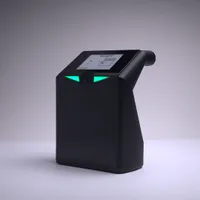
The launch monitor space is competitive, making it hard to stand out. The first and most important aspect of a good launch monitor is the hardware. Everything starts and ends with the cameras and sensors, as they will determine whether the device can deliver accurate data.
Fortunately, after several hours of testing, I feel great about the hardware offered in the LaunchBox. The dual high-speed cameras have consistently delivered accurate data that matches my expectations. I did encounter a couple of occasions when it missed shots, but they were few and far between.
There's a small E Ink display that shows you key data about your shot, such as carry distance, ball speed, back spin and more. The choice to use this type of screen minimizes battery use and prevents glare when you're out hitting balls on a bright summer day.
It also lets you pick up the device and bring it within range to track your data without any additional software (though E6, the company's sim software, works on smartphones if you want the full experience outside your full simulator).
The hardware is also very light, which is great for a launch monitor that's meant to be carried around. It's actually surprising how portable it is, as most other camera-based launch monitors I've tested are quite heavy.
TruGolf LaunchBox review: How good is the data?

As mentioned from a hardware perspective, the cameras are good. And when the hardware and cameras are solid, the resulting data is good.
Based on extensive testing and comparisons with other launch monitors, I have no complaints about distances and spin numbers. Compared with my distances from the Foresight GC3, which is the ultimate launch monitor for budget and accuracy, the numbers are right in the range I expect.
But compared with Foresight, Uneekor, Square, Garmin and all the other high-end, side-mounted launch monitors, LaunchBox offers something special: club data without stickers.
Without spending time adding things to your clubs and potentially making them USGA non-compliant, you can just fire up the TrueGolf LaunchBox and see your face angle, club path and all of the other key metrics that help you get better at golf, which is what we're all really looking for when we throw down the big money on a device like this.
As a slicer who's struggled with the dreaded left-to-right ball flight since the day I started golfing, I've finally been able to dial the slice in, thanks to being able to study my club face and club path and make meaningful adjustments. Golf is a lot more fun when you have a higher chance of hitting the fairway, and getting meaningful practice on the simulator makes that more likely. The club data puts the LaunchBox in the same category as far more expensive ceiling-mounted models.
TruGolf LaunchBox review: Is the software worthwhile?
The software is both the best and worst part of TrueGolf's devices. Everyone who knows golf simulation knows that E6 is one of the best pieces of software on the market. You get first-party support for both E6 Connect (the older, lighter software) and E6 Apex (the newer, more graphically pretty option with thousands of courses).
Depending on your subscription (you will need a subscription for Apex, but Connect comes with several courses as part of the package), you'll also get a driving range, all kinds of practice games and much more. The Enjoy subscription, which features courses and practice, is available for $450 per year, though there are cheaper options if you only want to play simulated rounds or smash balls on the range.
So, aside from the subscription price, what's the drawback? Sadly, you can't use my favorite simulator software, GSPro (or any other third-party software like Awesome Golf), with LaunchBox. I enjoy playing on E6 Apex, and I think it looks fantastic from a graphical standpoint, but GSPro has some incredible fan-made courses that I miss (Georgia Golf Club, which is awfully similar to the world-famous Augusta National, for example).
If you already love E6 on other launch monitors and you're happy being locked in with it, then this will be a non-issue. If you're like me and like having options, the overall experience is slightly diminished without GSPro. It means that while this is now my go-to for day-to-day golf practice, I have to keep another launch monitor handy (I have the Square Golf launch monitor), which isn't ideal.
TruGolf LaunchBox review: Why are the buttons on the back?

A small hardware gripe I have with the LaunchBox is the cumbersome buttons on the back of the launch monitor. It's hard to remember which button does what (the power button stands out because it's much larger, but the menu and select buttons are the same). It makes doing anything outside of E6 cumbersome and difficult.
Switching from Wi-Fi to Ethernet, or choosing lefty or righty feels way harder than it needs. I get wanting a clean-looking device, but when it comes at the expense of the overall experience, it doesn't seem like a good trade-off.
TruGolf LaunchBox review: Verdict

Despite a few small gripes, I love the LaunchBox. In this price range, it's my new favorite option, primarily because it offers detailed club data without requiring annoying stickers on the club face or shaft.
Add in its portability, long battery life thanks to the E Ink display and accurate dual-cameras, and you have a device that I can easily recoemnd to all golfers whether they're looking to build the golf simulator of their dreams in their home or just looking for detailed data on the driving range.


Follow Tom's Guide on Google News and add us as a preferred source to get our up-to-date news, analysis, and reviews in your feeds.
More from Tom's Guide