




Engineering coursework demands far more from a laptop than everyday note-taking and web browsing. Whether you’re running CAD software, working with 3D models, compiling code or analysing complex data, the right machine needs enough CPU power, memory and graphics capability to keep up. In this guide, we've done the testing to help you find the laptop to get you through your engineering studies.
Finding the best mix of these traits in a well-priced laptop is hard, but we here at Tom's Guide have tested and reviewed laptops for nearly 20 years to help point you in the right direction. We've also asked you to help us know what engineering students need in a laptop with your expert advice.
Whether it be the highly customizable Framework Laptop 16 with its upgradeable design and speedy performance, or a more value-focused option like the HP HyperX Omen 15, equipped with an OLED display and packing enough performance to run through workloads, you'll find a laptop an engineer can make the most of.
The latest notebooks engineering students should consider are the MacBook Pro M6 and Microsoft Surface Laptop Ultra with an RTX Spark N1X chip, with the latter being excellent for 3D work and AI tasks. But is it right for you? In this guide, I've put together our in-depth reviews and expert advice to help engineering students find the right laptop for classes.

Darragh here, and I cover a wide variety of categories when it comes to laptops. No, I haven't been an engineering student myself, but I know the power it takes in a laptop for it to be worth considering for the type of demanding CAD and 3D apps engineers will be using. Thanks to expert advice for students and our computing team, we've found top-of-the-line machines that can handle engineering work for your studies.
The best overall laptop for engineering students


Being able to upgrade and configure a laptop as you see fit is a huge advantage for engineering students, as you can adjust your budget and upgrade down the line. That's why the Framework Laptop 16 is our top recommendation for most, as it keeps pace with demanding coursework while still being practical to carry across campus.
It's one of the only laptops around that makes repairability and upgradeability easy. And you can get some serious engineering muscle under the hood: up to an AMD Ryzen AI 9 HX 370 processor, with the flexibility to add either an Nvidia GeForce RTX 5070 laptop GPU or an AMD Radeon RX 7700S (depending on your workflow for 3D work). I'm a huge fan that RAM is user-configurable depending on your DIY configuration — meaning you can start small and upgrade as projects (and memory requirements) scale up.
Another big draw here is its 16-inch, 165Hz display, offering ample space for CAD models, technical diagrams and multi-window multitasking, all in a size that strikes the right balance between desk space and backpack-friendliness. Brightness isn't the best, but in a classroom, technical drawings or color renders will offer up plenty of visual detail.
On the downside, the customizable keyboard deck can be a tad wobbly, seeing as it's a module that can be shifted around to wherever you want on the deck. Not a dealbreaker, but worth noting if you’re picky about build quality. Thermal performance and battery life are fine (just over eight hours to get through a day of classes), but not best-in-class. Still, for most engineering students who need power, flexibility and a big display in one package, this is the laptop I’d reach for.
If you've got the extra change for the next step up, there's also the Framework Laptop 13 Pro. You'll find a better display and a bigger battery, but it's one expensive laptop. Still, a great option for upgradeability!
- Read our full Framework Laptop 16 review
The best laptop for value for engineering students


If value is your top priority, the HyperX Omen 15 delivers serious real-world performance without the premium price tag. Well, when it's at the right price. The RAM crisis isn't making laptops any cheaper, but seeing as we've found this laptop starting at just over $1,000 and bringing plenty of power, this can go a long way for engineering work.
For a taste of its power, we measured 79 fps in Forza Horizon 6 (Extreme, 1080p), backed by an Intel Core Ultra 9 386H and RTX 5070. These are numbers that translate directly to smooth CAD, simulation and rendering workflows for engineering students who need dependable horsepower on a budget.
In our hands-on time, the laptop’s vibrant OLED made anything on screen look livelier than ever. For complex modeling or data analysis, this combination of memory and graphical muscle puts it comfortably ahead of most midrange Windows options at this price.
That said, there are trade-offs for the value. The Omen 15’s striking OLED display and power can drain that battery, as we saw it last for 8 hours and 30 minutes in testing. Plus, with fans peaking at 74 decibels during gaming, you should expect some noise when running simulations or rendering under load.
If your campus day involves lots of unplugged work or quiet study sessions, keep a charger and headphones on hand. Otherwise, for most cost-conscious engineering students, this is the best-value machine for balancing performance and budget. Just make sure to grab it when prices dip.
- Read our full HP HyperX Omen 15 review
The best premium laptop for engineering students

Let's get the obvious out of the way: The Razer Blade 16 (2026) is one pricey laptop, especially at its highest configuration with an Intel Core Ultra 9 358H chipset, RTX 5090 and 64GB of RAM. But this kind of power packed in an incredibly sleek, premium design goes a long way for engineering software, and it's a laptop that's fit to last you throughout your studies and beyond.
While it's primarily made for gaming, this machine is purpose-built for sustained, heavy-duty workloads, making it an ideal digital companion for complex CAD, simulation or rendering tasks. In our hands-on testing, the Blade 16 delivered consistently high frame rates in AAA games with settings cranked up, and that reflects how well it can push through GPU-intensive rendering tasks for engineering work.
It's all made better with the laptop's vivid 16-inch (2560 x 1600) OLED panel. This vibrant, color-accurate display makes it a strong fit for CAD work, so students who rely on visual clarity for technical drawings or 3D modeling will get a kick out of what this screen can show off.
Aside from its price, there is a trade-off for this strong performance in a thin, compact machine. Under heavy workloads, our reviewer, Tony Polanco, noticed the Blade 16 can run hot, and the fan noise ramps up. If you're taking this to class, keep in mind that it can get loud.
If you're looking to keep costs low, the Blade 16 comes in a wide range of configurations, starting from an RTX 5060 (although this can still set you back upwards of $2,000). Regardless, if your priority is maximum performance and all-day productivity (battery life lasts nearly 13 hours, which is surprising for a gaming laptop), the Razer Blade 16 has you covered.
- Read our full Razer Blade 16 (2026) review
The best MacBook for engineering students
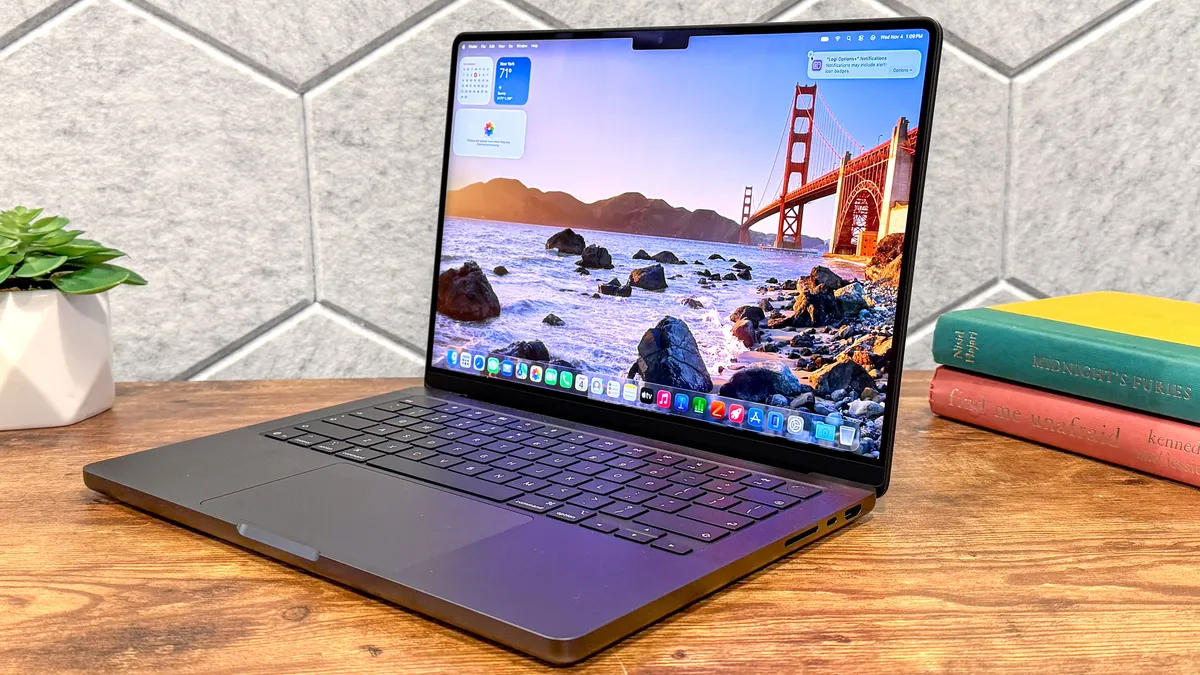
The MacBook Pro 14-inch M6 packs a serious punch for engineering students who need both speed and stamina in their daily workflow. Even with its base M6 chip, you're getting enough muscle for simulation or CAD work, and it ran for an outstanding 19 hours in our battery rundown test, making it one of the few laptops you can actually leave unplugged for a marathon day of classes.
It's the new standard for Apple's "entry-level" Pro laptops, so while it may not be the most powerful, it is the most affordable of the bunch, and it's still a powerful machine for plenty of 3D work and the like. For students, those kinds of savings matter. But if you do need the extra boost, there's always the MacBook Pro with M5 Pro, or the all-new MacBook Pro with PROLED XDR Display for added OLED touchscreen support. Otherwise, I recommend sticking with the M6 model to keep the price lower!
Equipped with the new Apple M6 chip (12 CPU and 12 GPU cores), the M6 handled everything from dozens of Chrome tabs to demanding 3D rendering tasks. We saw much higher scores and smoother frame rates than the previous M5 (and even the Dell XPS 14) in the 3DMark Wild Life Extreme GPU tests. In hands-on use, running programs for simulation and analysis was a cinch, and the machine stayed quick even under load.
As always, where the MacBook edges ahead is in premium build quality and day-to-day endurance. It outlasts rivals like the Framework Laptop 16 and HP HyperX Omen 15 on battery, and its unibody design feels rock solid.
In practical campus life, this MacBook is compact enough to slip into a backpack, as we experienced firsthand commuting to work. If you want the best all-around Mac for engineering, one that combines real workstation-class power, all-day battery and a premium build, this is the one to get. Just be mindful that if you need Windows-only tools or true upgradeability, you may want to look elsewhere.
- Read our full MacBook Pro M6 review
The best AI laptop for engineering students

The Surface Laptop Ultra is Microsoft's unapologetic answer for Windows power users who expect nothing less than workstation-class performance, and it delivers. With an Nvidia RTX Spark N1X chip offering up a whopping 6144 GPU cores, you'll see unmatched local AI performance, but also amazing on-chip graphics power, which is a game-changer for engineering students knee-deep in CAD, simulation or rendering workflows.
So, if you're looking to take advantage of local AI tasks for your engineering work, or you're interested in a sleek, portable machine that can run 3D tasks on just a single chip, the Surface Laptop Ultra is a great contender. It won't have the best graphics power compared to gaming laptops, or the strongest performance compared to Apple's chips, but it covers pretty much the bases, with a big focus on AI.
What stands out in daily use is the Ultra's unified memory pool, letting every component tap into a shared reservoir of RAM. In practical terms, we found this let us run larger local AI models and massive assemblies without hitting the slowdowns you get on traditional gaming laptops.
As for the laptop itself, the keyboard is excellent, as each key has a satisfying tactile click and a soft landing, which makes hammering out long lab reports less of a hassle. Plus, the large haptic touchpad feels natural across Windows 11, with responsive feedback that actually makes window management feel interactive.
Display-wise, the mini-LED panel is both sharp and color-accurate, with buttery-smooth motion that works well for 3D model manipulation or design work. That said, it doesn't have the outright pop or vibrancy you'd get from OLED rivals like the Razer Blade 16 or HP HyperX Omen 15. That's something to note if you prioritize saturated colors for visual tasks. Battery life, too, is a step behind its rivals at over 10 hours, so if your campus day involves lots of unplugged hours or long commutes, you’ll want to keep a charger handy.
So, if you want a top-tier Windows machine for engineering workloads, and you’re willing to pay for sustained power and best-in-class local AI work, the Surface Laptop Ultra is as good as it gets. It's important to note that this runs on Arm, but all the important engineering apps work on this, and you can check via worksonwoa.com.
- Read our full Microsoft Surface Laptop Ultra review
The best compact laptop for engineering students

You'll regularly find the Asus ROG Zephyrus G14 at the top of our list of best gaming laptops, and the latest model sporting an RTX 50-series GPU is no different. Not only does its power under the hood make it an ideal choice for engineering students, but it's also wonderfully portable.
Along with its AMD Ryzen AI 9 HX 370 CPU and the 64GB of RAM that came with our review unit, the Zephyrus G14 can chew through transcoding a 4K video down to 1080p in under 3 minutes, multiple Chrome tabs and apps, and play demanding games at 120 FPS and more.
Being just 3.5 pounds, it's a great laptop to take around to class and blast through research or work. One problem is its battery life, which can last around 5-6 hours for daily tasks. That may decrease when using demanding, engineering-focused apps, so it's worth taking its power brick with you for a quick charge between classes.
Regardless, as a laptop that offers all the key elements an engineering student needs (and for a long while to come), it's hard to go wrong with the Zephyrus G14. Oh, and its 14-inch (2880 x 1800) OLED display? It's a beauty.
- Read our full Asus ROG Zephyrus G14 (2025) review
The best 2-in-1 laptop for engineering students
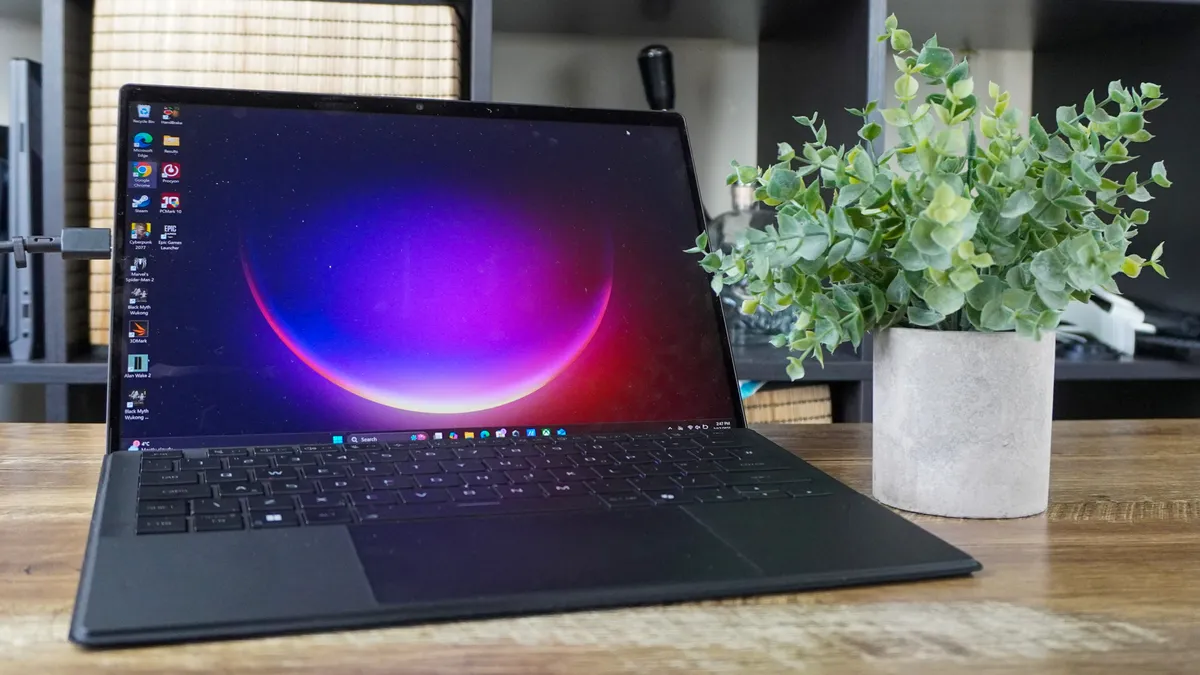
At first glance, the Asus ROG Flow Z13 might seem like an odd choice for engineering students — a tablet-style 2-in-1 without a dedicated GPU? But don’t be fooled by its slim Surface Pro-like design. After a month of testing, it proved to be a seriously capable mobile workstation.
The secret lies in AMD’s Ryzen AI Max 390 chip. Even as the lower-end variant, its integrated graphics deliver performance comparable to an RTX 4060 (without ray tracing), making it ideal for running CAD tools, 3D modeling software, and simulation platforms like SolidWorks, ANSYS, or MATLAB.
Because the APU shares memory with the system RAM, the 32GB model effectively gives the GPU up to 24GB of VRAM — far more than most mid-range dedicated GPUs. Upgrade to the Ryzen AI Max+ 395 with up to 128GB of RAM, and this machine can easily handle large datasets, FEA simulations, and demanding multitasking.
Battery life is another big win. With no power-hungry discrete GPU, the Flow Z13 delivers strong endurance for all-day use on campus. It's pricey at over $2,000, but if you're after serious power in an ultra-portable form factor, this could be the ideal laptop for engineering students who need both mobility and muscle.
- Read our full Asus ROG Flow Z13 review
Expert comments from you

"A discrete GPU is a must for a workstation-class laptop that is ideal for engineering students. The ability to easily upgrade memory, storage, etc is a major plus."
COLGeek on the Tom's Guide forum
To get up-to-date, real-world advice from current engineering students, we asked you (i.e., actual students) what you value most in a laptop made for engineering work.
From our poll, the two most important factors that stand out are RAM and compatibility with CAD and other software. But fast processing via a strong CPU and powerful graphics with a discrete GPU are also key in choosing a laptop fit for studies. As for storage? It's not a major consideration, as there are the best external SSDs if you're looking for more space, after all.
We also have advice from our forum, with commenter COLGeek saying a "discrete GPU is a must for a workstation-class laptop that is ideal for engineering students. The ability to easily upgrade memory, storage, etc. is a major plus." You'll find many gaming laptops in this guide sport an RTX 50-series graphics card, like the HP HyperX Omen 15 and Razer Blade 16, but if you're looking for upgradeability, the Framework Laptop 16 has you covered.
Following this, COLGeek also brought up battery life in gaming laptops: "One thing I would not recommend (as a general recommendation) is a gaming laptop for an engineering student laptop. While they tend to have plenty of CPU and GPU horsepower, they generally have poor battery life.
"Battery life is definitely something student engineering laptop purchasers should consider. It is not always convenient to plug a laptop in while attending class."
That's especially true with the HP HyperX Omen 15 and Asus ROG Zephyrus G14 we recommend, with battery life dipping below six hours for both in our testing. However, for their price and power, if you do tend to keep your laptop closer to a charger and plug, these are options worth checking out.
As per commenter Faisalhillsmap, here's what to look out for:
"A balanced laptop is more important than just lots of RAM. I'd prioritize:
- A fast multi-core CPU
- A dedicated GPU (especially for CAD and simulations)
- 32GB RAM
- A 1TB SSD
- Good cooling
- Long battery life
- A comfortable keyboard and plenty of ports
"For most engineering students, CPU + GPU + 32GB RAM make the biggest difference."
Interestingly, Nvidia N1X and Intel Panther Lake processors come with a new league of integrated graphics, with the N1X's 6144-core GPU and Intel Arc B390 bringing performance similar to gaming laptops. For 3D work, this is a great advantage, and the Microsoft Surface Laptop Ultra demonstrates this well. Plus, if you are looking for plenty of RAM, the MacBook Pro and Asus ROG Flow Z13 can offer more than you could want, from 32GB and well beyond this.
Have advice you want to share? Let us know in our forum!
Performance benchmarks compared
We run Geekbench single-core and multi-core CPU tests and report the scores for each. By comparing these scores and seeing which is higher, you can get a general sense of which is more capable.
The MacBook Pro M6 is the top performer we've tested, but other laptops come with different strengths, such as the Razer Blade 16's power for gaming (and graphics) and the Surface Laptop Ultra's local AI capabilities.
Best Laptops For Engineering Students Performance Results
Slide through to benchmark scores for Geekbench
Geekbench (single-core)
| Product | Value |
|---|---|
| MacBook Pro 16-inch (M6) | 4752 |
| Asus ROG Flow Z13 (AMD Ryzen AI Max 390) | 2965 |
| Razer Blade 16 2026 (Intel Core Ultra 9 358H) | 2872 |
| Microsoft Surface Latop Ultra (Nvidia RTX Spark N1X) | 2604 |
| Framework Laptop 16 2025 (AMD Ryzen AI 7 350) | 2878 |
| Asus ROG Zephyrus G14 2026 (AMD Ryzen AI 9 HX 370) | 2929 |
| HP HyperX Omen 15 (Intel Core Ultra 9 386H) | 2857 |

Battery benchmarks compared
Battery life is a key concern for students since you don't want a laptop to die in the middle of class. With that in mind, we've collected all the results from our battery tests of these laptops to show you how long each lasts.
As you can see, the MacBook Pro with M6 is the current winner in terms of long battery life at over 19 hours, and it's still not the longest-lasting laptop we've tested. Still, it's certainly one of the best laptops for battery life, and even the Razer Blade 16 defied the odds but offering up over 12 hours of battery life, despite being a gaming laptop.
Best Laptops For Engineering Students Battery Life Test Results
In our battery test, we set the laptop's display to 150 nits of brightness and have it endlessly browse the web via Wi-Fi until it runs out of juice.
Battery life (hh:mm:ss)
| Product | Value |
|---|---|
| MacBook Pro M6 | 19.083333333333332 |
| Razer Blade 16 2026 | 12.766666666666667 |
| Microsoft Surface Laptop Ultra | 10.25 |
| Asus ROG Flow Z13 | 10.233333333333333 |
| HP HyperX Omen 15 | 8.5 |
| Framework Laptop 16 2025 | 8.333333333333334 |
| Asus ROG Zephyrus G14 2025 | 5.75 |
Also tested
Many of the laptops we test can be fit for engineering students, especially if they come equipped with powerful specs under the hood. Our top recommendations will point you in the right direction for the machines worth putting in your shopping cart, but if you're after more options that are close to making the cut, check out all the other laptops worth your attention.




How to choose a laptop for engineering students

If you're running CAD or simulations, you need power and plenty of it: a strong combination of CPU, GPU and RAM. For that, I'd point you in the direction of the Framework Laptop 16, MacBook Pro M6 (or M5 Pro/Max) or Microsoft Surface Laptop Ultra for an optimal balance.
However, these are pricey options, and if you're on a budget, the HP HyperX Omen 15 is a solid shout for a tad over $1,000.
If portability is critical, I'd recommend the Asus ROG Zephyrus G14. But if all you care about is maximum performance for intense code compiling, simulations and data analysis, the Razer Blade 16 (2026) is a great "no expense spared" choice.
Of course, if you're looking for a laptop that's more for essay writing than CAD work, then take a look at our best laptop for college guide. Otherwise, keep these features in mind when finding a laptop for engineering studies:
- Performance: If you're going to be spending years studying engineering, you're going to need a computer with enough power to handle anything your teachers throw at you. We recommend at least a new mid-range CPU (Intel Core Ultra or AMD Ryzen 7) and at least 16 GB of RAM, though if you can afford to spend more on a laptop with better specs, it will pay off in the long run.
- Graphics and gaming: Most gaming laptops come with discrete graphics cards so they can run the latest games well, but the same card can be equally vital to engineering students who will be using CAD (computer-assisted design) and 3D analysis programs. These kinds of applications really benefit from the power of a good GPU, so if you're expecting to do any graphics or 3D work, it's a good idea to invest in a laptop with a discrete Nvidia or AMD graphics card.
- Operating system: Laptops typically come in three flavors: Windows (most mainstream PCs), macOS (MacBooks) and ChromeOS (Chromebooks) — and now Googlebook OS. ChromeOS isn't good for much besides web surfing, file management, and light computing, so a Chromebook isn't a great choice for serious schoolwork. However, a crafty student could install Linux on a high-powered Chromebook to turn it into a decent laptop for engineering work.
Best Laptops For Engineering: Frequently Asked Questions
Should engineering students buy a Windows laptop or a MacBook?
Windows is usually the safer choice for engineering students because many specialist CAD, simulation and self-developed tools are designed for it.
However, a MacBook can still be a strong option when your applications support macOS, as the MacBook Pro M6 shows.
Many engineering students spend a lot of time working with specialized or self-developed software, so Windows is often preferable to macOS because it throws up fewer roadblocks when using such tools. However, even Windows can sometimes get in the way of serious engineering work, which is why many engineering students get MacBooks or Windows laptops and install Linux on them so they can dual-boot into whatever operating system works best for their needs.
Ultimately, though, when making your buying decision, be sure to consult your teachers and/or the engineering department at your school for more specific advice on what you'll need for your studies.
Do engineering students need a dedicated GPU for CAD and 3D modelling?
Engineering students need either a dedicated GPU or strong integrated graphics if their course regularly involves demanding CAD, 3D modelling, rendering or simulations. A strong CPU and sufficient memory remain important whichever route you take.
How much RAM does an engineering student need?
The more, the better. Realistically, at least 16GB of RAM is a sensible starting point for engineering study, but 32GB is the safer target for larger CAD assemblies, simulations and heavy multitasking. With the RAM crisis, making the most of memory is key. While laptops like the Surface Laptop Ultra and ROG Flow Z13 offer an incredible amount of RAM, you can configure your options to get less to keep the price down.
Can a gaming laptop be a good choice for engineering students?
Yes, a gaming laptop can be a good choice for engineering students because its CPU and dedicated GPU can handle CAD, rendering and simulation work, but it may be heavier, louder and shorter-lived on battery than a conventional laptop. If you're not bothered by those trade-offs, you'll be happy grabbing a gaming laptop that offers plenty of graphical power.
How we test laptops for engineering students

To find the best laptops for engineering students, we run every laptop through a series of benchmarks, along with real-world tests. From the results we get, and a general feel of using a laptop daily, we can see how good a laptop is for students.
In our testing, we measure the average brightness and color quality of each laptop's display using our in-house light meter and colorimeter. For general performance, we run our machines through tests that include Geekbench 6 (CPU performance), as well as machine learning performance via Geekbench AI tests — essential for the on-device AI tasks that some of these engineering apps require.
Plus, we run graphics benchmark tests such as CrossMark and 3DMark. A strong GPU is needed for CAD work, and these are a great way to measure that.
For an in-depth look at how we test laptops, we've got you covered.
