

iOS 13 Will Make Your FaceTime Calls Less Awkward
Now you won't be looking at the screen.
Here at Tom’s Guide our expert editors are committed to bringing you the best news, reviews and guides to help you stay informed and ahead of the curve!
You are now subscribed
Your newsletter sign-up was successful
Want to add more newsletters?
Daily (Mon-Sun)
Tom's Guide Daily
Sign up to get the latest updates on all of your favorite content! From cutting-edge tech news and the hottest streaming buzz to unbeatable deals on the best products and in-depth reviews, we’ve got you covered.
Weekly on Thursday
Tom's AI Guide
Be AI savvy with your weekly newsletter summing up all the biggest AI news you need to know. Plus, analysis from our AI editor and tips on how to use the latest AI tools!
Weekly on Friday
Tom's iGuide
Unlock the vast world of Apple news straight to your inbox. With coverage on everything from exciting product launches to essential software updates, this is your go-to source for the latest updates on all the best Apple content.
Weekly on Monday
Tom's Streaming Guide
Our weekly newsletter is expertly crafted to immerse you in the world of streaming. Stay updated on the latest releases and our top recommendations across your favorite streaming platforms.
Join the club
Get full access to premium articles, exclusive features and a growing list of member rewards.
If you're tired of looking like you're not looking at the screen when you take a selfie, Apple is planning to address that.
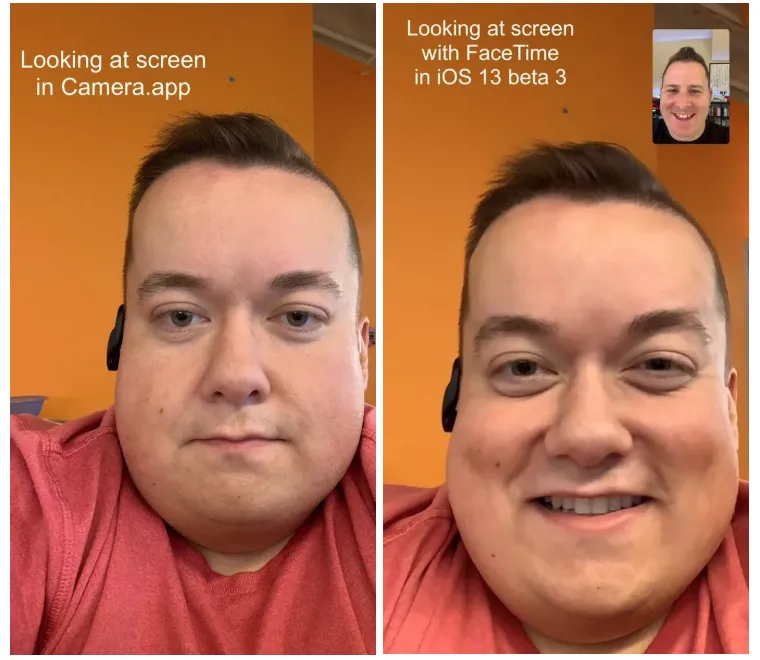
In the iOS 13 beta, Apple has added a new feature that adjusts images you take from your front-facing FaceTime camera so it appears as if you're looking at the camera when you're not.
According to The Verge, who reported on the feature after app developer Mike Rundle tweeted about it this week, the feature can be turned on or off from the phone's FaceTime settings. It's called FaceTime Attention Correction.
The feature might not sound like much, but could actually be an important addition to Apple's operating system.
Often, when people are on FaceTime or snapping a selfie of themselves, they'll be looking at the image of themselves on the screen instead of the front-facing camera. It then makes it appear as if they're looking at themselves and not the person they're talking to. The FaceTime Attention Correction feature adjusts the appearance of where they're looking on the fly, so it looks like they're looking at the person.
It's unclear how Apple created the fake images and it's unknown how it might work in practice. Apple appears to be approximating where the person's eyes are pointing and responding with an image that looks right. Another developer, Will Sigmon, posted an image of himself using the feature on Twitter.
Apple, of course, hasn't commented on the feature and it's unclear whether it's simply testing it or will make it available in the final iOS 13 build the company will release this fall.
Get instant access to breaking news, the hottest reviews, great deals and helpful tips.
If you're an iOS 13 beta user, you can download the third version and try out the FaceTime Attention Correction now.
Don Reisinger is CEO and founder of D2 Tech Agency. A communications strategist, consultant, and copywriter, Don has also written for many leading technology and business publications including CNET, Fortune Magazine, The New York Times, Forbes, Computerworld, Digital Trends, TechCrunch and Slashgear. He has also written for Tom's Guide for many years, contributing hundreds of articles on everything from phones to games to streaming and smart home.
