Tom's Guide Verdict
The Arlo Essential Pan Tilt Indoor Camera 2K is a flexible and high-quality indoor camera for those in Arlo’s ecosystem, but alternatives, such as those from Wyze and Eufy, offer even more at a similar price.
Reasons to buy
- +
Inexpensive
- +
Well-designed app
- +
AI features work well
Reasons to avoid
- -
Competition offers more for the price
- -
Subscription required for video storage
Why you can trust Tom's Guide Our writers and editors spend hours analyzing and reviewing products, services, and apps to help find what's best for you. Find out more about how we test, analyze, and rate.
Arlo has long been a major player in the world of smart security cameras and for good reason. Its cameras have always offered high-quality footage, sleek designs, and advanced features. But over the past few years, we’ve seen more and more low-cost models with similar advanced features — something that has led to the Arlo Essential line, including the Arlo Essential Pan Tilt Indoor Camera 2K.
The new model is part of the third generation of Arlo Essential cameras, and offers pan/tilt functionality, a 2K resolution, AI descriptions, and more, at a pretty reasonable price. Is Arlo successfully taking on the budget players, or should you stick with something else?
Arlo Essential Pan Tilt Indoor Camera 2K Review: Price and availability
The regular price for the Arlo Essential Pan Tilt Indoor 2K camera is $49, but it's frequently on sale. For example, at the time of this writing, it was discounted to $34.99 at Arlo.com. The camera can be widely found at most online retailers.
Arlo Essential Pan Tilt Indoor Camera 2K Review: Design and installation

The Arlo Essential Pan Tilt Indoor Camera doesn’t break any boundaries when it comes to design, but it still looks nice enough. Like most of Arlo’s lineup, it has a white matte plastic body, with a black face. It’s not the most premium-looking camera, and it doesn’t feel as durable as Arlo’s higher-end models, but it still looks and feels perfectly fine.
Its design is kind of split into two parts. There’s a base, which can rotate around as needed for panning. Above that, there’s a bracket holding the camera itself in place – and on the bracket, the camera can tilt up or down. On the back of the base of the camera can be found a USB-C port, which is how the camera is powered. There’s no battery in the camera – you’ll have to keep it plugged in at all times.
The Arlo Essential Pan Tilt Indoor Camera is designed to be easy to set up. You can place it on a table or another surface, but it also comes with a bracket to mount the camera to a ceiling. I opted to simply place the camera on a flat surface.
Once you’ve positioned the camera how you want, all you have to do is plug it in and it should turn on. Then, download the app and sign in to your account or create a new one. When you go to add the camera, it should detect it automatically and allow you to connect it to your Wi-Fi network. The setup process took around five minutes, including installing a firmware update that was available.
Arlo Essential Pan Tilt Indoor Camera 2K Review: Image and audio performance
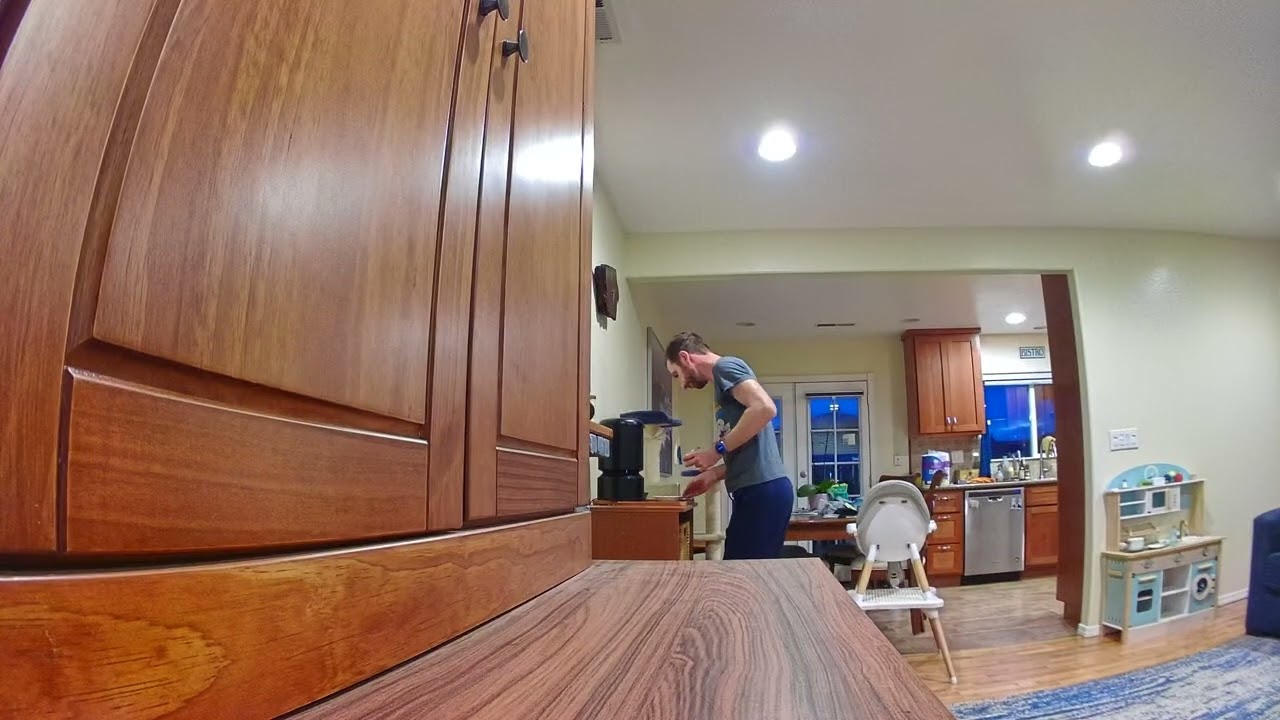
Generally speaking, footage captured by the camera looks quite good. For starters, it’s decently crisp and detailed. The 2K resolution genuinely helps. I have tested plenty of 1080p cameras and could notice the difference between this camera and those models.
The wide field-of-view, which sits in at 130 degrees, allows the camera to capture most of a room. Theoretically, it can capture most of a backyard when pointed out of a window, however it’s not really built for this purpose (the company makes the Arlo Essential Pan Tilt Outdoor camera for that), and the infrared lights will reflect on the glass in low-light environments, making for footage that doesn’t really show anything beyond the window itself.
The camera has subject-tracking, and it seemed to work well during testing. Decent subject-tracking is one of the biggest advantages to cameras with pan/tilt functionality, as it means that you’ll still be able to track suspicious activity even when a subject would otherwise be out of view.
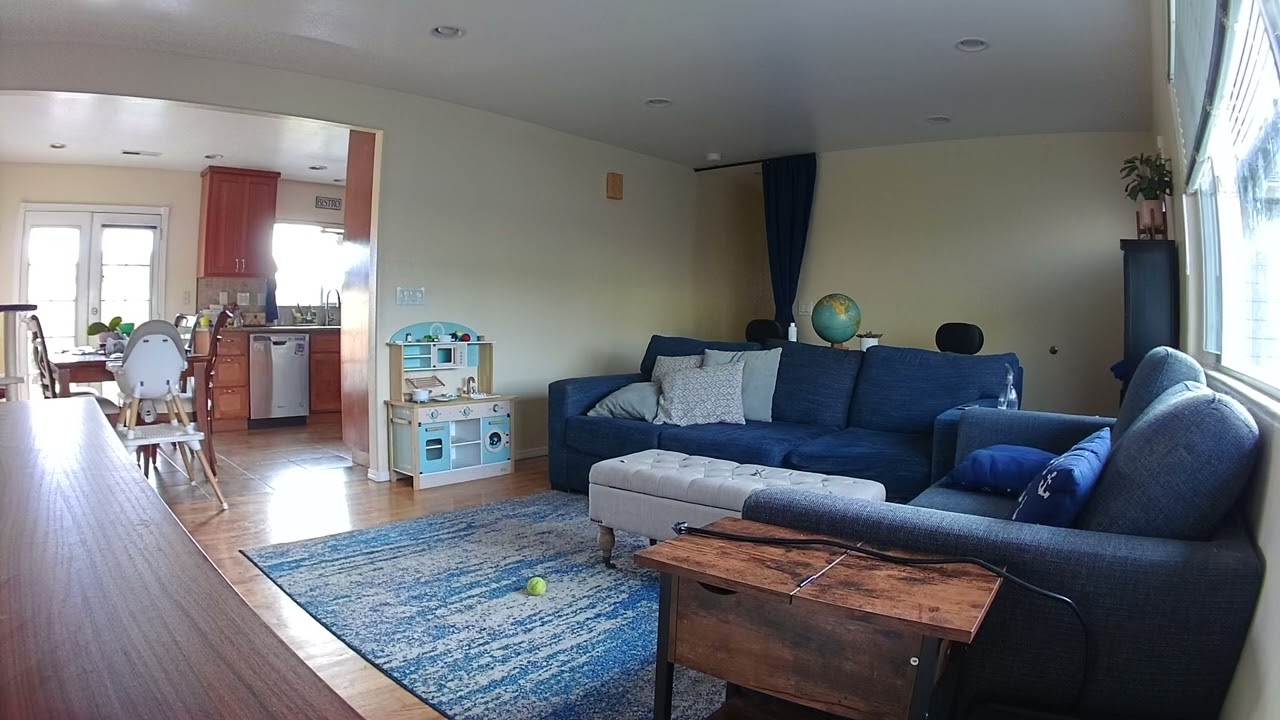
One of the trade-offs you get by buying this camera over some of the others is the lack of HDR, which can have an impact depending on how you use the camera. For example, it struggled to capture both darker indoor environments and brighter scenes through the window on a bright day, at the same time.
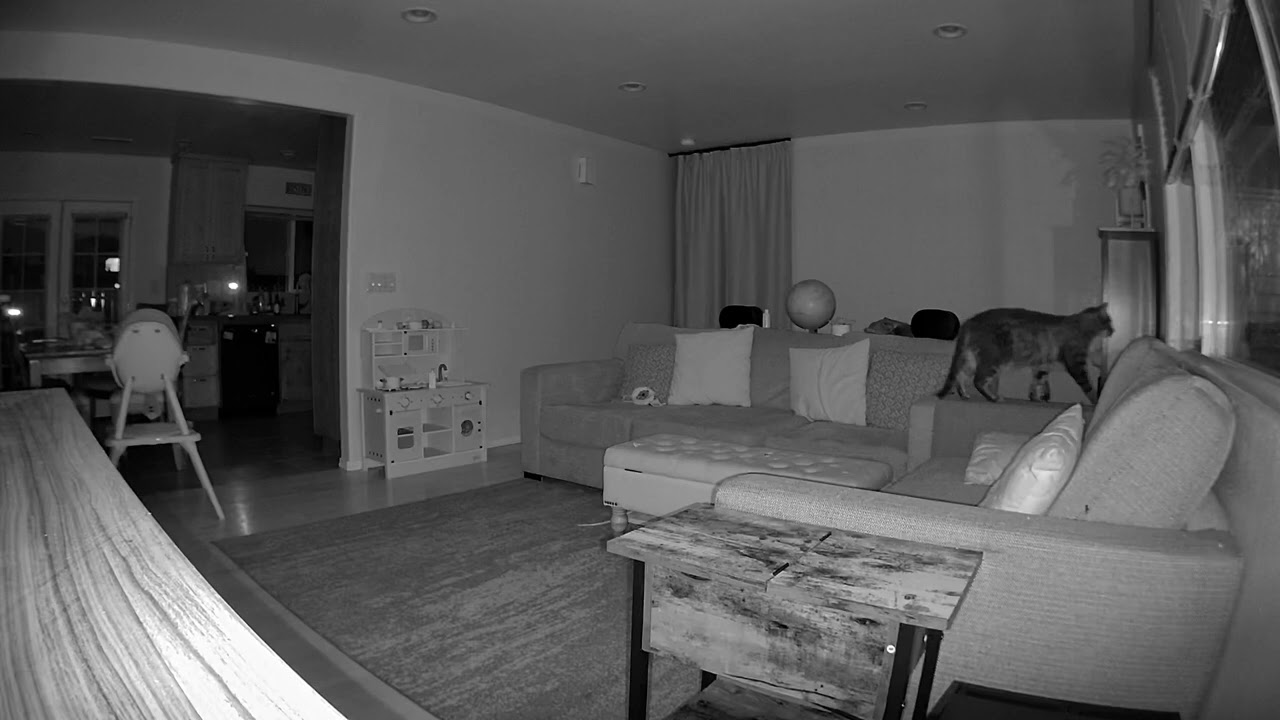
Another trade-off is the lack of a spotlight. This means that you’re stuck with infrared-based night recording, rather than color night footage of any kind. I did find that night footage was reasonably crisp, but without a spotlight to illuminate a scene you will miss out on some details that could be important. That said, depending on the power of a spotlight, infrared is often better at capturing far-away details.
The camera supports two-way audio, and it worked pretty well. Arlo says that the camera has “noise-canceling 2-way audio,” which supposedly lets it detect and play audio more cleanly. In a two-way audio setup, I was able to hear someone in front of the camera, through my phone, quite well, and while I did have to ask them to speak up, the camera’s microphones and audio processing made for a sightly better audio experience than the Wyze Cam Pan v4 that I tested at the same time.
That said, the speaker built into the camera wasn’t as good, and made my voice sound tinier. That’s not a huge deal though – my voice was still easy to hear through the camera’s speaker.
Overall, the Arlo Essential Pan Tilt Indoor Camera 2K offers crisp and detailed video. Only one problem – the Wyze Cam Pan v4 exists, and it costs only $10 extra. I happened to be reviewing the two at the same time, and found that while there are areas in which Arlo does slightly better, like in picking up audio and having a wider lens, the Wyze Cam Pan v4 generally captured far better footage, both in resolution (it’s a 4K camera), and in color accuracy. That’s not to mention the fact that the Wyze camera has a spotlight for color night recording.
Arlo Essential Pan Tilt Indoor Camera 2K Review: App and smart home support

The Arlo app is generally well-designed and easy to use, and if you use multiple Arlo cameras, you’ll be able to manage them all easily. The app is split up into five different tabs. The main screen is the Dashboard tab, which shows thumbnails for all of your Arlo cameras and lets you arm and disarm your security system as a whole (or at least all the Arlo products in your system).
The other tabs include the Feed (which shows footage in chronological order), an Emergency tab (for getting in touch with emergency services and activating sirens), a Devices tab (to manage your devices), and a Routines tab (to set up automations).
From the Dashboard and Devices tabs, you can tap on a camera to access a live feed of what the camera sees and tweak its settings. This is where you can do things like enter two-way audio mode and control the pan/tilt settings of the camera.
Controlling the positioning of the camera is relatively easy, and you can set a “home” point, which is where the camera will return to after it either automatically tracks a subject, or you manually move its position. You can also set additional positions, which will allow you to set the camera’s position easily without having to manually move the camera.
AI features

Some of the smart features included in the subscription worked well too. You’ll get what are now common features, like person detection, animal detection, package detection, and so on. Obviously, you’re unlikely to use a camera like this for package detection, but the camera did a pretty good job at telling me that a person was detected instead of just that “motion” was detected.
The object-recognition tech goes a step further too – using generative AI to provide a short text summary of what was captured alongside events. I was pleasantly surprised with how well this worked. Here’s an example of the kinds of summaries it produced:
“A person is holding a camera and walking towards the camera. The person is wearing a blue shirt. The scene is a backyard with a wooden fence, a lawn, and some patio furniture. There are also some toys on a table in the foreground, including a pineapple-shaped container and a purple bottle.”
For reference, in the clip recorded I was carrying my camera in my backyard as I was taking photos of a speaker for a review. The other details were almost entirely correct – with the only incorrect detail being that the pineapple “container” (a small kids bubble machine) and purple bottle were actually on a Traeger smoker, instead of a table – but there was no way for the camera to possibly know this, as the smoker was directly in front of the window the camera was pointed out of, and only the top of it, with its cover on, was visible.
And, after all, objects were placed on top of it as if it were a table. When I moved the camera to the driveway instead of the backyard, the camera even identified my car make and model correctly in some descriptions.
The Arlo Essential Pan Tilt Indoor Camera 2K works with Alexa, Google Home, IFTTT, and Samsung SmartThings. The main smart home ecosystem it doesn’t support is HomeKit – so if you’re looking for a HomeKit camera, you’ll need to keep looking.
Arlo Essential Pan Tilt Indoor Camera 2K Review: Video storage and subscriptions

The Arlo Essential Pan Tilt Indoor Camera 2K doesn’t have local recording, and unfortunately, it doesn’t work with any of Arlo’s base stations or hubs, so you can’t record locally at all. Instead, you’ll need to subscribe to one of Arlo’s cloud storage plans, called Arlo Secure.
Arlo Secure gets you a 60-day video history, but it also offers other features. Notably, you can’t access features like the person recognition, or the audio recognition features, without it. If you go for the highest-tier subscription, you’ll also get 24/7 emergency response and professional monitoring.
Here’s a rundown of pricing for Arlo Secure. Arlo Secure Plus costs $9.99 per month or $95.88 per year for one camera, or $19.99 per month or $215.88 per year for unlimited cameras. Arlo Secure Premium (which includes professional monitoring) costs $29.99 per month or $299.88 per year, and supports unlimited cameras. There’s no single-camera Arlo Secure Premium option.
Arlo Essential Pan Tilt Indoor Camera 2K Review: Verdict

The Arlo Essential Pan Tilt Indoor Camera 2K is an excellent pan/tilt camera, with a solid app, at a great price. It represents a continuation by Arlo to offer affordable alternatives to its higher-end models – and if you’re in the Arlo ecosystem already, then it’s easily worth considering for those who want an indoor pan/tilt camera. That’s especially true for those who have an Arlo Secure subscription.
But if you’re not already in the ecosystem, then another option might be better for your needs. The Wyze Cam Pan v4 in particular is a better option than the Arlo model, at least when it comes to the basics. It costs only $10 extra, has a 4K camera instead of a 2K one, has similar AI-powered object recognition and tracking features, and even has a microSD card slot for local recording.
The higher resolution genuinely makes a difference, and in general, you’ll get more detailed and accurate images from the Wyze model. The only thing to consider is the fact that while the Wyze model has AI-generated descriptions, they’re locked behind Wyze’s most expensive subscription, which costs $19.99 per month, while Arlo offers it in its Plus plan for $9.99 per month.
Similarly, the Eufy Cam S350 is another pan-and-tilt camera that delivers 4K video, local storage, and even better, gives you AI summaries for free.
Ultimately, if you already have Arlo cameras, then the Essential Pan Tilt Indoor Camera 2K is a good complement to your system. Otherwise, it's worth looking elsewhere.