




Having one of the best gaming mice is pivotal to any serious gamer, especially those trying to rank up in Valorant, Counter Strike 2 or League of Legends. A mouse needs to have the perfect grip, a reliable sensor, a handful of useful features, and some good quality plastic in order to be used by professionals and casual players alike, and crucial in finding the right mouse for you.
Most mice, besides ultra-budget options, have similar sensors which do not differ all too much — while new sensors are constantly being added to the latest mice, even the most seasoned mouse enthusiast will struggle to notice the difference between the Pixart 3395 on the Fantech Aria XD7 and the Hero 2 sensor on the Logitech G Pro X Superlight 2.

One of the basics of the mouse is the Polling Rate, and finding the right polling rate for you is an important choice. However, while mice with the highest polling rates tend to cost the most, you may find very little tangible advantage.
What is a polling rate?

The polling rate of a mouse, measured in frequency (Hz), is essentially the amount of times that a mouse's sensor reports the position of the mouse to your computer. A low polling rate means that the mouse updates its own position less frequently, which will translate to a less accurate depiction of your cursor or crosshair on screen.
Practically speaking, anything below 1,000Hz is not highly recommended on modern equipment — mice that are 500Hz or below tend to lead to lack of responsiveness, and can sometimes lead to poor accuracy. It is common that using a wireless mouse in Bluetooth mode will reduce polling rate to 125Hz or lower, which should be avoided at all costs.
How high does it need to be?
The elephant in the room is whether you should just go for the highest polling rate commercially available, which right now is 8,000Hz. I have reviewed a couple of mice recently which support 8k polling, namely the Cherry M68 and the Fnatic x Lamzu Maya 8K, and both of them made it into my go-to favorites. Interestingly, the fact they support 8k polling was a con against them.

Why is that, you ask?
8k caused me more issues than it was worth. While the requirement to have a dongle unit attached via a cable to my PC was a minor annoyance, more significant were performance impacts that the 8k mouse had on my beefy gaming PC. The simple fact is a lot of games are not built with 8k polling rates in mind, and can't keep up with the rate at which your mouse position is updated.

Take the Fnatic X Lamzu Maya 8K — I loved the comfortable grip and the low weight of the mouse, and I am glad that it was less expensive compared to other 8k mice. But, the fact that the mouse supported 8k was not really a concern for me — I mostly just stuck to 1,000 or 4,000Hz to improve battery life as well as prevent annoying stuttering in some of my less-optimized games. It's cheaper than the Cherry M68 Pro by $20, so is a much easier recommendation to make.
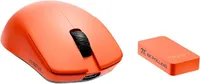
For the professionals...

An interesting resource I appreciate are the Professional eSport player gear lists, provided by ProSettings. On their CS2 gear list, you can see that not many players have made the jump to 8k yet — 4k and below appear much more popular.
I can definitely see the appeal in competitive players opting for a 4k compatible mouse, a middle ground between the more pricey 8k and the standard 1k. While there are plenty of dedicated 4k mice out there, I would recommend the Logitech G Pro X Superlight 2 as the best mouse for those looking to get a competitive edge in their games — it is one of our all-time favorites.
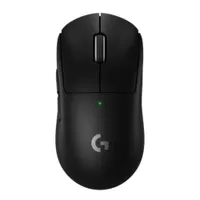

You don't need to spend big to get a professional product, though. Some of the cheapest mice I have reviewed ended up being some of the best. Take the Redragon M916 Pro ($44) for instance— for less than $50, you can get a 4k polling rate compatible mouse that will serve the competitive-minded perfectly well.
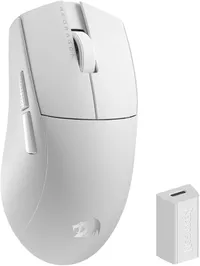
For most people

If I'm being really honest, most people will do absolutely fine on a 1,000Hz polling rate mouse — whether you are playing at a professional level or are trying your best to improve at the game, the benefits of a rate higher than 1,000Hz are minimal.
Of course, if you like the look of an 8k polling rate mouse, switching to a 1,000Hz version is usually as simple as unplugging the 8k dongle, or toggling a setting in the mouse's companion app. Ultimately, the most important thing about a mouse is how it feels to use, and this should be your priority when choosing a mouse, too.

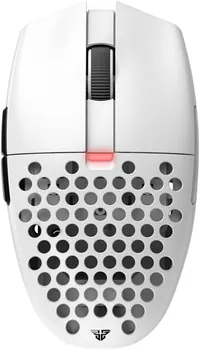
The Fantech Aria XD7 is one such mouse, and a great choice for those looking for a budget option for competitive gaming. It is remarkably lightweight, in part due to the honeycomb case design — although understandably this can be a little divisive. Regardless of looks, I was really impressed by how comfortable and effective this mouse was, and how it brushed shoulders with big name mice at double the asking price.
Mice like these really go to show that yu don't have to spend big to get the best performance, or win more games. Pick what is comfortable, and work on your skill!
More from Tom's Guide

