







Yes, the MacBook Neo has leapt into a lot of hearts and minds as the best budget laptop you can get. And yes, other laptop makers are out here calling it a tablet — completely missing the point of it. But that doesn’t mean the competition isn’t responding. In fact, it’s happening quietly beneath the radar with companies dropping prices.
But this isn’t just dropping prices on random laptops to look like they’re offering something to compete with the Neo. These are three laptops that I’ve personally tested and love for their bang for buck, which are sure to make those laptop engineers at Cupertino nervous.
So if you’re feeling the value notebook vibes and want to see what else is out there beyond Apple’s offering to make a well-thought out decision, here are my personal picks from months of daily driving that I believe are every bit a match for the Neo’s prowess.
Asus Zenbook A14
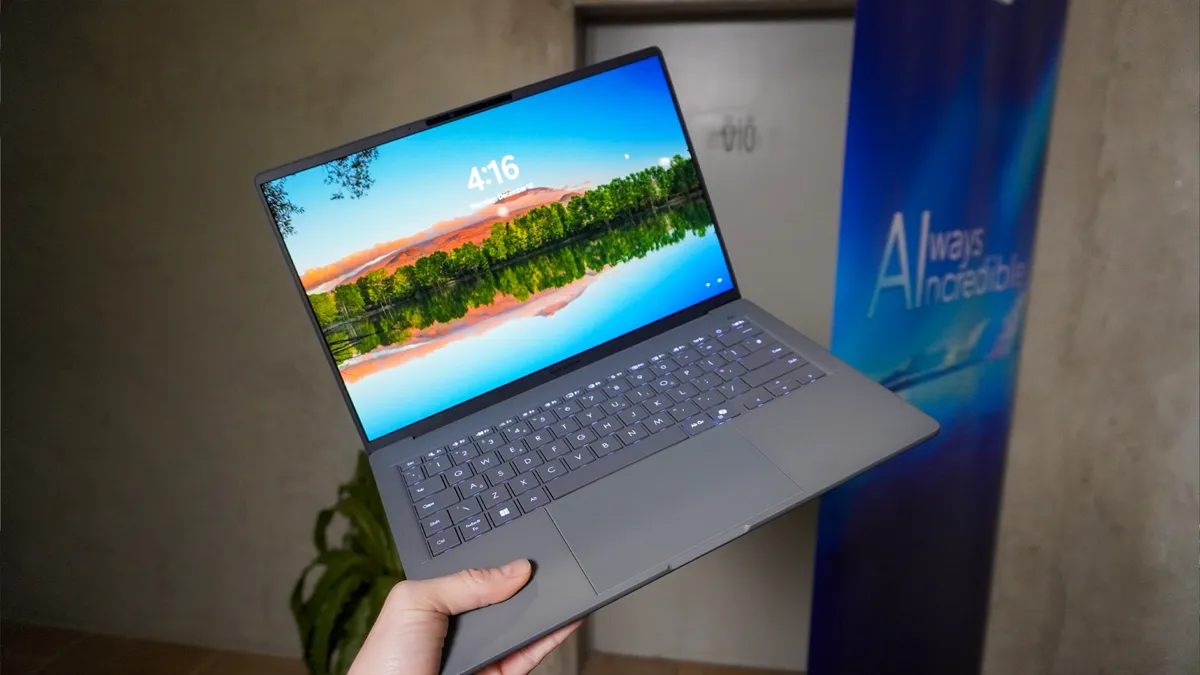

I first went hands-on with the Asus Zenbook A14 at CES last year and fell in love with it. Then when the pricing was revealed for my final review, that love affair fell away slightly, as the initial plan to compete with the MacBook Air fell apart by making this at least $100 more. Fast forward a year, and you can now get this for $699.
So if we were in the business of re-reviewing laptops, this would be an easy 4.5 stars for that insanely good value for money. Thin dimensions and a featherweight construction from ceraluminum (the surface feels like paper, it’s so cool) give way to:
- A gorgeous 2K OLED panel
- Snapdragon X Plus performance that steps up to the A18 Pro in the Neo with faster multi-core speeds, zippier graphics and faster data transfer speeds (it’s an actual laptop chip after all)
- And an 18+ hour battery life in my testing.

Throw in nice ergonomics with a generous touchpad and great keyboard, and you’re onto an ultraportable winner with a low price tag.
Acer Chromebook Plus Spin 514


The idea of a Chromebook Plus laptop has been through a bit of a spirit journey of sorts, as nobody could figure out how to make a premium Google laptop. Making the build and specs uber premium at a sky high price tag didn’t work, and neither did throwing in 12 months of free Google AI Pro.
But Acer stumbled on the answer with the Chromebook Plus Spin 514: focus on the fundamentals and throw the MediaTek Kompanio Ultra 910 chipset in for a peak pairing of performance and power efficiency. This Arm chip has been the bang-for-buck comeback of ChromeOS, and in my time daily driving it, you can feel that in the serious zippiness of app opening and multitasking.

Add in an unmistakably premium build quality, another gorgeous OLED display (always surprising you can get this at such low prices) and a 15-hour battery life, and you’re onto a winner. But one catch: this is ChromeOS. You’re not going to get the vast amount of apps to choose from that you’d get on the MacBook Neo or a Windows laptop.
However, for the casual productivity purposes you’d pick up a Neo for, Google’s OS offers more than enough of the essentials to get through your day-to-day.
Lenovo IdeaPad Slim 3x

Back at MWC last year, Lenovo brought a whole lot of awesome ultra-expensive prototypes and laptops to the party. But out of everything there, the often-forgotten budget system in the corner caught my eye the most.
The IdeaPad Slim 3X brings that Lenovo experience in the finite attention to ergonomics (a beautiful-feeling keyboard), zippy performance with Snapdragon X and a super long 16-hour battery life.

That’s not to say it’s all the way there in terms of competing with the MacBook Neo — the display is rather underwhelming and you can feel some of that cheapness in the build quality.
But on balance, this is a stellar budget machine that is at an impressively low price of entry.

Follow Tom's Guide on Google News and add us as a preferred source to get our up-to-date news, analysis, and reviews in your feeds.
More from Tom's Guide

