
Just last month, Amazon's personal AI shopping agent got a major upgrade that gave users over 100 new ways to utilize it. Being able to create lists, ask questions about various Amazon subscriptions & benefits, manage those same subscriptions, update the instructions for incoming deliveries, get answers to one’s billing & payment questions and more are all now possible through Alexa for Shopping.
Now, Alexa for Shopping has gotten yet another major upgrade. And this time, it gives users the ability to have a direct chat with it right from their text messages without even having to open the Amazon app or site. Here’s how that new nifty shopping feature works and who can currently access it.
Text with Alexa
Texting with Alexa for Shopping is the latest feature that has come to Amazon’s AI shopping agent and is currently rolling out to a select number of US customers through invitations.
And over the coming weeks, even more Amazon customers will have that option expanded to them in the same manner. Amazon shoppers should keep an eye out for a text message inviting them to try out the new Alexa for Shopping feature—other users can check out this landing page and sign up to get updates on when more invites for that latest update begin rolling out.
Amazon has listed a wide range of best-use cases for users who’ll begin texting Alexa for Shopping. Those examples include texting Alexa to begin producing your weekly shopping list, looking up a birthday gift you need by a certain day, sharing a photo of a piece of clothing & asking the AI agent to find similar options and making sure it resupplies your pet food supply after letting it know you’ve run out.
Some of the other methods Amazon mentioned as the best ways to utilize Alexa for Shopping's direct texting feature include:
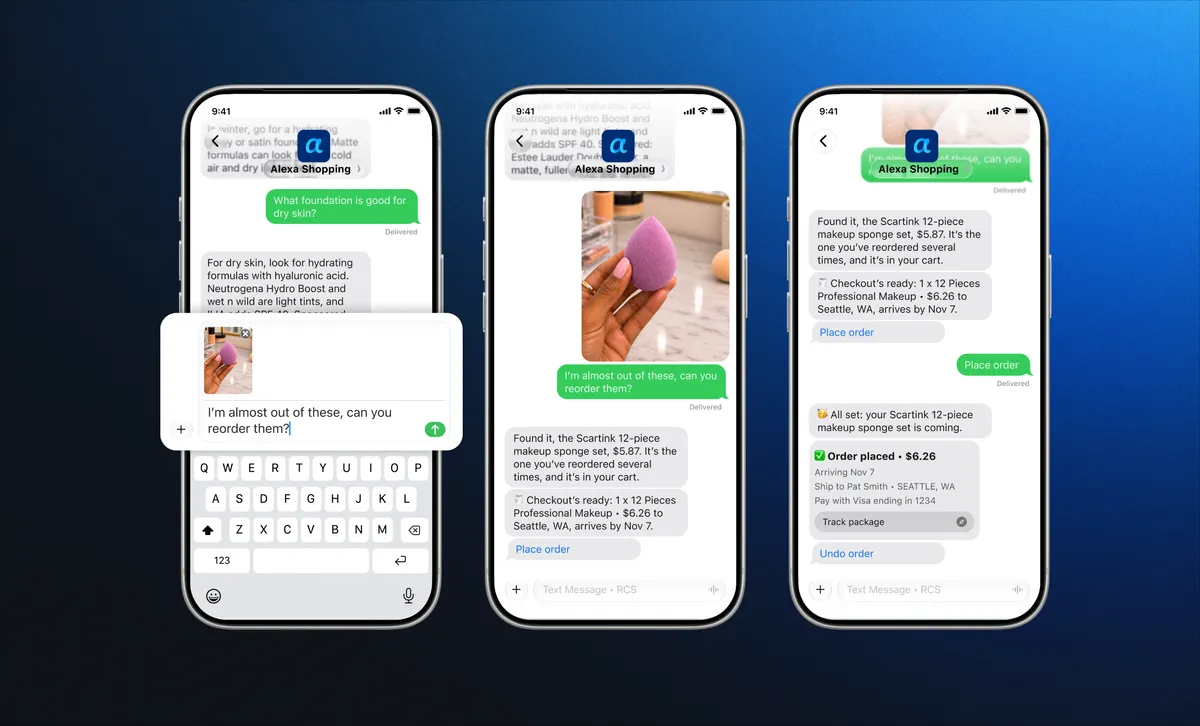
- Reordering items: Texting commands such as “reorder the [product name]” makes Alexa for Shopping find what you mentioned and purchase it after you give it your approval to do so.
- Personalizing your Amazon shopping experience: You can tell Alexa for Shopping how you like to shop and it keeps that in mind for any future requests you may bring up. For instance, telling it to only show you organic options, give you nutritional data every time you ask about food and add items to your cart automatically when you mention them are all doable.
- Keep a close eye on prices and deals: Now you can make sure Alexa for Shopping knows when to set up product alerts whenever a price drops or a major deal pops up. Simply texting it, “let me know when [product name] goes on sale”, will make this feature work.
- Managing lists: You can notify Alexa for Shopping about your lists and the changes you want to make, such as “add [product name] to my grocery list” or “create a new Christmas gift list.”
- Get updates on incoming orders: Texting Alexa for Shopping commands like “where’s my package?” will now give you an easier way to stay on top of your current delivery without you having to do it from Amazon’s app or site.
- Showcase options from Amazon’s Shop Direct: Doing your research for certain items through your text exchanges with Alexa for Shopping will make it bring up other product options obtained through Amazon’s Shop Direct feature.
- Get instant updates about new product releases: You’ll be in the know as soon as certain products launch, just by texting Alexa for Shopping commands such as “update me when [company name] drops new [type of product and product name].
- Do product comparisons: Right from your text messages, you can tell Alexa for Shopping to “compare the top-rated [type of product]” to make it produce the most important info you need to know, customer reviews and pricing tied to those products.
- Look through a product’s price history: If you want to get a good look at an item’s price history to see if its current price is actually a good deal or not, you can text Alexa for Shopping “what’s the price history on this [product name]?” and it’ll handle the rest.
Bottom line
It’s interesting to see Amazon make a concerted effort to turn Alexa for Shopping into more of a reliable AI agent that can exist outside of its app and site. I get the feeling that it wants to keep Amazon customers inside its ecosystem and away from the likes of Meta Muse and other third-party AI tools that also fulfill their online item research and shopping needs.
I’m perfectly fine with continuing to interact with Alexa for Shopping directly inside the app since I have no desire to text it every time I get the urge to add something new to my video games wishlist.

Follow Tom's Guide on Google News and add us as a preferred source to get our up-to-date news, analysis, and reviews in your feeds. Subscribe to Tom's Guide on YouTube and follow us on TikTok.
More from Tom’s Guide
- ChatGPT can now turn your photos into GIFs — and free users get the upgrade too
- Here's what James Talarico, Abdul El-Sayed and other US midterm election winners have to say about AI data centers
- Did the AI bubble just pop? $2 trillion reality check hits Nvidia, Meta & SpaceX as Wall Street panics, signaling a potential end to RAM crisis in 2027