





Google is always tinkering with Gmail, its very popular email client. In the past year, the web version of Gmail has gotten a new loo in addition to several features that impact how you manage your inbox and even the messages you're sending to others.
- How to disable Gmail's smart features and prevent tracking
- How to block emails in Gmail: If you're tired of being spammed
- Essential tips and tricks: How to use Gmail
Keeping track of all the changes that have come to Gmail can be a little overwhelming, especially since Google rolls out its updates in phases. There could be features added to the email client that you might have overlooked completely.
With that in mind, here’s a rundown of some of the bigger changes Google has made to Gmail recently, along with some important security features you should really know about. Also check out our guide to all of the new Gmail features and what we like and what we don't.

Inline Action Buttons
Easily my favorite addition to Gmail in the past year, inline action buttons pop up on a message in your inbox to give you quick access to frequently used actions. From left to right, the four inline icons let you take a message and archive it, delete it, mark it read or unread or snooze it. (More on that item in a moment.)

These buttons improve on Gmail's old way of handling one-off tasks. Before, when I wanted to delete a single message from my inbox, I would have to click on the box to the left of the message, then click again on the delete button. The inline delete button lets me take care of that with a single click. (The old click-the-box-next-to-a-message trick is still the best way to handle multiple emails at once, though.)
Expanded Right-Click Menu
Speaking of quick ways to handle tasks, have you explored Gmail's right-click menu on the desktop lately? Back in February, Google started adding options when you right click on a message with your mouse or hold down the Control key as you click with your keyboard.

In addition to the archive, delete, read/unread and snooze options available as inline actions, the right-click menu now offers quick access to the reply, reply all and forward functions for a message. You can also search for additional messages from that sender, apply labels to a message or move it to a different inbox. My favorite option in this expanded menu? Opening a message in a new window for those times that I want to keep multiple emails visible for my reference.
Snooze Messages
At least several times a day, usually during working hours, an important message will pop up in Gmail that requires more of a thoughtful response than I can give it at the moment. My options are either to drop what I'm doing and respond or ignore the message and hope I remember to get to it later. Gmail's Snooze feature is a better approach to that latter problem.

Select the Snooze option, and Gmail makes a message go away, only to bring it back to your attention at a later point in time. By default, you can make message vanish until later today, tomorrow, this weekend, next week or the disturbingly vague "Someday." You also have the option of setting a specific time for that snoozed message to return to your attention.
Gmail Will Nudge You
Speaking of resurfacing messages, Gmail takes matters into its own hands if it feels like there's a message you need to respond to. The nudge feature notices if you've left an email sitting for a few days without a reply or whether someone hasn't yet respond to one of your queries; if so, an inline message will appear, asking if maybe you want to reply or follow up.

With nudges, Google's tapping into its machine learning prowess to spot things like dates, deadlines and other calls to action. Having had the feature active for nearly a year now, I find that about one in five messages resurfaced by a nudge do require a follow up from me, but your mileage may vary. If you find the feature a distraction, it’s easy enough to disable Gmail’s nudges.
Schedule Emails
You're not always near a computer or smartphone when you need to send out an email — say a reminder to your colleagues or a birthday greeting to a pal. But Google is in the midst of upgrading Gmail that lets you decide to send emails later at a date and time of your choosing.
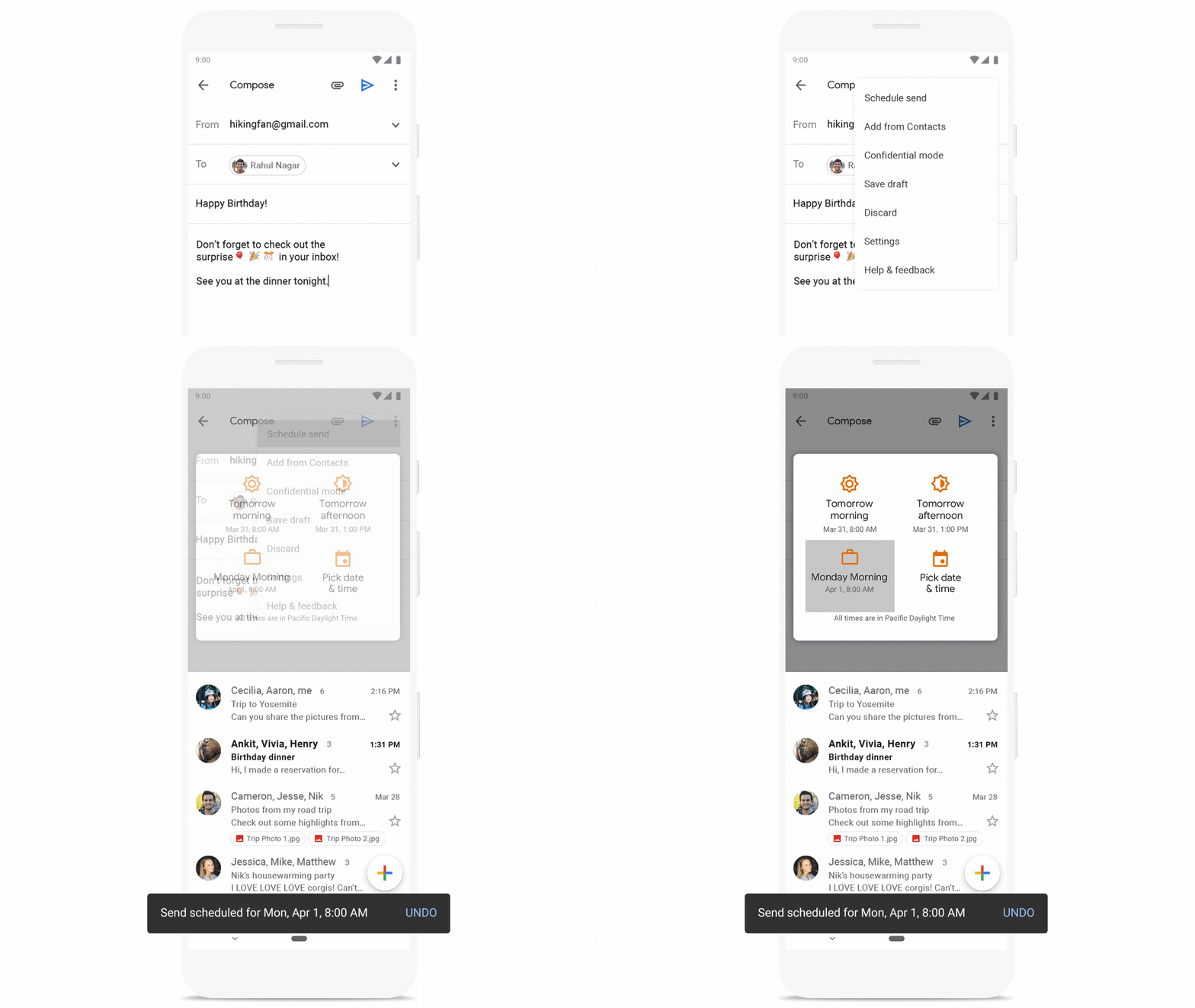
The New Write Now Send Later feature is rolling out to Gmail accounts as of this writing. (It hasn't hit my account yet, but maybe you're luckier than I am.) After you compose an email, you can opt to schedule it to be sent out a later time. Just click on the options menu — those three vertical dots — and from the drop-down menu that appears, select Schedule Send. You'll then be given some options on when to send out your email — tomorrow morning, for example — or you can use a time-and-date selector to pick a specific time.
Clickable Attachments
Action buttons aren't the only thing that have gone inline with Gmail. Attachments now appear inline, too, so you can open them without having to open a message first. This can be a real-time saver if you've already read the message and just need to get to the attachment quickly.

Microsoft Word documents, PDFs and photos appear in a pop-up window within Gmail. Clicking on an attachment that's a Google Doc will open a new tab in your browser.
Confidential Mode
Thanks to the arrival of Confidential mode, you can now send self-destructing emails to people — or at least, messages that expire at a time of your choosing.

Messages sent in Confidential mode disable the ability of your recipient to copy, download or forward the message. To enable the feature, just hit Compose and then click on the icon that looks like a clock superimposed over a lock.

You're not really sending a message, but rather a link that your recipient follows to read what you have to say. You have the option of including an SMS passcode generated by Google that your recipient will need to read your message. (You’ll need to include their phone number if you pick this option.) All told, Confidential mode is an ideal solution to sharing sensitive information you'd prefer not to leave lying around someone else's inbox.
Two-Factor Authentication
If you haven't turned on two-factor authentication for Gmail, you really should. It's easy to set up and it makes it that much harder for hackers to slide into your email account.
Just head to Google's 2-Step Verification website with your smartphone or tablet within reach. Click Get Started and follow the prompts. Your biggest decision will be whether to use Google Prompts, a security key or a text message/phone call to provide that second way of verifying that the person logging into your Gmail account is really you. You'll also get to pick a backup option for two-factor authentication.
Smart Reply

If you use the mobile version of Gmail, you're already familiar with the Smart Reply feature that puts tappable canned responses in a message to help you quickly reply. That feature made its way to Gmail on the desktop in the last year, saving you from unnecessary keystrokes when all you need to do is confirm that a meeting time is good for you.
Smart Compose
Google not only wants to help streamline your replies, it can also make composing a letter easier. Or at least, it wants to try. Last May, Gmail introduced a Smart Compose feature that suggests words and phrases as you type an email in the Gmail web client. Think of it as a version of the predictive text feature on your smartphone, only in the case of Smart Compose, the text appears in the body of your email as a lighter shade than the text you've typed. To accept Smart Compose's suggestion, just hit the tab key; to ignore it, keep typing.

I confess that I find Smart Compose a little distracting, especially since its suggestions are more miss than hit. (For me, Smart Compose works best when I'm typing regularly repeated phrases along the lines of "Any help you can provide would be appreciated" and I can just hit tab to complete the sentence.) But Google is promising that Smart Compose is about to get, well, smarter in that it will be able to learn and reflect your writing style.
An example Google gives is that if you start off messages with "Hi" instead of "Hello," Smart Compose will figure out your preferred phrasing. If you're the sort who waits until you've written an email before coming up with a subject line, Smart Compose is also going to start suggesting subject based on the first line of your email. (A message containing birthday greetings will get a "Happy Birthday" subject line for example.) These improvements are making their way to Gmail as we speak.
Smart Compose is coming to all Android phones, after previous just being available on Pixels. Expect it to reach iOS devices soon, too.

