Tom's Guide Verdict
The Apple HomeView is built well, but as a smart display, it can't do as much as rivals from Amazon, and Siri isn't as capable as other AI assistants.
Reasons to buy
- +
Personalized home views
- +
Nice-looking piece of hardware
- +
Good audio
Reasons to avoid
- -
Limited customization
- -
Siri not as good as Alexa+
- -
No physical button to turn off camera or mic
- -
Fewer streaming apps than other smart displays
Why you can trust Tom's Guide Our writers and editors spend hours analyzing and reviewing products, services, and apps to help find what's best for you. Find out more about how we test, analyze, and rate.
After years of waiting, Apple has finally come out with a smart display, but is it already too late? The Apple HomeView is a sleek device with a nice-looking interface, but scratch deeper than the surface, and you’ll find that it quickly comes up short against the best smart displays. Yes, Amazon’s are the only other game in town, but that company’s much longer history when designing a smart home device — and AI — shows just how far Apple needs to go.
Yes, there are some redeeming qualities of the HomeView — it’s great at music, and integrates well with your iPhone — but when testing it alongside an Amazon smart display, I was left wanting for features time and again.
Price and availability

The HomeView goes on sale November 13, 2026, for $299. It comes in two versions, a freestanding model, and a wall-mounted version. The freestanding HomeView is offered in four colors (silver, starlight, rose pink, space gray) while the wall version comes in just silver or space gray.
If you opt for the wall-mounted version, you’ll have to pay an additional amount for either the USB-C wall connector ($59) or the hardwired mount ($79); if you choose the latter of these two, you’ll probably want to call an electrician to install it.
Design and installation


The base of the HomeView is a small aluminum cylinder that’s rounded at the top, where it connects to the display. The bottom of the base has several rows of perforated holes for the display's speaker.
In an era where most smart home speakers (Apple’s included) are using more fabric-covered finishes, the HomeView reminded me, more than anything, of the love child of a first-generation Amazon Echo and the iMac G4.
The HomeView’s screen is smaller than I would have imagined from the early videos and hands-ons. It definitely won’t take up a ton of room on your counter, which is a nice thing if you have limited space.
Display, camera, and speaker
Apple’s specs say the display is 7 inches on the diagonal, but owing to the bezels, the usable space is about 6.4 inches. Measuring vertically and horizontally, the screen is 4 7/8 inches in each direction.
It’s very nice to look at; its 1088-by-1088-pixel resolution (220 pixels per inch) made all of my photos look excellent, and the display can automatically adjust its brightness from 0.3 to 500 nits.
For a device that’s smaller than the HomePod mini, the HomeView does a pretty impressive job with music. Apple says that the HomeView has two custom full-range drivers and a custom down-firing woofer, which delivered stronger bass than I would have expected for a device this size.
I was able to blast the “Hamilton” soundtrack throughout my kitchen, and it was loud enough that I had to turn down the volume. In order to do so, though, I had to either yell at Siri, or tap the screen; there’s no dedicated volume controls.
A 12MP camera with Center Stage sits at the very top center bezel; it was perfectly adequate when making FaceTime calls, and the Center Stage feature was welcome, as it let me move around my kitchen while chatting.
A swipeable, but limited interface

You can set up the HomeView with any number of faces. As a Peanuts fan, one of my favorites was an animated clock with Snoopy and Woodstock doing a bunch of shenanigans — and easily swipe between them. However, due to its size — or because of Apple’s design decisions — the HomeView’s homescreen feels more limited than Amazon’s.
Here’s an example. Like the Echo Show devices, the HomeView has a face, called Home Modular, that lets you control smart home devices, and even get a live look from any cameras connected to Apple Home. However, if you want to see pictures of your kids, know what the weather is, and see what’s happening at your front door, good luck. You can create a custom Modular face that incorporates some of these elements, but you can't fit them all.
By contrast, the Echo Show 8, which admittedly has a larger 8.7-inch screen, lets you pack more on there, so you get a much more holistic look at everything going on both in and outside of your home.
Widgets

In order to simplify things for developers, the HomeView uses the same widgets that you can install on an iPhone. But what works for a smartphone doesn’t necessarily work for a smart display.
You can add Widgets to the HomeView, but surprisingly — and somewhat aggravatingly — some of them don’t work, or aren’t optimized for the device. For example, I added the Disney+ widget, but when I tapped on it, it displayed a message saying “The Disney+ app is only available on iPhone.” Same with the Anker Eufy app and YouTube. The only widget that lets you play videos natively is Apple TV.
Even more frustrating for me was the Photos widget. After setting it up — which requires you to use your iPhone to select the photos you want — the widget then displays a picture from your collection. However, if you tap on the widget to change the image, you get a message saying “App unavailable. The Photos app is only available on iPhone.” I felt a bit like Charlie Brown right after Lucy swiped the football away.

Those widgets do serve a purpose — you can start playing a video on your iPhone, and then cast it to the HomeView, but it’s an extra step that you don’t need to take with any other smart display.
What’s odd is that the HomeView lists dozens of widgets, but few are optimized for the HomeView. Perhaps this will change once the product goes on sale. And, what Widgets are available aren’t that many. While there’s a Stocks widget, there’s none for News or Sports, so you’ll have to ask Siri for updates on the game.

Forget using the HomeView as a smart TV; while you can watch Apple TV content, there aren’t any other widgets for most popular streaming services, such as Hulu, Peacock, or Netflix. One of the main reasons I like smart displays is that they can act as mini TVs, so I can cook Sunday dinner in the kitchen, but still be able to watch football games without running into the living room.
Privacy and personalization
In keeping with Apple’s admirable insistence on privacy — and because it’s a nice feature — the HomeView’s screen will only display personalized content if its camera recognizes that individual’s face.
So, for example, if I walk up to the HomeView, I’ll see my photos and calendar appointments, but if my wife were to approach the device, she would see her content, provided she were a registered user. In either instance, our iPhones would also have to be on the same Wi-Fi network for any personal content to appear.
If the Homeview recognizes your face, a small orange dot appears in the upper right corner. Curiously for a company which prides itself on privacy, there’s no button on the HomeView to disable its camera.
Siri falls short
One of the reasons that the HomeView was delayed was that Apple was waiting for Siri to get smarter. So, I put it to the test versus Alexa+ on an Echo Show 15. Tl;dr — Apple needs to do a bit more work.
Weather
The first challenge was asking for the weather. The first time I asked Siri, I received a very terse “Expect partly cloudy skies today,” and the HomeView’s screen changed to show me the current temperature. The next time I asked, I got a slightly more detailed response: “Expect clear skies today with a high of 59 degrees and a low of 47 degrees.”
By contrast, Alexa+ was much more conversant. “Right now it’s cloudy and 56 degrees, feeling 53. Today’s high is 61 with a low of 45, and it’ll stay breezy with decreasing clouds and no rain expected.”
Pizza
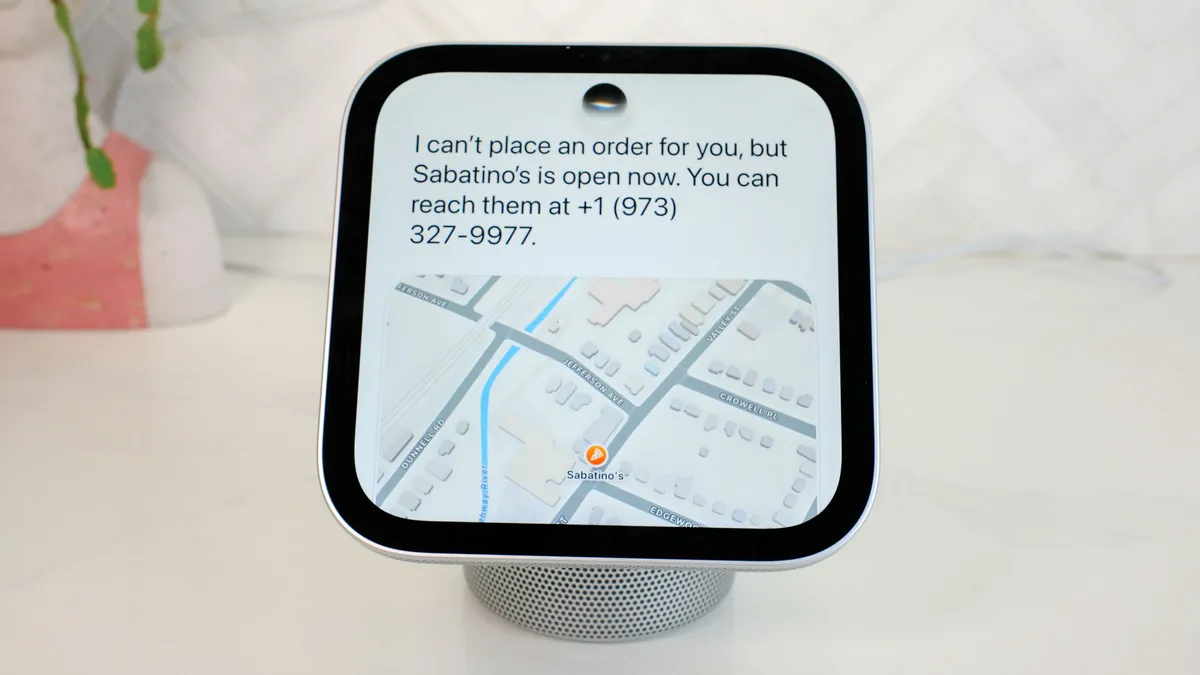
Next, I asked both Alexa+ and Siri to look up local pizza places. Again, Siri gave me a list, but Alexa+ was more effusive, telling me how late some of the more popular restaurants were open.
I then asked both AIs to order me a pizza from one particular restaurant. Siri couldn’t, but offered to place a call, but Alexa+ linked to Uber Eats, and walked me through ordering a large pie.
Smart home
Another key function for the HomeView is that it can act as a central control panel for all of your smart home devices. Not only can you tap widgets on the screen to turn your lights on and off, but you can also use your voice to control things. For example, I said “Hey Siri, show me my video doorbell” and the HomeView brought up a live view of my front door nearly instantly.
I also liked that you can add a widget to show a live view of your security cameras. I have a Eufy camera, which worked well with the HomeView, but this is one area where Apple needs to incentivize its partners a bit more; there are far fewer security cameras compatible with Apple Home than there are for Amazon and Google.

Directions
How well can a home assistant get you where you need to go? I asked both Siri and Alexa+ to get me directions to Newark airport. Siri gave its usual brief response: “It will take about 13 minutes to drive to Newark Liberty International Airport in light traffic.” I then asked Siri to send the directions to my phone, which it did as a text message with a link to Apple Maps to my phone.
Alexa+ was more chatty, but less helpful. “Navigation isn’t supported on this device, but I can give you the route info. It’s about 12 minutes and 5 miles to Newark Liberty International Airport, with light traffic on I-78.” I then asked Alexa to send the directions to my phone, but the best it could do was send a copy of the conversation to the Alexa app.
Uber
When I asked Alexa+ to book me an Uber ride, it went so far as to ask me if I wanted to start from my work or home location, and went through all the rest of the steps. The best Siri could do was offer to open the Uber app.
Calendar
One thing I did like is that Siri can scan through your calendar and messages to surface things you might have missed, or forgot about. For example, I asked “what time are my neighbors having people over today?”
It then dug through all of my messages and replied “Your neighbors are having people over for a fire today at 4:30 p.m.” On the screen, it added further detail: “There will be drinks for the adults and marshmallows to roast for kids.”
Bottom line

Historically, Apple has generally not been first to any particular category, but when it enters a market — MP3 players, phones, tablets, etc. — it’s generally learned from the mistakes of the competition, and delivered a device that outshines everything else on the market.
The HomeView is not that. While the physical design of the device is lovely, its software does not live up to the same standard. It can do far less than rival smart displays from Amazon, and Siri is still a less capable home assistant AI than Alexa+ or Gemini.
I think Apple probably had to release it; there have been reports that the HomeView was languishing in a warehouse for the better part of a year, which makes sense considering it’s using the A18, rather than the A19 chip — but maybe it should have stayed there.

Follow Tom's Guide on Google News and add us as a preferred source to get our up-to-date news, analysis, and reviews in your feeds. Subscribe to Tom's Guide on YouTube and follow Tom's Guide Entertainment on TikTok and Instagram.