Tom's Guide Verdict
The Apple TV 4K (4th gen) has a more powerful processor, support for full surround sound, and now has a lost remote finder. But it's the most expensive streaming device by far, and Siri still falls well short of Gemini and Alexa+ when it comes to finding what you want to watch.
Reasons to buy
- +
Easier to find a lost remote
- +
Fast, clean interface
- +
Can create a 4-channel surround system with HomePod speakers
Reasons to avoid
- -
Expensive
- -
Siri not as good as Alexa+ or Gemini for surfacing content
Why you can trust Tom's Guide Our writers and editors spend hours analyzing and reviewing products, services, and apps to help find what's best for you. Find out more about how we test, analyze, and rate.
The best streaming devices generally don’t get updated all that frequently; there’s not too much that changes year-to-year. It’s been four years since Apple released its last device, but now it’s back with the Apple TV 4K (4th gen).
This fourth-gen streamer has the company’s newest A19 processor — the same as in the iPhone 17 — which means it’s not only faster, but has access to the new-and-improved Siri, which in theory should mean that it’s easier for you to find shows to watch. And, you can also create a fully immersive surround-sound setup using HomePod smart speakers. But, the Apple TV 4K also comes with an exorbitantly high $299. Yes, it’s a nicer setup all around, but it’s hard to justify the price if you’re not in the Apple ecosystem.
Price and release date

At $299, the Apple TV 4K (4th generation) is by far the most expensive streaming device, and is a big jump in price over the 2022 model, whose most expensive variant cost $149 when it was first released (Apple jacked up the price to $249 earlier in 2026). Apple’s just offering one version this time, with 128GB of storage.
Among the best streaming devices, the next most expensive gadget is the Amazon Fire TV Cube, which costs $199 regularly.
Apple TV 4K (4th generation) vs. Apple TV 4K (2022)
Should you upgrade? Here are the major differences; for ease of comparison, I’m only including the 128GB version of the 2022 model.
| Header Cell - Column 0 | Apple TV 4K (4th gen) |
Apple TV 4K (2022) |
|---|---|---|
Processor |
A19 |
A15 |
Wi-Fi |
Wi‑Fi 7 (802.11be) with 2x2 MIMO |
Wi-Fi 6 (802.11ax) with 2x2 MIMO, |
Wireless |
Thread, Bluetooth 6 |
Thread, Bluetooth |
Ports |
HDMI out, power and Gigabit Ethernet |
HDMI out, power and Gigabit Ethernet |
Supported speakers |
4 |
2 |
Mics |
3 |
2 |
Aside from the specs, the 2026 model supports up to four HomePod devices, whereas the 2022 model only supports two. In addition, the newer model has three mics, and its more powerful processor supports the newer, more advanced Siri.
Design and setup

The 4th-generation Apple TV 4K and its remote look identical to the previous model — a small black cube with ports on the back for HDMI, Ethernet, and power. One minor change is that the status LED is now in the middle, not that it’s all that noticeable.
Setup was a cinch; once I plugged in the Apple TV 4K, all I had to do was bring my iPhone near the device, and I was good to go within minutes. The Apple TV 4K even remembered all my installed apps from my previous Apple TV device. However, I did have to re-login to every app. If you have a lot of streaming services, this can get a bit tedious, no matter how easy they make it with QR codes.
Where’d my remote go?

One of the nicest upgrades is the new FindMy built into the remote; Apple’s remotes have long been easy to lose in the couch. You can use any iPhone to help locate the device and even have it play a little tone, but if you have an iPhone with Bluetooth 6 (the iPhone 17 or later), you can get super-precise location tracking.
I tried this with both an iPhone 14 Pro and an iPhone Air; with the 14 Pro, FindMy knew when I was close, but told me to look around. With the Air, the phone started buzzing more urgently the closer I got, and even gave me distance estimates. Finally, when I was within a few inches, it said “here.”
One thing that’s still missing from Apple’s remote though: backlit buttons.
Siri: Still a work in progress

Another benefit of the A19 chip in the Apple TV 4K (4th generation) is that it supports Apple Intelligence, which can be used for, among other things, finding what to watch. However, in my testing, it could use some work, especially when I compared it with Gemini on the Google TV Streamer and Alexa+ on the Fire TV Stick 4K.
My first stab with Siri was “Find me scary movies for kids.” I got a response saying “I’m not finding anything for that,” and offered to let me search YouTube.

I next tried “Find scary movies good for kids,” which did bring up some options, but I wouldn’t call “Poltergeist,” “Alien,” or “Seven” appropriate for my 8-year-old. I don't want her to know what's in the box just yet.
When I performed a similar search on the Google TV Streamer and on the Fire TV, I received much more relevant movies, such as “Coraline,” “Goosebumps 2,” “Hocus Pocus,” and “The Addams Family.”
I tried the same search another day on the Apple TV, and I got a few better suggestions, such as “Gremlins” and “Arachnophobia,” but the results still fell well short of what I hoped.
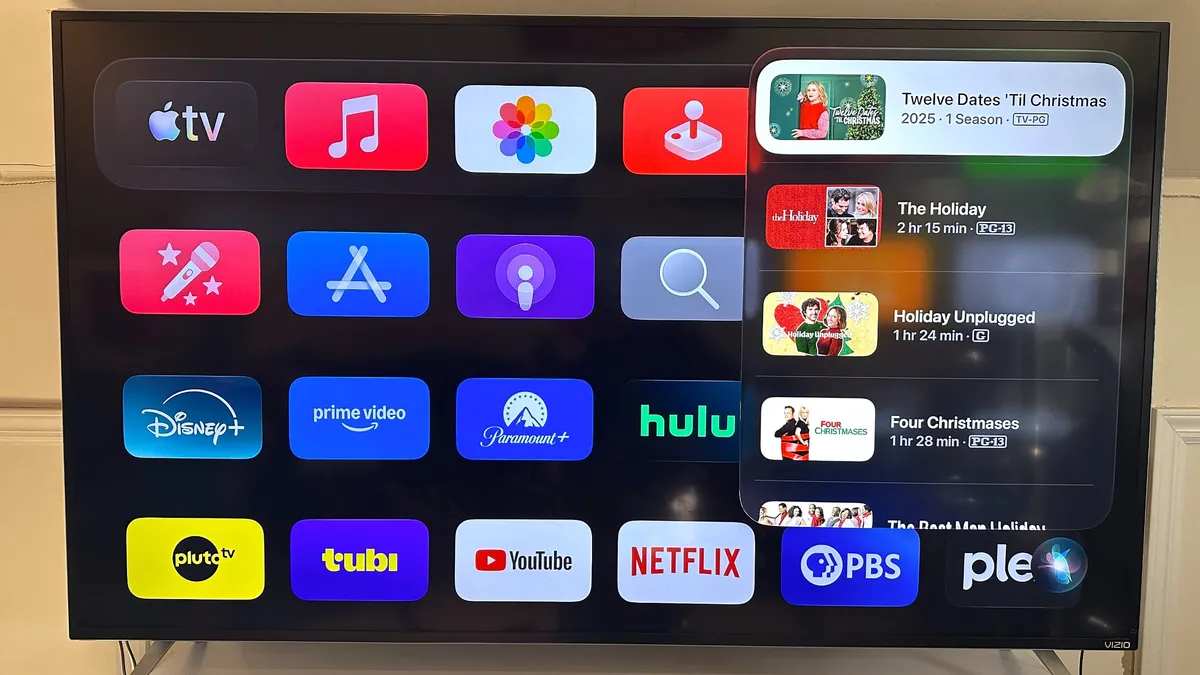
“What’s that movie with Audrey Hepburn that takes place in Rome” just returned a bunch of Christmas movies, none with Hepburn. On the Fire TV, Alexa+ brought up “Roman Holiday” in an instant, along with suggestions for other Hepburn movies.
Siri performed better when I asked it to “find action movies with Tom Hanks.” “Saving Private Ryan,” “Captain Philips,” “Angels & Demons,” and “Greyhound” were listed as the first few options.
Siri’s responses appear as a scrollable column along the right side of the screen, but there’s no audio reply. By comparison, on the Google TV Streamer, Gemini delivers the list, as well as a bit of dialogue, which makes everything feel friendlier overall.
Siri seemed to have a blind spot when it came to Netflix. I searched directly for “Top Gun: Maverick,” but Siri only showed that it was available through Paramount, when in fact you could also stream it on Netflix. Similarly, when I asked Siri for “The Girl with the Dragon Tattoo,” it only gave me options to buy or rent the movie, even though it was free to stream on Netflix.
A search for “KPop: Demon Hunters” was also fruitless. I either got a list of other movies with “demon hunters” in the title, or received this response: “I don’t have the answer for that, but I can search the web if you ask on your iPhone.” Siri was, however, able to find “The Queen’s Gambit” and “Love is Blind.”

Other things worked mostly as expected. “Turn off subtitles” worked within Apple TV, but not within the Netflix app. “Show my video Doorbell” brought up a live view from my doorbell’s camera. I could even place it in a small window in the corner while I watched other programs.
Interface and performance
One of the best things in the Apple TV 4K’s favor is its far, far cleaner interface when compared with devices like the Fire TV, which are just littered with ads and sponsored content.
However, I wish it would go a little further than simply displaying a grid of apps; I do like how, on the Google TV Streamer and Fire TV, they both display a row of movies and shows currently airing, things I’ve recently been watching, and recommendations based on my viewing habits; it makes it easier to resume a binge session, and makes discovering new content a little easier.
The Apple TV 4K (4th generation) definitely felt a little snappier than the older model; while I didn’t time it, apps seemed to open faster.
Impressive surround sound
Like the previous generation Apple TV 4K, the fourth-gen model lets you wirelessly connect Apple HomePods to use as an audio output. But, while the older model only let you connect two speakers, the fourth-gen Apple TV 4K lets you connect four, so you can have two front channels and two rear channels, for true surround sound.
The one caveat is that each pair has to match - that is, you need to have two HomePods or two Homepod minis as front channels. If you go the HomePod Mini route, you’ll spending around $600; I had two HomePod 2s as my front channels, and two HomePod Mini 2’s as my rears, which would mean an investment of just under $1,000. At that price, you may as well look at one of the best soundbars.
Amazon offers a similar feature with its streaming sticks, in that you can arrange a number of Echo Dots or Echo Studios to create a surround-sound system. I tried it with four Echo Studios, and it was pretty impressive.
Bottom line

The Apple TV 4K (4th generation) has some incremental upgrades over the previous model, but like I found with the HomeView, Siri as an AI assistant falls short of its rivals in Gemini and Alexa+.
In an era where there’s more movies and shows than ever to watch, an AI that’s capable of digging up something catered towards your tastes is essential. While I’m sure that Siri will improve over time, right now, you’re better off with a less expensive streaming stick, even if you do have to put up with some ads. The Roku Ultra, for example, costs half as much, yet offers support for Dolby Atmos and Dolby Vision.
One argument in the Apple TV 4K's favor is that it has 128GB of storage, which is far more than you get with other premium devices like the Google TV Streamer (32GB) and Fire TV Cube (16GB). But how many of us are still downloading movies?
The Apple TV 4K has some necessary upgrades, but until Siri gets better, it’s not a necessary upgrade.

Follow Tom's Guide on Google News and add us as a preferred source to get our up-to-date news, analysis, and reviews in your feeds. Subscribe to Tom's Guide on YouTube and follow Tom's Guide Entertainment on TikTok and Instagram.