







iOS 27 seems to be the turning point for Artificial Intelligence on iPhones, thanks to Apple adding a bunch of new features and upgrading Siri to offer AI-chatbot capabilities. AI in the iOS 27 beta is still rather rough around the edges though, especially where Siri is concerned, but it's good to see Apple start to catch up with its rivals. Sadly, there is one feature that Apple seems to have forgotten about — and it's easily my favorite AI-adjacent feature on Android.
I'm talking about Circle to Search, which landed on the first Android phones back in January of 2024. The feature isn't really an AI feature in and of itself, but it does offer a useful shortcut to Google Lens, which does use AI for a variety of things. We're talking translation, image and text recognition, reverse image search and so on.
iOS has offered something similar to Google Lens since its inception with Visual Intelligence, which has since been rebranded "Siri Mode" in iOS 27's camera. But so far, there's no Cupertino equivalent of Circle to Search, and that's something Apple needs to fix.
Circle to Search made Google Lens way more convenient
Google Lens is quite a broad feature, starting life as a camera mode and eventually maneuvering its way into a bunch of different parts of the Android ecosystem. These days, Lens offers real time translation via the Google translate app, image search capabilities in Google Photos and, of course, the dedicated camera mode that is accessible through the standalone app.
Circle to Search doesn't give you access to the full Google Lens experience. The shortcut doesn't bring you to the camera mode, to scan and look at the world around you. Instead, it's been designed to bring the Google Lens experience to whatever is on your screen. That's useful in itself, but it's the actual mechanism that makes it so valuable to have.
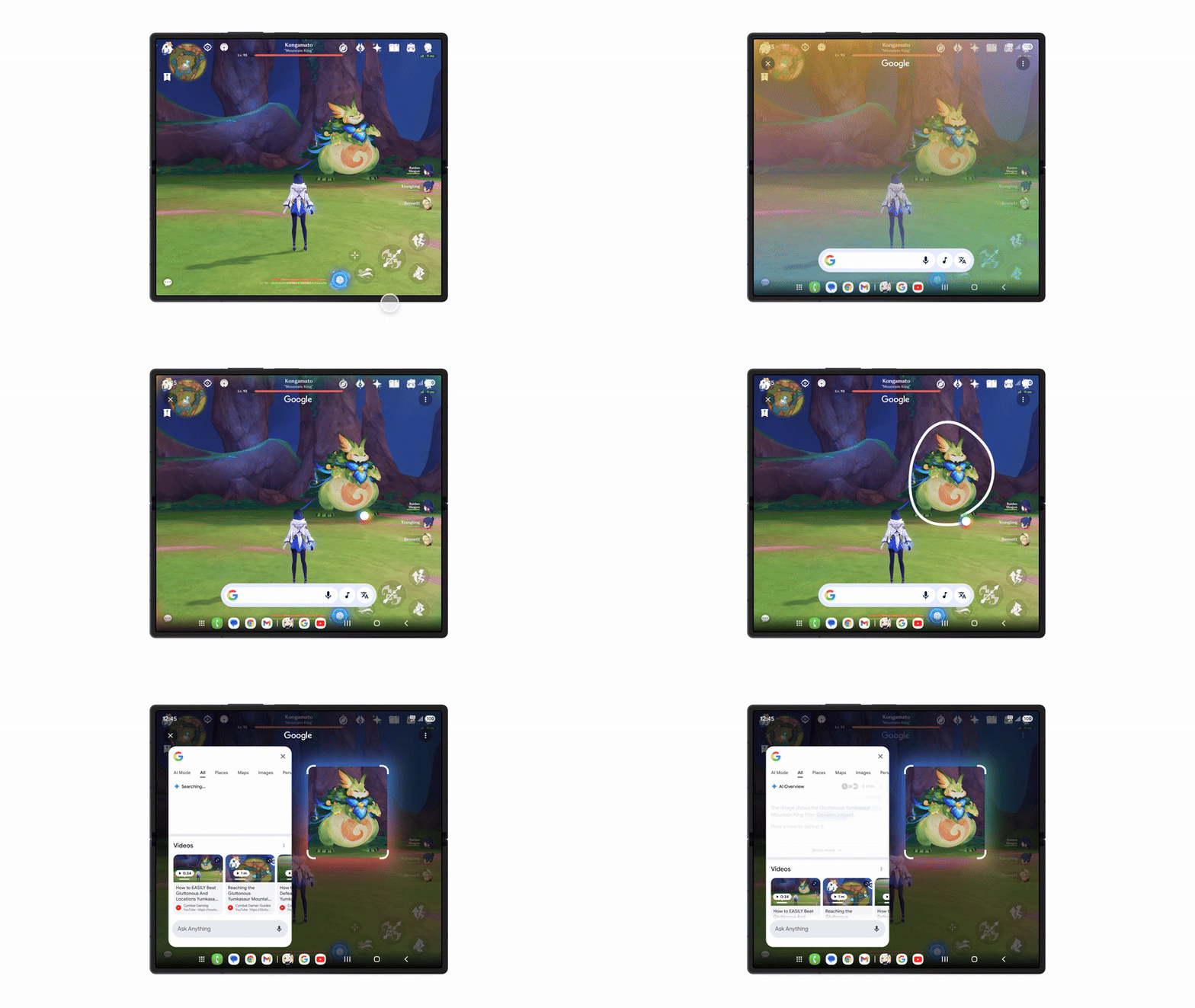
Circle to Search is activated by pressing and holding at the very bottom of your Android phone screen — the spot you'd swipe up from to return to the home screen. It doesn't matter what you're doing on your phone, this brings up the Lens overlay on your phone screen. This brings up shortcuts to various tools, like song recognition and translation, as well as the headline feature: the ability to circle and search.
Draw a circle around anything on your screen, and Google's AI will go looking for it across the internet. Sometimes those results are totally useless, and other times they're so impressively accurate that it feels like magic.
The great thing about Circle to Search is that if you ever come across anything you'd like to know more about, you simply have to perform the gesture and fling a circle around it. There's no need to ask a chatbot for more information or take a screenshot to bring to Google Lens, everything is done on your screen within a few seconds.
I've never been a big fan of mobile AI, or using my voice to bark commands at my phone, but Circle to Search is so convenient that you can't afford to ignore it. Heck, I even forget that there's AI involved a lot of the time, and it makes very little sense that the iPhone doesn't have an equivalent feature of its own.
Siri Mode could learn a thing or two

I will preface this part by pointing out that Siri AI is in pretty rough shape right now. Not only is iOS 27 still in beta, but Apple has confirmed that Siri AI will remain in beta even after the stable version of iOS 27 launches later this year. There are definitely some kinks to be worked out of the new AI, and anyone that has used Siri AI will have come across some of them.
Apple has been working on getting Siri AI ready for over two years now, and the priority has clearly been to make a serviceable version of Siri AI that's available for the public to use. With all the effort focussed on making that happen, and now ensuring all the bugs and wrinkles can be ironed out, it makes sense that other features might fall to the wayside.
But that doesn't mean that Apple should ignore the concept of bringing a Circle to Search-like feature to iOS in the near future — either as part of a future update to iOS 27 or with iOS 28 next year.
The new Siri Mode, like Visual Intelligence before it, does a lot of the same things as Google Lens — and the more recent Gemini Live. You point your camera at objects in the real world, and then use Siri to learn about the different things that are within view of your iPhone's camera. This can be done with voice commands, or by using the shutter button and circling specific objects to initiate a Google search.
Unlike Google Lens, which has always been a standalone thing, iOS 27 beta lets you access Siri Mode via the Action or Camera Control buttons, depending on how you've set them up. This is certainly very convenient, and sure as heck beats the way Google has set up how you access Gemini Live on my Pixel 10 Pro.
But there's no alternative to Circle to Search. If you want to know about what's on your phone screen, the best that's currently on offer is the ability to ask Siri AI. As I said before, the beta version of Siri AI is still in pretty rough shape, and that means the experience you get by asking about what's on your screen isn't always that great.
From my use, I've found answers can be vague or sometimes completely wrong. I even asked Siri what was happening on my screen, and it went off to explain exactly what sunscreen was, continuing that explanation every time I repeated my request. It was only later that I found out Siri AI doesn't quite understand the home screen and just starts repeating its last answer every time you try to ask. Or, at least, that's what happened on my iPhone 17 Pro Max after installing iOS 27 beta 2.
The equivalent of Circle to Search just doesn't exist on iOS, and that means Android phones have that edge when it comes to discoverability and searching for things they come across.
Bottom line

There may be iPhone users out there that don't feel like they need Circle to Search, but having never used an Android phone they don't fully understand what they're missing out on. I didn't really give the feature much thought when it first launched, but only because I didn't fully understand what it was actually capable of doing.
After more than two years of using it almost every single day, I can tell you, I couldn't live without Circle to Search on a future phone. There are alternative ways of getting the right kind of results, like taking screenshots and running them through Google Lens, but that is far from convenient. There's nothing quite like tapping your thumb against the screen and scrawling around something to get near-instant search results.
Honestly, it's surprising that Apple hasn't developed its own version our Circle to Search yet — either as a rebranded clone or something it built from scratch. With all the emphasis on adding AI, and all the copy/pasting Android and iOS do with each others' best features, it feels as though the iPhone experience is worse off without it. Here's hoping that things will change in either a future version of iOS 27 or the inevitable iOS 28 upgrade.

Follow Tom's Guide on Google News and add us as a preferred source to get our up-to-date news, analysis, and reviews in your feeds.
More from Tom's Guide

