



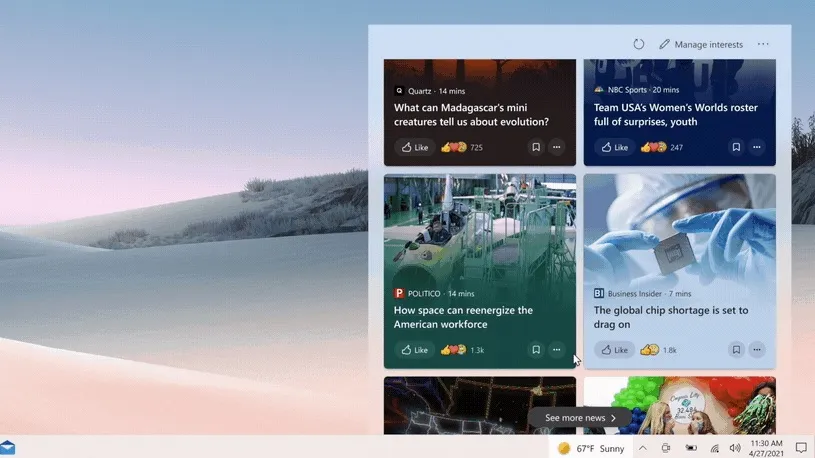
Microsoft’s Windows 10 taskbar update, which adds a customizable “News and Interests” widget, is finally on its way to regular users.
The widget, which opens up a panel of tiles showing personalized news, weather, traffic, stocks and sports information, was first revealed in January as part of the Windows 10 Insider program. It will begin rolling out to Windows 10 proper “over the next several weeks,” according to the Windows Blog.
- Find out the best Windows VPN right now
- Our picks of the best Windows 10 antivirus software
- Plus: Windows 10 gets a new feature to save laptop battery life
Whereas previous versions of Windows cluttered up the Start menu with various news and weather tiles, which could also be personalized if you agreed to share certain personal details, News and Interests hides more subtly in the form of a weather icon to the right side of the Windows 10 taskbar. Clicking on this icon will bring up an expanded window with the full set of tiles.
These tiles bring in news stories from across MSN, including sources like USA Today, Quartz, Business Insider, Politico and NBC Sports. Clicking on a story will open a “streamlined reading experience,” as opposed to opening the story in a full browser window, though you will need the Microsoft Edge browser installed for the feature to work.
Central to News and Interests is the ability to fine-tune your content preferences so you only receive stories and updates on subjects you care about. So you can filter out sports or stocks content, for example, or select specific topics that you’d want to read more about.
You can even personalize the aforementioned weather icon, and choose whether to have it show with or without extra text detailing the current conditions in your area. Hovering over the icon will also provide a little extra weather information without opening the entire News and Interests window.
While some users will likely prefer not to share any more of their personal information with Microsoft, this taskbar update does seem like a handy little upgrade ahead of the much bigger Windows 10 Sun Valley update tipped for later this year. That said, hopefully Microsoft has found a way to reduce News and Interest’s RAM usage, which could reportedly eat up to 150MB of memory.
- More: Check out the best laptops you can buy right now

