As I keep saying, there’s a big two-device compromise problem. I love my 14-inch MacBook Pro for its rigidity, battery life, silent thermals, great ergonomics, and raw performance for my prosumer workload. But macOS locks me out of native PC gaming (mostly), so I need another machine to do that.
So when Nvidia’s RTX Spark was announced, I saw the possibility of a future daily driver pull into view — the everything machine I’d always wanted. And then when I held the Asus ProArt P14 in my right hand and the 14-inch M5 MacBook Pro in my left, it became clear I’d found my top pick of Team Green’s roster.
That’s because Asus didn’t just build a competitor; they pretty obviously reverse-engineered the MacBook Pro’s footprint and low-profile industrial aesthetic. It was going to take a lot to get me to switch from my Apple lifestyle, but coming as close to the Apple feel as possible is a helpful start, to say the least!
So for the first time, a Windows machine has the silicon architecture to challenge Apple Silicon, and Asus is packing it into a machine that rolls tanks onto the MacBook Pro’s turf.
Design and build: spotting the physical differences

Laptop |
Dimensions |
Weight |
|---|---|---|
Asus ProArt P14 |
12.2 x 8.6 x 0.6 inches |
3.3 pounds |
M5 MacBook Pro |
12.3 x 8.7 x 0.6 inches |
3.4 pounds |
Stacking them directly, you can see how much Asus took inspiration from Apple, as the ProArt P14 matches the MacBook Pro 14 almost millimeter for millimeter. But there are subtle differences.
First is the finish. Apple’s anodized aluminum has a smoother, more metallic texture, whereas Asus’ stealthy matte charcoal coating has a much more interesting texture under your fingers.

And second is the weight balance. Holding them both one-handed, the Pro definitely feels denser, but the distribution feels better balanced. Whereas in the ProArt P14, it’s lighter but more heavily weighted toward thermal management at the back of the system (more on that later).
Ports-wise, both are effectively set up for creators with full-size HDMI, high-speed USB-C, a headphone jack, and a full-size SD card slot. But the ProArt flex here comes with the legacy USB-A port on the right flank — a minor detail that saves you from carrying dongles.
Screen showdown: 2.8K OLED vs Liquid Retina XDR

Laptop |
Display |
|---|---|
Asus ProArt P14 |
14-inch 2.8K (2800 x 1800) 16:10 OLED |
M5 MacBook Pro |
14.2-inch (3024 x 1964) Liquid Retina XDR Mini-LED |
So when it comes to picking between these screens, I know the default is to say “OLED is better,” but there are levels to this.
Because yes, the infinite contrast, instant pixel response times for gaming, zero blooming, and no camera notch give the ProArt P14 an advantage. It’s a gorgeous display — this is Asus’ bread and butter after all, as colors melt off the screen.
But the MacBook Pro (I’m assuming, as we won’t know until full testing — this is just based on what’s always happened before) will likely have a higher sustained peak brightness for outdoor work.
Really, it comes down to what you’re going to do with it. For gaming and color-accurate video grading in indoor/studio settings, the OLED wins on pure punch. However, for working out and about in bright coffee shops, Apple’s Mini-LED will probably retain the top spot.
The tactile friction point: Key feel and trackpad

The MacBook Pro has always been one of my favorites ergonomically speaking —packing shallow but snappy scissor keyboard switches set in a well. It feels familiar, reliable, and fatigue-free, but it does lack the travel for deep gaming presses.
Meanwhile, the ProArt P14’s keys have a deeper dish, a little more key travel, and a softer landing underneath. The added depth creates a more satisfying impact, and the WASD stability for gaming feels a little better. But the slight added mushiness may come back to haunt me if I type all day.
Then there’s the trackpads. Now don’t get me wrong, the ProArt’s physical trackpad is massive and smooth, with a nice tactility to the physical click. But Apple’s Force Touch haptics are basically witchcraft, with an identical click anywhere on the glass and zero chance of any mechanical dead zones.
Under the hood

Currently, I’m on an M5 MacBook Pro, but you can spec it up to M5 Pro or M5 Max with unified memory shared between CPU and GPU cores. The end result is lightning-fast performance across all your tasks that has always been one step ahead of the competition from Qualcomm, Intel, and AMD.
And now, the ProArt P14 is taking on Apple with the RTX Spark N1X platform — marrying an Arm-based Nvidia Grace CPU with a dedicated Blackwell RTX GPU, backed up by up to 128GB of unified memory.
In terms of how much you can spec it, ProArt P14 configurations start from that baseline N1X with fewer cores and 24GB of memory, so the versatility of configs means you can run the full gamut against the MacBook Pro.

Apple’s machine falls down in modern AAA PC gaming backlogs — some of it works through Metal compatibility, but most will be left to crippling emulation or cloud streaming.
But with N1X’s CUDA cores, the ProArt P14 can run 1440p games at 100 FPS, complete with DLSS support and anti-cheat compatibility. Beyond that, I expect they’ll be pretty evenly matched in creator performance and AI. Differences there will come down to the software optimization for the silicon.
The potential dealbreakers

I’m just going to summarize some quick things that may become the thorn in the ProArt P14’s side once we get one in the labs to fully test.
- The fan noise: When I tested the ProArt P14 for gaming, it was the loudest RTX Spark laptop in the room. The MacBook Pro stays near-silent during everyday tasks, and hopefully the P14 is the same — but it’s clear that an insane amount of Nvidia silicon requires aggressive airflow.
- Battery endurance: Nvidia is claiming “all-day” battery life and the same performance both on and off the charger. During my testing, I can confirm the latter, but we don’t know about the former yet! If it can achieve that 12-14+ hours of mixed real-world productivity, Apple loses its biggest single advantage.
- The price: The MacBook Pro starts at $1,999. To get the equivalent amount of memory (24GB), that price goes up to $2,199. This is the big question mark for N1X laptops, and hopefully they’ll be competitive on cost.
Early verdict

This is a way-too-early verdict, as I’m piecing together the few times I’ve had to test the ProArt P14 and its potential against months of MacBook Pro use. But I’ll give it a stab.
Switch to the Asus ProArt P14 if

You refuse to carry two laptops ever again. If you want a sleek, premium aluminum daily driver that can handle your prosumer work by day and play games by night, the ProArt P14 is the first Windows laptop that really steps on the MacBook Pro's throat.
Stick with the MacBook Pro 14 if
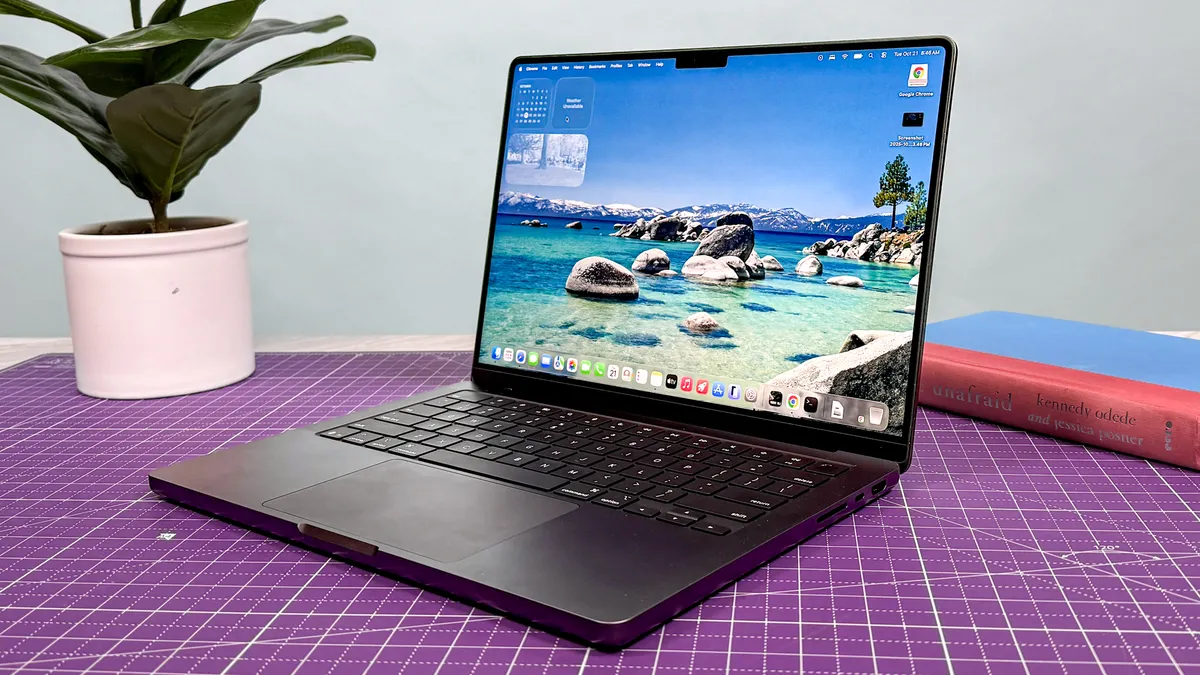
Gaming isn't a priority; you prioritize whisper-quiet operation, a uniform haptic trackpad, and a pure macOS creative pipeline. Battery endurance is proven on this machine, but the jury’s still out until we get the P14 in for testing.

Follow Tom's Guide on Google News and add us as a preferred source to get our up-to-date news, analysis, and reviews in your feeds.
More from Tom's Guide
- I tested Acer’s wild flip-and-swivel handheld — why Project DualPlay Mini is the ultimate netbook love letter
- I wanted to hate Nvidia’s DLSS 5 ‘AI filter’ — but the real DLSS 5 is photorealistic black magic
- As a PC snob, I wanted to catch GTA 6 making console compromises. Instead, I’m in awe of the trickery