Right now if you’re shopping for a premium laptop and want a seamless experience with your iPhone you typically get a MacBook Air or Pro. But what if you have a Galaxy Z Fold 8 or Pixel 11 Pro?
Google believes it has a viable Apple alternative for Android fans in the Googlebook. Going on sale Oct. 4, these laptops from Acer, Asus, HP, Dell and Lenovo are designed to deliver much of the same seamless magic while also adding some unique twists that surpass MacBooks — including Gemini built in.
“First and foremost, we want Android users to feel like there is a laptop for them that is as premium and as beautiful and performant as that high-end smartphone that they have,” said Sameer Samat, president of the Android Ecosystem at Google.
Along with Tom’s Guide senior writer Tony Polanco, I sat down with Samat to nail down what a Googlebook is, how they truly differ from Chromebooks and whether consumers will be willing to pay $899 to $1,299 for this new breed of laptop.
What the heck is a Googlebook?

It’s easy to dismiss Googlebooks as just Chromebooks with fancier designs and higher price tags, but Google is emphasizing a unique software experience.
And it starts right when you power up the Googlebook for the first time. You’ll see a pop-up right on your Android phone, and your Googlebook asks you to biometrically authenticate. Once you do, the Googlebook just sets itself up.
“Your Googlebook asks you if you want to bring all your apps over, all your autofill passwords and payments — all of those things just work seamlessly,” said Samat. “So right out of the gate, you have the feeling that (your phone and Googlebook) were made to go together.”

Once you start using your Googlebook, your phone and laptop offer a pretty seamless handoff experience. For example, if you start a Gmail on your phone, the draft will just pop up when you open the app on your Googlebook. And if you take a picture with your Android phone, it will automatically show up in what Google calls the fused file system.
Working in Chrome is another good example of how Googlebooks and Android phones work hand in hand.
“You're browsing something. In the taskbar there's a suggestion,” Samat said. “You open up your Googlebook, and it knows you've been on your Android Chrome browser, and right there, it's waiting for you.”
Gemini inside
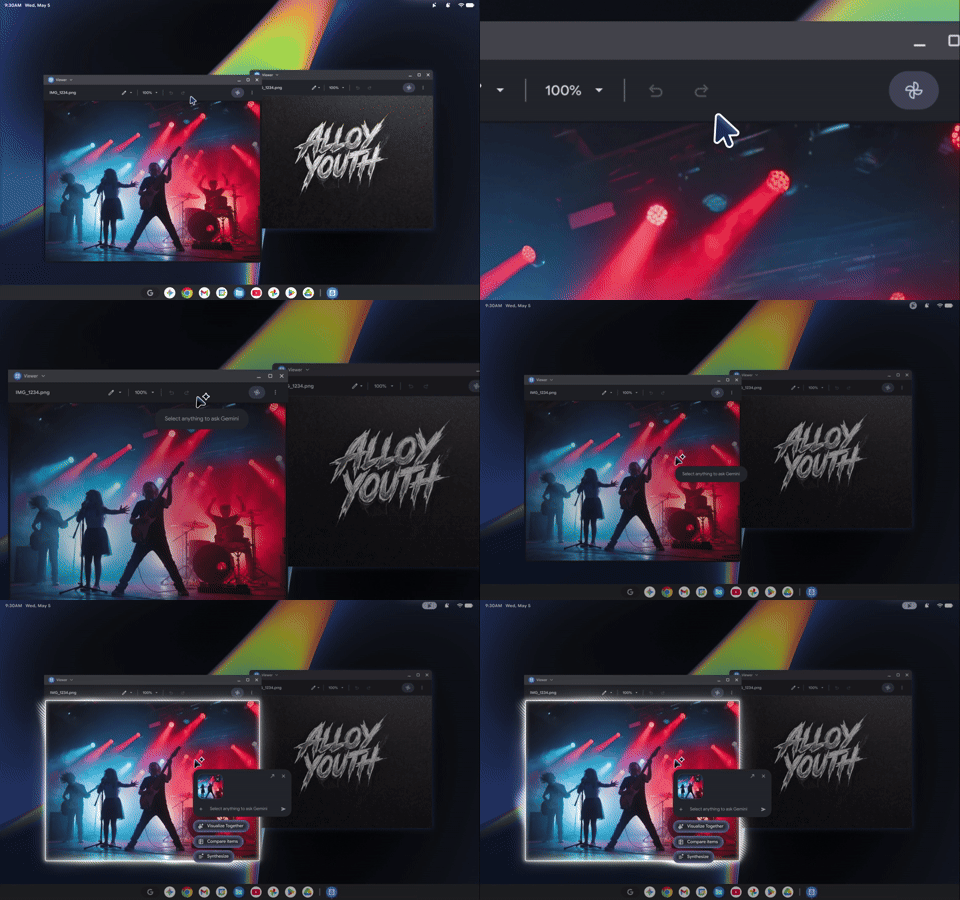
The other key Googlebook ingredient is Gemini Intelligence built in. With Magic Pointer, for example, you can shake the cursor while hovering over something you want to know more about and then you can simply ask Gemini a question. It’s like Circle to Search without having to circle anything.
It works well, but I was surprised that you can’t use Gemini to do things like dim the brightness or control the hardware in other ways. But features like this should come in time.

“We are working on all those things for the phone and for and for the laptop,” Samat said. We we think that you know you should be able to not only get information retrieved, but for Gemini to take action on these devices.”
Raising the hardware bar (Glowbar included)

While Apple is known for high-quality hardware, Google believes it has an advantage in that it’s not locking you into a single design. There’s a wide range of brands, sizes and form factors to choose from.
"What I think really distinguishes this ecosystem is choice."
This includes everything from an Acer convertible that doubles as a laptop and tablet and Dell’s 13-inch XPS Googlebook with Snapdragon to Asus’ amazingly light 2.2-pound Googlebook 14 and Lenovo’s 15-incher.
"What I think really distinguishes this ecosystem is choice,” said Samat. “So you've got your Samsung Fold or your Pixel, and you've chosen the HP or you've chosen the Dell. Maybe you like the ASUS device because it's so light, and that choice paired with whatever premium Android phone you've got is really quintessential to the Android openness and choice experience.”

Google also made a Glowbar on the back of the systems standard, a strip of colorful LEDs that sits towards the top of the lid. It’s an aesthetic statement taken from the original Pixelbook, and it’s definitely intended to draw attention from across the room. But it has a functional purpose, too.
“There's a boot up animation that tells you the power left in the device,” Samat said. But one of the things I'm really excited about is we are opening an API for developers.”
What about the apps?

As you might expect, Googlebooks have Google Play Store support, but Google isn’t just slapping Android apps on a laptop. It has been working with developers to optimize their apps, and it will call ones out specifically in the store that are ready for the desktop with a specific label.
This includes WhatsApp, Capcut, Photoshop Lightroom, Netflix and more.
“For example, I wanted to make sure we had Antigravity. I wanted to make sure we had a fully fledged Linux terminal, which could run Quadcode CLI, Codex CLI, because these are some of the new ways people are working today,” Samat said. “In terms of the apps in the Play Store, we’re really excited about Disney Plus and Netflix. Netflix supports full HDR, which no other platform has, and has offline (playback) as well, which is unique.”
At the same time, you don’t have to reinstall phone apps on the desktop if you just need to check something quickly. For example, you can just pull up Uber Eats on your Googlebook to check on the status of an order.
Can Google justify the high prices?

All of these systems are pricey, ranging from $899 to $1,299, but Google has pretty strict requirements for what can be a Googlebook. Most of these machines have OLED touchscreens, the latest processors from Intel, Qualcomm and Snapdragon, 16GB of RAM and backlit keyboards.
But that isn’t going to stop people from wondering whether Googlebooks are just high-priced Chromebooks.
“Really what we wanted to do is to make sure that Googlebook enters the world in a clear way for people. This is truly premium hardware. This is a software experience that works extremely well with your Android phone,” Samat said. “We believe that if you're a premium Android user, yep, this is the laptop for you, and you're going to feel that right from the jump.”