GPT-4o's new image generation capabilities have captured the world’s attention. Featuring superior text generation and complex instruction handling, OpenAI once again managed to impress with its tools.
The launch was not without controversy, as it also re-ignited the debate about what AI means for artists. But from a technical perspective, it’s clear that ChatGPT can confidently reimagine images in different, well-known styles.
Based on these results, I was curious to try out if ChatGPT could actually replace the need for me to use Photoshop to edit my images.
First created in 1987, Photoshop has been a mainstay in photo editing software used by professionals and enthusiasts alike. In 2023, Adobe announced it was putting AI into this much-beloved piece of software, giving users access to AI tools such as generative fill.
Could a new AI tool that’s a few days old rival the photo editing behemoth Photoshop? I decided to put it to the test.
1. Double trouble

Starting out with a photo I took of a cow, I asked ChatGPT to edit my image by inserting another similar-looking cow in our field of view.
I used a very simple prompt but within seconds I was suddenly looking at two cows standing side by side. ChatGPT kept most of the details from the original photo untouched and did a great job at making the edit look very natural.
I was off to a great start and was encouraged to moo-ve on.
2. AI photoshoot

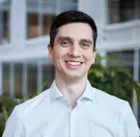
With the first test cleared with ease, I wanted to see if I could use ChatGPT to edit a photo of myself.
I grabbed one of my headshots in which I’m wearing a white shirt with the top button undone. If I were to make myself look more formal, my first go-to would have been Photoshop to edit myself into a full suit and tie.
Add in the task of replacing the background and I would easily be looking at an hour or two of work to pull it off. Could ChatGPT do the trick in less time?
I fed in my headshot and asked for a more formal look. I also specified that the background should feature a bookcase to add to the formal atmosphere.
ChatGPT nailed the suit and location, but I ended up with an AI version of me that wasn’t an exact clone. While I could recognize some of my features, I wouldn’t be able to use this photo in something like a bio page as it would be misleading.
If you want to preserve your likeness, you’re better off sticking to Photoshop for now.
3. General enhancement

I enjoy taking snaps of pretty sights when I’m travelling or out and about. While I’m happy to post some on social media, I find that not all of them are good enough to make the cut.
Tools like Photoshop or Snapseed help enhance the lighting and colors of my photos and can bring a dull-looking snap to life.
I grabbed one of my unused photos from my camera roll and asked ChatGPT to enhance it in the style of a travel magazine. The result was great!
ChatGPT used its new image-generating capabilities that come with its GPT-4o model to crop the picture to focus on the important parts. It also enhanced the colors of the sky and made the sea look more interesting!
While I could have managed the color grading manually, making edits to the water look so natural would have taken me ages to pull off. ChatGPT really came through for me here!
4. Generative fill

AI has also infiltrated Photoshop with one main feature being Generative Fill, a tool allowing you to add or remove content in images while preserving the original as much as possible. Could ChatGPT pull off the same technique?
Using a photo I took of a caravan, I asked ChatGPT to extend the image by adding a campfire on the right side of the photo.
While the AI-generated image looks quite natural, ChatGPT made a number of adjustments to the vehicle. It looks very similar to the original, but just like my headshot, the two caravans aren’t one and the same.
If you’re ok with this, ChatGPT will work wonders for you. If you strictly need to keep your images as close to their original form as possible, you’ll need to knock on Adobe’s door.
5. Collage

Lastly, could ChatGPT blend two images together? There was only one way to find out.
Using two Tokyo snaps, I asked ChatGPT to create a collage for me, something that’s certainly possible in Photoshop.
I was impressed that it correctly recognized Tokyo’s Sky Tree observation tower and replicated it excellently. ChatGPT also managed to insert it in the background of another image I had of Senso-ji Temple, one of Japan's more popular places of worship.
While I can appreciate that ChatGPT needed to portray the tower from angle that was different to the one I took in order to make it fit, once again ChatGPT reimagined the temple rather than leaving it exactly as is.
Final verdict
Overall ChatGPT gave a solid performance. If you simply need a quick edit of a photo for personal use, it’s worth giving GPT-4o's new image generation a shot at a first attempt. What ChatGPT won't deliver in the form of a perfect result, it will make up for in saved time.
On the other hand, if you’re a photographer working on the photos of a wedding you were hired to cover, I'm afraid you’ll have to keep on doing the hard work yourself a while longer.
Now that you've learned about using ChatGPT to edit your images, why not check out our other AI articles?
Check out 5 mind-blowing ChatGPT prompts you’ll wish you knew sooner and 11 prompting tips to get better results. And you can even replace Alexa with ChatGPT on your Amazon Echo.