







If it feels like new AI tools are popping up almost daily, you’re not imagining it. The latest wave of AI features is focused on making everyday tasks faster — including building websites.
One example is a feature called Web to Design from the AI design platform MagicPath. Instead of creating a website layout from scratch, you simply paste a URL of a website you like into the tool and it converts that page into an editable design you can modify.
Naturally, I had to give it a try.
Here’s what actually happens when you paste a website into an AI design tool — and whether it’s genuinely useful or just flashy AI hype.
What the Web to Design feature does
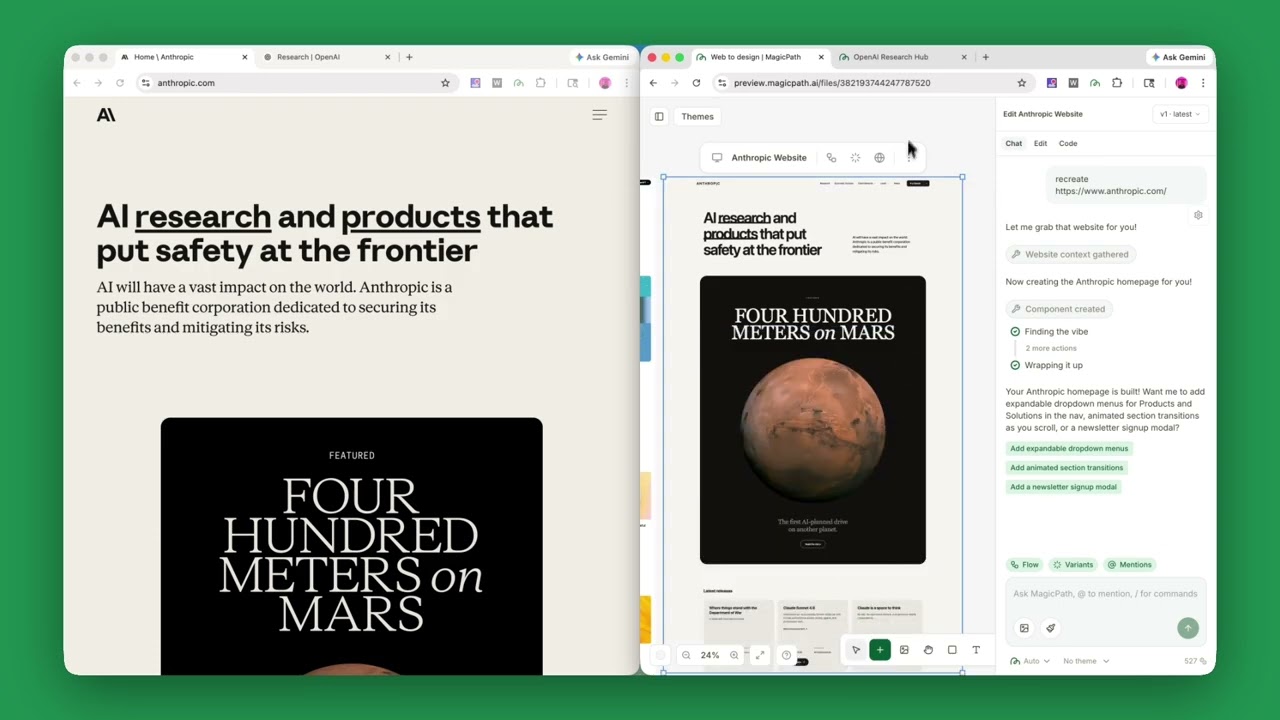
The concept is surprisingly simple but a total game changer if you're attempting to build a website without a template.
Instead of starting with a blank canvas, MagicPath allows you to import a live website directly into its design editor. The tool then recreates the page structure so you can edit text, layout and components.
The basic workflow looks like this:
- Paste a website URL into MagicPath
- The AI scans and reconstructs the page
- The design appears as an editable layout
- You can modify sections, rewrite copy or rearrange elements
In other words, a finished website becomes the starting point for your design process rather than the end result. This is very different from tools like Figma or Webflow, where you typically build layouts piece by piece.
Here's what happened when I tried it

One of my favorite websites for colors, theme and overall vibe is Delish.com.
To see how well MagicPath worked, I started with a simple test: I pasted the URL of a Delish into MagicPath and let the tool do its thing.
Within a few moments, the page appeared inside the editor as a fully structured layout. The AI had reconstructed the major sections of the site — including the hero area, navigation bar, text blocks and images — so they could be edited directly inside the design canvas. It was mind-blowing!
I also tried it with Walmart.com, Netflix.com and YouTube. Each time was a completely new rendering ready for me to edit to my liking. Since I was testing out the free tier, I wasn't able to completely create a site, but for $14/month, anyone can.
Instead of a static screenshot, the page behaved more like a working template. I could click into text fields to rewrite copy, move sections around the page and swap out elements without needing to rebuild anything from scratch. It essentially turned the original website into a starting point for experimentation.
What stood out most was the speed. Normally, recreating a layout you like means manually rebuilding headers, spacing and sections piece by piece. Here, the structure was already in place, which made it easy to start adjusting things right away.
Of course, it wasn’t perfect. Some elements needed tweaking and the layout still required editing to make it truly your own. But as a quick way to generate a workable design foundation, the process was surprisingly smooth.
The result felt less like copying a page and more like importing the blueprint of a design that you can then modify and reshape.
Why this is interesting

What makes the feature compelling is how it changes the inspiration-to-prototype workflow. Most designers and creators have experienced this moment:
You see a website with a layout you like and think “I wish I could start from something like this.” Until now, the process usually meant manually recreating sections, attempting to find or copy styles and then rebuilding layouts element by element.
MagicPath essentially turns that inspiration step into a working starting point in seconds.
You can import a page and then swap in your own branding, rewrite the copy with AI, rearrange sections and even generate additional pages based on the design. For quick prototypes or landing page experiments, that’s a significant time saver.
The other feature: Web Capture
MagicPath also offers a related feature called Web Capture. Instead of importing an entire page, a Chrome extension lets you grab individual components from websites — things like navigation bars, hero sections or pricing tables.
Those pieces can then be dropped into your own project. Think of it as creating a personal library of design components pulled from the web.
As with anything AI generated, it’s not a replacement for thoughtful design work. Imported pages still need editing, restructuring and original thinking. I can imagine this being most useful in a few specific scenarios.
- Landing page experiments: Marketers can import a page structure and test variations quickly.
- Rapid prototypes: Startup founders or product teams can build rough concepts without spending hours recreating layouts.
- Design inspiration: It shortens the distance between “I like this site” and “I have something similar to experiment with.”
The bottom line
Tools like MagicPath are part of a broader shift toward AI-assisted creation instead of blank-page creation. It could be argued that this type of AI is taking the job away from graphic designers, but at the same time, it's leveling the playing field for those without the skills or design background to stand out with a polished website.
Rather than starting with nothing, the new generation of AI tools starts with existing content, structure or examples and lets you transform them. We've seen this pattern with tools like ChatGPT and Claude, where users increasingly feed the models documents, code or drafts to improve instead of generating something from scratch. Design tools are simply catching up to that workflow.

Follow Tom's Guide on Google News and add us as a preferred source to get our up-to-date news, analysis, and reviews in your feeds.
More from Tom's Guide

