







I’ve tested my fair share of rugged phones over the years, like the Sonim XP Pro with its MIL-STD-810H construction, but the Blackview Xplore 1 Walkie Talkie is arguably the most suited I’ve tested to date for going off the grid. There are plenty of phones with a walkie-talkie feature, but most of them operate on push-to-talk networks that still piggyback off cellular and Wi-Fi networks.
However, the Blackview Xplore 1 Walkie Talkie is truly unique because it functions just like any long-range walkie-talkie you can find. Not only is it perfect for staying connected in remote areas, but it’s also an extra lifeline in the event of an emergency — or during cell phone outages. If that’s not enough, it also packs a massive 20,000 mAh battery, a night vision camera, an infrared remote control, and much more.
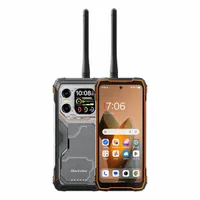
Yes, it's an actual walkie talkie

As I’ve mentioned, most phones with walkie-talkie features lean on cellular networks to function, whereas the Xplore 1 is a true, dedicated 2-in-1 dual-band device. This means it can operate via analog and digital signals to provide maximum utility when you’re out in the remote wilderness.
I tested it with my Motorola T110 walkie-talkies, and it works like a charm for back-and-forth communication. My only gripe is that I wish there were a place to store the antenna when I’m not using it, but there isn't.
I also wish the InterPhone app, which the phone uses for its walkie-talkie function, were a bit more intuitive. However, once I changed the radio frequency to USA FRS (Family Radio Service) and selected the same channel, I was able to communicate perfectly with the other two Motorola T110 handhelds I have lying around.
Ultimately, this is a handy feature to have when camping or traveling to remote locations — and it’s something I wish more phones offered for emergency situations.
Battery endurance like no other

First of all, this thing is a beast. Its MIL-STD-810H rating gives it far more protection than the average phone against drops, spills, and extreme temperatures. At the same time, there’s a massive 20,000 mAh battery that provides days of power.
I’ve been testing it for a couple of weeks now, and it has lasted me almost 3.5 days of normal usage. While that easily beats most phones, I suspect it would last much longer by putting it on airplane mode when you’re off the grid — saving the battery for only when you need to use the walkie-talkie.
For a device like this, I definitely recommend bringing a solar panel with you. Otherwise, it features 33W wired charging that should return a decent amount of power in a short time.
Night-vision camera to see in the dark

Another thing that makes the Blackview Xplore 1 Walkie Talkie suitable for life off the grid is its 20MP night-vision camera, which complements the 64MP main shooter. When it gets dark out, this camera allows you to peer through the darkness to better identify your surroundings. It works a lot like my Cigman CNVPRO night-vision binoculars, but it’s conveniently integrated into the phone.
While testing it out, I was able to see approximately 50 feet away in near-total darkness. I love this kind of utility because it means I don’t need to pack a separate gadget to take photos or videos at night. With this in hand, I’d be fully prepared to capture Bigfoot if I heard something rustling nearby.
Way more utility than the average phone

The final reason the Blackview Xplore 1 Walkie Talkie is worth bringing on a weekend camping trip is its secondary rear display, which naturally helps cut down on battery consumption.
This 2.01-inch display functions as a notification panel and music player, while also allowing you to frame selfies using the 64MP main camera. For those who truly need it, there’s even a compass function accessible through this screen.
The most impressive part is that you get all of this utility for a fraction of what you’d pay for flagships like the Galaxy S26 Ultra or iPhone 17 Pro Max. Ultimately, having a rugged, dedicated walkie-talkie that keeps you connected where others fail makes the Xplore 1 an essential off-the-grid companion that’s hard to beat.

Follow Tom's Guide on Google News and add us as a preferred source to get our up-to-date news, analysis, and reviews in your feeds. Subscribe to Tom's Guide on YouTube and follow us on TikTok.
More from Tom’s Guide
- iPhone Fold predicted to own nearly 50% of the foldable market in very first year — here's why I doubt that
- I just tried Google Maps' new bus tracking feature in the UK — it's a good start, but there's room to improve
- Remember LG's canceled rollable phone? They've actually started showing up in the real world — here's what we missed

