Apple released the iOS 26.3 beta 1 for developers yesterday and we’re uncovering what’s inside the newest version. So far, the biggest change is the new transfer tool which makes it easier to switch to Android.
However, there are some smaller, welcome surprises like the expanded wallpaper gallery, which now has a dedicated Weather section.
With this lighter beta 1 update, Apple has split the Weather and Astronomy wallpaper section in the iPhone wallpaper gallery. Currently, if you open the app, those categories are listed together under “Weather & Astronomy.”

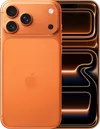
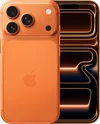
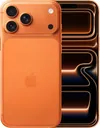
In the beta, they’re now split into two dedicated rows simply labeled “Weather” and “Astronomy.” That split also brings a number of new wallpaper options, especially in the weather section. iOS 26.2 introduced one weather wallpaper, but in iOS 26.3 beta 1, Apple has added three new ones.
Across all of the weather images, there is one core feature: live weather conditions for your location. However, each wallpaper comes with unique preset fonts and widget setups too.

This makes it easier to pick a weather wallpaper that fits your preferences without having to do a bunch of customization. Though that option is still available.
Hopefully, Apple adds more options as iOS 26.3 expands even further in the new year. What do you think of Apple’s built-in wallpaper choices or do you prefer to use your own custom ones? Let us know in the comments. We don’t expect the full iOS 26.3 release to be ready until early 2026, though.
Here’s what else we know about iOS 26.3

As mentioned above, the biggest feature we’ve seen so far is the new transfer tool which was built in partnership with Google. Now, if you’re switching to or from iOS and Android, the whole process should be much smoother. Google’s version is also in beta, though the system isn’t functional yet.
We’re still discovering what’s available in iOS 26.3, but Apple usually follows a developer beta with one for people who have signed up for its public beta program. So far, beta 1 feels smaller especially compared to iOS 26.2 which launched last week.
This should be followed by iOS 26.4 in the spring which we expect to be a much more substantial update as it should introduce a much smarter incarnation of Siri.
Stay tuned as we update and explore the latest iOS 26 release for any changes or new features.

Follow Tom's Guide on Google News and add us as a preferred source to get our up-to-date news, analysis, and reviews in your feeds.
More from Tom's Guide
- Update your iPhone now — Apple patches two iOS zero days used in the wild by hackers
- iOS 26.3 beta makes it easier to switch to Android with new transfer tool — here's how it works
- 5 biggest wearable tech predictions for 2026 — from new Fitbits to the ever-elusive Apple Ring