

Discord Will Soon Let You Stream Privately to Friends
A virtual gaming hangout
Here at Tom’s Guide our expert editors are committed to bringing you the best news, reviews and guides to help you stay informed and ahead of the curve!
You are now subscribed
Your newsletter sign-up was successful
Want to add more newsletters?
Daily (Mon-Sun)
Tom's Guide Daily
Sign up to get the latest updates on all of your favorite content! From cutting-edge tech news and the hottest streaming buzz to unbeatable deals on the best products and in-depth reviews, we’ve got you covered.
Weekly on Thursday
Tom's AI Guide
Be AI savvy with your weekly newsletter summing up all the biggest AI news you need to know. Plus, analysis from our AI editor and tips on how to use the latest AI tools!
Weekly on Friday
Tom's iGuide
Unlock the vast world of Apple news straight to your inbox. With coverage on everything from exciting product launches to essential software updates, this is your go-to source for the latest updates on all the best Apple content.
Weekly on Monday
Tom's Streaming Guide
Our weekly newsletter is expertly crafted to immerse you in the world of streaming. Stay updated on the latest releases and our top recommendations across your favorite streaming platforms.
Join the club
Get full access to premium articles, exclusive features and a growing list of member rewards.
Chat program Discord is already the go-to platform for communicating with friends both in and out of your favorite PC games. And soon, it'll allow you to show your buddies what you're playing with a single click.
Launching on August 15, Discord's Go Live feature will let you broadcast your gameplay privately to up to 10 friends in your Discord server's voice channel. As long as you have Discord's game detection enabled, you can fire up a game on your PC, hit "Go Live," and instantly share your Rocket League goals or Mortal Kombat 11 fatalities with a virtual room full of pals.
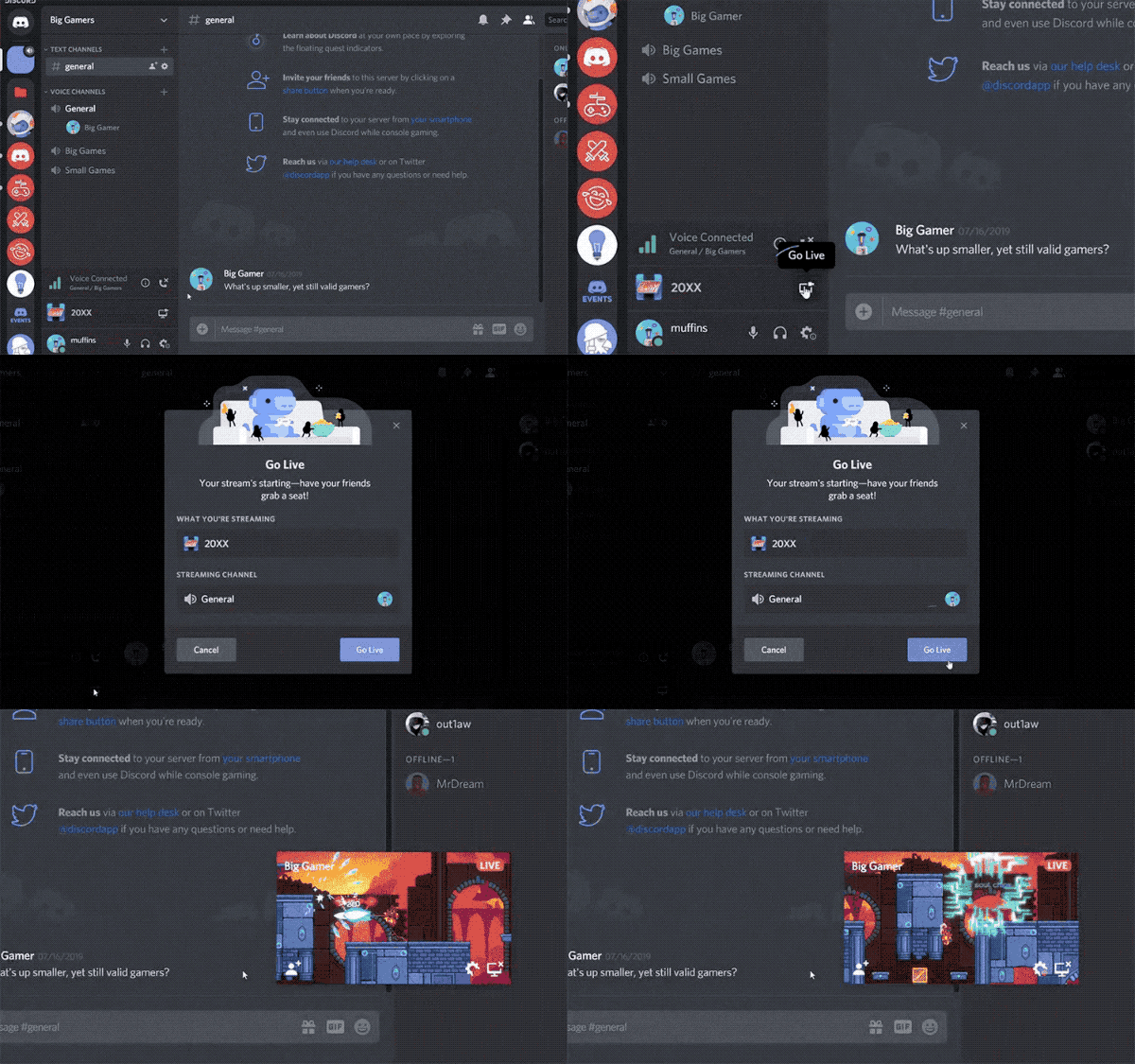
I got a live demo of Go Live in action, and it really is as simple as it sounds. During my demo, a Discord employee invited me to a voice channel in a private server, opened up Rocket League, and activated Go Live. As soon as I saw that he was live, I could click an icon and immediately get a live view of his gameplay.
According to Discord, Go Live is strictly meant for giving your friends a live look at what you're playing. It won't let other players take control (like PS4's Share Play does), nor will it have a public streaming option similar to Twitch or Mixer.
All Discord users will be able to stream in 720p at 30 frames per second for Go Live. If you're a Nitro Classic member ($4.99/month), you'll be able to broadcast at up to 1080p/60fps, while Nitro subscribers ($9.99) will get a 4K option.
I'd like to see certain features be added to Go Live. For instance, Discord already supports game detection for Xbox One, so it would be great to be able to share my Xbox gameplay with my server. But in its current state, Go Live seems like handy way to show your friends a new game (or just show off your skill) without any technical legwork.
Get instant access to breaking news, the hottest reviews, great deals and helpful tips.
Mike Andronico is Senior Writer at CNNUnderscored. He was formerly Managing Editor at Tom's Guide, where he wrote extensively on gaming, as well as running the show on the news front. When not at work, you can usually catch him playing Street Fighter, devouring Twitch streams and trying to convince people that Hawkeye is the best Avenger.

