



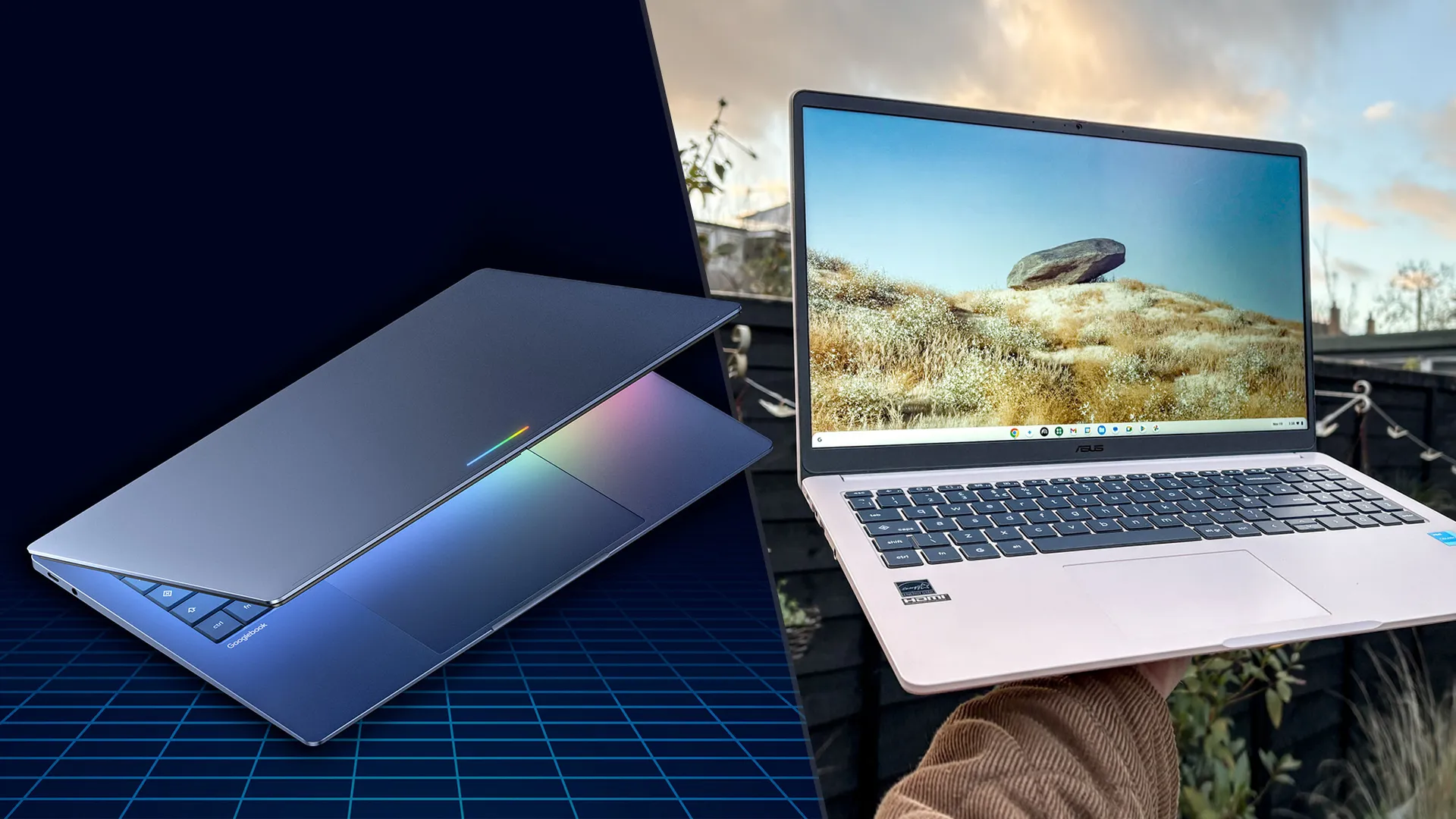
Googlebooks have arrived, and I’m sure you’re wondering how they differ from the best Chromebooks. That’s a fair question, but even though they're Google laptops with similar names, these notebook lines are vastly different from one another. Especially since Googlebooks directly compete with the best Windows laptops and best MacBooks.
I recently tested the first five Googlebooks, and the differences between them and Chromebooks were instantly apparent. Instead of plastic, Googlebooks have sleek, sturdy metal chassis that make them feel like premium devices. Inside, they pack fast processors from Intel, Qualcomm, and MediaTek, with Google Gemini features built in for on-device AI workloads.
Googlebooks aren’t replacing Chromebooks, but it’s still important to know what distinguishes the laptop lines — especially as we draw closer to the busy holiday shopping season. To that end, here are the biggest differences between Googlebooks and Chromebooks.
Googlebooks vs. Chromebooks: Price

Chromebooks have long been among the most affordable laptops, ranging from $150 to over $600. This has been a major reason for their popularity, even though ChromeOS isn't as robust as Windows or macOS. If you frequently work somewhere with a reliable internet connection and exclusively use Google’s suite of apps, Chromebooks are a solid choice.
Since Googlebook are marketed as premium laptops, they generally command premium prices—though their starting prices aren’t unreasonable. For example, the Acer Googlebook 14 starts at $899, while the most expensive offerings like the Asus Googlebook 14 start at $1,299. No matter which Googlebook you buy, you’ll get 12 months of Google AI Pro providing 5TB of cloud storage and Gemini Advanced tools, plus three months of YouTube Premium, Adobe Photoshop, and CapCut.
I should note that these are the current prices of Googlebooks. Given the ongoing RAM crisis, that might change. Hopefully, prices will remain the same or at least not go up too much, as these are relatively affordable machines for what they promise.
Googlebooks vs. Chromebooks: Design

The first Googlebooks are manufactured by Acer, Asus, Dell, HP, and Lenovo. While the laptops I checked out each had their respective company’s distinctive flourishes, they also share core design elements that identify them as Googlebooks.
The laptops are built with premium materials like aluminum, magnesium alloy, and carbon fiber. They all feature a responsive touchscreen, large trackpad, and backlit keyboard. Each also has a Glowbar to denote them as Googlebooks. Some models will have OLED panels, while others, like the Acer Googlebook, will be 2-in-1 convertibles. Basically, expect Googlebooks to come in all shapes and sizes.
Chromebooks can be similarly diverse in terms of design. And while there are certainly more “premium” Chromebooks out there, the line is mostly known for plastic chassis, dim, dull display quality, and so-so keyboards. Yes, these aspects help keep Chromebooks relatively affordable, but you get what you pay for.
Googlebooks vs. Chromebooks: Features

No, Googlebooks do not run on ChromeOS. Instead, they run on the brand-new Googlebook OS, which combines Android and ChromeOS. Google Gemini is also a core part of Googlebooks, as the LLM is built into the OS. As a result, it offers AI-driven features that simply aren’t available on Chromebooks.
One of these is called Magic Pointer, which lets you shake or wiggle your mouse cursor while hovering over content on your screen to bring up Gemini right where you’re looking. In the chatbox that opens, you can ask Gemini to summarize text, translate foreign languages, and more.
Other Googlebook features include Ramber, a speech-to-text tool that can clean up your messy stream-of-consciousness thoughts, and Create My Widget, which lets you generate custom interactive Android desktop widgets kind of like vibe coding.
Taking a page from the Apple ecosystem, Googlebooks are designed to work hand in hand with the best Android phones. For example, the Continue On feature allows you to (among other things) start an email or project on your phone and continue where you left off on the Googlebook later. This also applies to photos you snap or documents you download. Lastly, Cast My Apps lets you stream and interact with your phone’s apps in a desktop window.
Googlebooks vs. Chromebooks: Bottom line
As you can see, Googlebooks and Chromebooks are completely different beasts. Yes, they’re both Google laptops that work well with the company’s apps. However, that’s where the similarities largely end, as they ultimately deliver two divergent experiences.
If you’re a dedicated Android user who wants a higher-end laptop that communicates seamlessly with your phone, a Googlebook could be perfect for you. Conversely, if you just want an extremely affordable laptop for using Google’s apps, Chromebooks are an ideal choice.
Of course, we’ll know more about Googlebooks once we’ve fully tested them under real-world use and in our lab, so stay tuned for more!

Follow Tom's Guide on Google News and add us as a preferred source to get our up-to-date news, analysis, and reviews in your feeds.
More from Tom's Guide
- I asked the head of Android why people will pay a premium for its new MacBook alternative
- I've been testing the iPhone 18 Pro Max and iPhone 18 Pro — your 10 biggest questions answered
- Apple's $250 million class action settlement website is now open — here's how eligible iPhone owners can file a claim and how much they'll get

