




If you're looking to transform your gaming space and start creating your ideal battlestation, one of the best gaming desks is the perfect place to start.
However, you may be wondering what exactly makes one gaming desk better than another. The short answer is that it depends on what you're looking for — do you want tons of space, or do you need to conserve it? Is storage a priority, or is having a mouse-friendly surface? Do you want to keep things simple, or get a super-customizable base you can expand on?
Our current overall favorite, the Corsair Platform 4, is a prime example of a quality gaming desk that's useful in a wide range of applications. It's spacious, height-adjustable, and even comes with an extra-large cable management tray and a monitor arm.
However, I've also selected many other worthy gaming desks for various other use cases, from needing a compact battlestation to laptop gaming, to the best out-of-the-box setup.
Tested by
Why you can trust Tom's Guide Our writers and editors spend hours analyzing and reviewing products, services, and apps to help find what's best for you. Find out more about how we test, analyze, and rate.

Anthony Spadafora has spent the past seven years working from home exclusively and during that time, he's tested dozens of standing desks, office chairs and other work from home accessories. While he oversees all of our networking and security coverage at Tom's Guide, Anthony has a penchant for home office furniture and working on desk setups.
The best gaming desk overall

If you're looking for a gaming desk that will give you anything you could possibly want out of the box, look no further than the Corsair Platform 4: Elevate Desk. It offers way more out of the box than most of its rivals, giving you everything you need to get started with streaming, gaming, or even working from day one.
This premium, dual-motor standing desk doubles as a modular "cockpit", with a high-quality monitor arm and a massive cable tray in the box, as well as some smaller plastic shelves that clip onto the side of the desk for extra handy storage. There are some optional additional accessories, for example, a multiframe pegboard, but these are nice-to-haves rather than need-to-haves, and you can always expand your desk's accessories later on.
Speaking of accessories, Corsair owns Elgato, which means all of its lights and other streaming gear are compatible with both the Platform 4 and the larger Platform 6. If you're a streamer who's already invested in the Elgato ecosystem, then getting this desk feels like a no-brainer.
The Platform 4 is definitely on the pricey side for a gaming desk at $999, but this does include two accessories that are usually paid add-ons for other gaming desks — one of the best monitor arms our tester, Anthony, has ever tried, and an extra-large cable management tray. The cable management tray even fitted one of the best mini PCs on it, with room to spare.
During testing, Anthony was really impressed by the functionality of both these accessories, especially considering these are both areas where other gaming desks are let down. Additionally, the Platform 4 does go on sale fairly frequently, and I've even seen its price drop as low as as low as $449 recently.
The main issue Anthony ran into while testing it was that the desk only has two presets — one for standing and one for sitting. This is far less than other standing desks we've tested, some of which have as many as four different presets. For most people, the two will be enough, but you, like Anthony, may prefer a few more options in this area.
Overall, the Platform 4 is an excellent gaming desk that is only slightly let down by its lack of height flexibility and its premium price tag. Still, Anthony has been using it for almost a year now, and he doesn't think he'll be getting rid of it any time soon.
- Read our full Corsair Platform 4 review
Best gaming desk for work and play

Secretlab's Magnus Pro presents the ultimate balance between simplicity and functionality. It's a standing desk with just shy of 24 inches of vertical variation, and it has one of the tidiest cable management systems we've seen on a gaming desk.
With a starting price of $799 for the smaller version of this desk, the Secretlab Magnus Pro is definitely a top-shelf buy. However, its full-length, built-in cable management tray, integrated power system, and excellent build quality help justify its higher price.
This desk can also hold up to 256 pounds, which means you don't have to fret about hurting it when you pile on your mountainous custom setup. Better yet, if you invest in the XL size, you'll have plenty of room to store your gear for both your gaming time and your workday.
After all, this isn't just a quality gaming desk — it's an exceptional standing desk that can blend seamlessly into even the most professional workspaces.
- Read our full Secretlab Magnus Pro review
The best gaming desk for simplicity

The Autonomous SmartDesk 5 is a sleek desk with a smooth finish, integrated touch controls, and an excellent built-in cable management system. Instead of a lid that flips up, Autonomous has outfitted this desk with a whole compartment that flips down.
This cable management compartment includes a three-prong power strip and four metal posts, which you can use to wrap any excess cable around — something our tester, Anthony, found incredibly useful in the two months he tested it for — as well as the desk’s control box.
The Autonomous SmartDesk 5 has a C-shaped frame as opposed to a T-shaped one. In practise, this means that you can load up the back of your desk with more weight, meaning you can use a gaming PC and a heavy, super ultrawide monitor such as the Samsung Odyssey Neo G9 without having to worry about stability issues.
However, at 55 x 29 inches, the SmartDesk 5 is a bit of an outlier when it comes to its size. Most companies have a smaller 48-inch wide option and a larger 60-inch wide one. In between these sizes, as it is, it may be too large if your gaming space is in a smaller room.
Additionally, at $599, it's not the least expensive gaming desk on the market, although it's definitely not the most expensive either.
With this being said, the Autonomous SmartDesk 5 is a great option if you want your gaming space to look sleek, streamlined, and minimize clutter as much as possible.
- Read our full Autonomous SmartDesk 5 review
Best customizable gaming desk

If you're after a super-customizable gaming desk, the Uplift V3 is an excellent option. The latest version of the Uplift desk, the Uplift V3 offers an improved user experience thanks to its redesigned frame for streamlined assembly and a wider, more adjustable cable management tray.
It's also a standing desk, but even if you're aiming on using it mostly for sitting, it's still a great option.
It has a huge range of customization options, with 30 different desktop styles to choose from. While this may be potentially overwhelming, it does also mean that you can get your desk looking exactly how you want it, something our tester, Anthony, really appreciated during the month he tested it for.
The customization doesn't stop there, however — you can upgrade the desk's components, too, from keypad upgrades to power grommets. One thing to keep in mind, however, is that this can get very pricey, very quickly. The Uplift V3 starts at $599, but once you get to adding on, well, all the add-ons, the price can rapidly creep up.
With this being said, you can always start out with the base model and upgrade it piece by piece, making it a long-term investment instead. With the desk's 15-year warranty, this may be a good option if you're looking to slowly and steadily update your gaming space.
Overall, if you're looking for a smooth, stable, customizable desk that can grow and change as you do, then the Uplift V3 is an excellent option.
- Read our full Uplift V3 review
Best corner gaming desk

If you want a gaming setup with as much room as possible, then the Vari L-Shaped Electric Standing Desk is an excellent option, with two desktops to take advantage of.
During testing, our tester Anthony found it to be spacious and sturdy. The desk comes with a pair of desk hooks as well as some coasters, but there are other accessories — for example, undermount storage, a hanging desk cubby, a power hub, and a cable management tray — that are all compatible with the desk. These are add-ons, however, and can get expensive if you want to get a lot of them.
With a weight limit of 200 pounds, it should be able to fit all of your kit, but it is a lower limit than other models on this list, for example, the Autonomous SmartDesk 5 or the Uplift V3.
While the laminate desktop comes in a range of colours, it can look a little cheap when you get up close to it. If you prefer a sleeker look, you might be better off going for something like the LiftSync Clear Plus.
Additionally, it does not come with built-in cable management, and adding a cable management tray to the desk will cost you $50 to its already pretty hefty $1,295 price tag — although it does occasionally go on sale. Plus, in the month and a half that Anthony tested it out for, he found himself thinking that this price is justified for such a spacious and sturdy desk.
Still, if you're looking for a very spacious gaming desk, the Vari L-Shaped Electric Standing Desk is a great option.
- Read our full Vari L-Shaped Electric Standing Desk review
Best gaming desk for small spaces

If you're looking for a more compact gaming rig, the Branch Duo Standing Desk fits a whole lot of features into a space-saving package.
With a futuristic frameless design, rounded corners, and an intuitive control paddle for adjusting its height, the Branch Duo is already a pretty great option as a gaming desk. Add in the fact that it can come in a snug 36 x 24-inch version, and it's excellent for gamers who don't have a huge amount of space, but still want to get a decent battlestation together. Plus, at $499, it's a little cheaper than your average gaming desk, too.
It's not all perfect, however. During testing, our tester, Anthony, found himself frustrated at the fact that the control box is in the way of the cable management tray — although he did accept that this was a necessary evil in order to leave extra room for the desk drawer.
Still, another bonus is that he found the Brach Duo to be easy to both assemble and disassemble — very helpful if you're renting or at college and know you'll have to take down your setup at some point.
So, if you're looking to save space or simply don't have much space for your gaming setup, the Branch Duo is an excellent option.
- Read our full Branch Duo Standing Desk review
Best gaming desk for laptop use

If you prefer to do your gaming on one of the best gaming laptops, but still want a dedicated space to do so from, then the LiftSync Clear Plus is a great option.
It's a sleek, all-white electric standing desk with a tempered glass top, a built-in drawer and USB charging ports, and coolest of all (in my opinion), integrated RGB lighting. You can use it as a standing desk, too, and it has a height range of 28.3 to 46.5 inches.
The tempered glass desktop means it is super easy to clean, and you can use glass cleaner or even disinfectant on it without worrying about stripping the surface, which our tester, Anthony, very much appreciated during his time testing it. However, you may also run into the same issue he did with the desktop and find that your mouse does not work on the desktop alone. This can be fixed by using one of the best gaming mousepads, but it's still a bit of an inconvenience.
Overall, has a very sleek design, and Anthony found that its L-shaped legs provided more stability than other gaming desks he's tested. Additionally, it's less than $500, making it one of the more budget-friendly options in this guide.
It's important to keep in mind, however, that its weight limit of just 110 pounds and lack of cable management tray mean that it just isn't suitable for desktop gaming.
Still, if you prefer to use one of the best gaming laptops over a desktop or console, the LiftSync Clear Plus is a great option.
- Read our full LiftSync Clear Plus review
Also tested

With a pegboard, speaker stands, and a clever drawer with a built-in wrist pad, this feature-packed standing desk is great for gamers who want a desk with a lot of space, functionality, and personalization. Plus, it's available for under $550.
However, it's not currently available in the US, which is why it hasn't quite made it to the main list.
Read our full Cougar E-Odyssey review
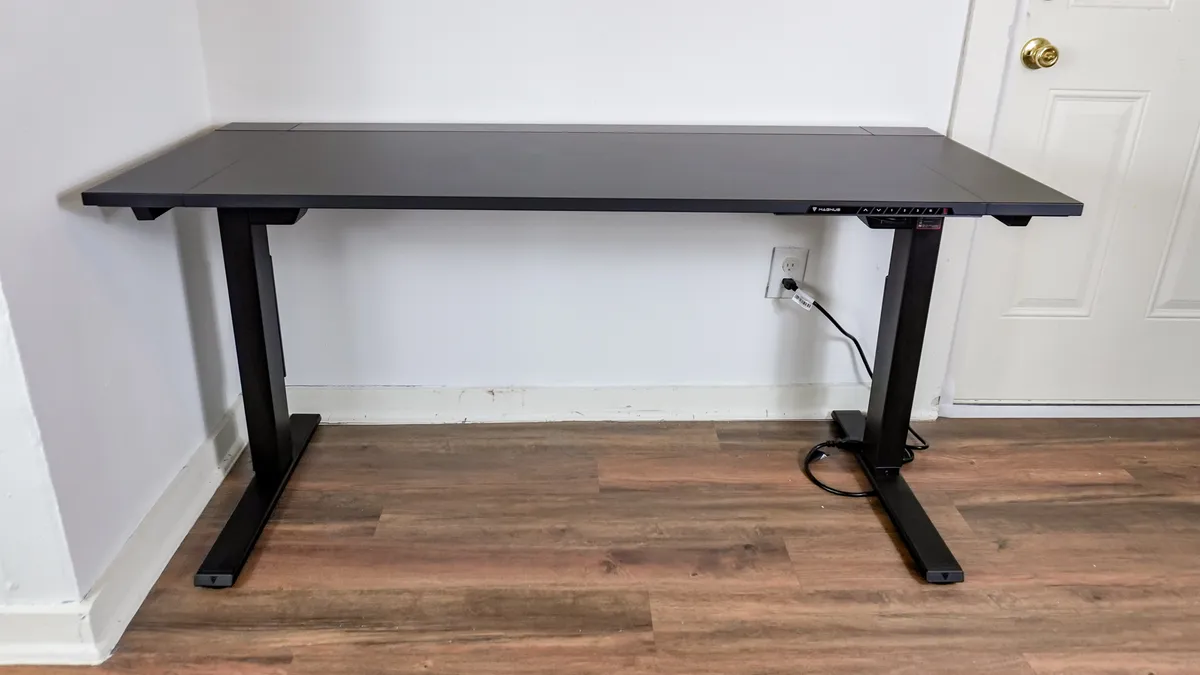
The Secretlabs Magnus Evo is a slightly more affordable version of the Secretlabs Magnus Pro, at $749 instead of $799. The main difference is that it has a hybrid laminate desktop instead of a metal one, like the Magnus Pro. This does mean that it's more susceptible to scratches than the Magnus Pro, although it does retain the more crucial features of the desk, like the integrated power column and quiet dual-motor operation.
Still, you will need to invest in first-party accessories if you want to get the absolute most out of this desk, and that can get pretty pricey.
Read our full Secretlabs Magnus Evo review

The Herman Miller Coyl Gaming Desk is stylish and exceptionally sturdy, which is ideal for anyone looking for a sophisticated setup. Plus, it has a unique rotary dial that lets you fine-tune height adjustments.
However, there is only one desk size available, and both the desk and its accessories are pretty expensive. Plus, you can’t use a monitor arm with the shroud installed, which is a bit inconvenient.
Read our full Herman Miller Coyl Gaming Desk review
How to choose the best gaming desk for you
Of course, choosing the best gaming desk for you is an individual decision based on what you're hoping to achieve. But there are some things you want to keep in mind:
Desktop Space: For one, you want to consider how big of a space you have for a desk, and whether the desk you're considering buying is the right size for the space. Luckily, these days we do a lot of shopping online, where it's easy to look up the dimensions of a desk and compare them against the space you're hoping to fill. If you end up shopping for a new desk in person, be sure to bring that tape measure!
Extra Storage: One of the issues with gaming desks is that they don't often come with storage, so you'll want to be aware of that limitation and be sure you have other places in your home to store files and other deskbound ephemera before you opt for a gaming desk.
Luckily, most gaming desks aren't overwhelmingly expensive. Sure, they'll set you back a couple of hundred dollars, but that's far cheaper than what you could spend on other desks.
FAQs
Does my gaming desk need cable management?
While you technically don't need cable management for a gaming desk, your life will probably be a great deal easier with it than without it.
Using a desk with built-in cable management allows you to neatly stow any wires, keeping them organized and making sure your desk stays free of clutter.
All the desks on this list (bar the LiftSync Clear Plus) either have cable management included, or have the option for an added cable management tray.
Is an L-shaped desk better for gaming?
Whether or not an L-shaped gaming desk is the right one for you depends on what your ideal gaming space looks like and how much room you have.
If you want to fit your gaming setup into a corner, or want the maximum amount of desktop room possible, then an L-shaped desk like the Vari L-Shaped Electric Standing Desk is a great option.
However, if space is limited, then something more compact like the Branch Duo Standing Desk will likely suit your needs better.
Can I use a gaming desk for working from home?
Short answer — yes. All the desks on this list are suitable for home working use, meaning you can use them for both work and leisure.
They're doubly suitable for working and gaming as they are all standing desks, too, allowing you to stand during the day. This will help improve your circulation, as well as posture.
Are gaming desks good for laptop gaming?
You can absolutely use a gaming desk for laptop gaming, and if you pair it with one of the best gaming chairs, your back will likely thank you for the improved posture and support during long gaming sessions. Based on your testing, we recommend the LiftSync Clear Plus as the best gaming desk for laptops.
Bear in mind, however, that if you want to go from using one of the best gaming laptops to desktop gaming, you'll need to get a desk with a higher weight limit, as the LiftSync Clear Plus can only hold up to 110 pounds.

