
Google Calendar is about to get a Gemini AI upgrade, and it makes more sense than you'd think
Gemini and Google Calendar have invited you to an event.
Here at Tom’s Guide our expert editors are committed to bringing you the best news, reviews and guides to help you stay informed and ahead of the curve!
You are now subscribed
Your newsletter sign-up was successful
Want to add more newsletters?
Daily (Mon-Sun)
Tom's Guide Daily
Sign up to get the latest updates on all of your favorite content! From cutting-edge tech news and the hottest streaming buzz to unbeatable deals on the best products and in-depth reviews, we’ve got you covered.
Weekly on Thursday
Tom's AI Guide
Be AI savvy with your weekly newsletter summing up all the biggest AI news you need to know. Plus, analysis from our AI editor and tips on how to use the latest AI tools!
Weekly on Friday
Tom's iGuide
Unlock the vast world of Apple news straight to your inbox. With coverage on everything from exciting product launches to essential software updates, this is your go-to source for the latest updates on all the best Apple content.
Weekly on Monday
Tom's Streaming Guide
Our weekly newsletter is expertly crafted to immerse you in the world of streaming. Stay updated on the latest releases and our top recommendations across your favorite streaming platforms.
Join the club
Get full access to premium articles, exclusive features and a growing list of member rewards.
Artificial intelligence features are arriving for just about anything you can think of, and Google has the advantage of having a huge audience with which to roll out its AI features.
Shortly after debuting its new 'AI Mode' for Search, the tech giant has promised that its powerful Gemini model will arrive for Google Calendar in the coming months.
Available in the Workspace Labs program, Google announced that users will be able to use the AI assistant to create events, check their schedule, or recall event details.
How Gemini works with Google Calendar
Google's Gemini Assistant for Calendar is only available on the desktop version of the Google Calendar at present, with the Gemini icon next to "grid" app selection tool in the top-right corner of the screen.
Clicking it will bring up a series of prompts, including creating a meeting, identifying when the next event in your calendar is, or even adding commuting time.
You can also input your own prompt, with conversation history lost once you close and reopen the app, you refresh your browser, or your computer goes offline.
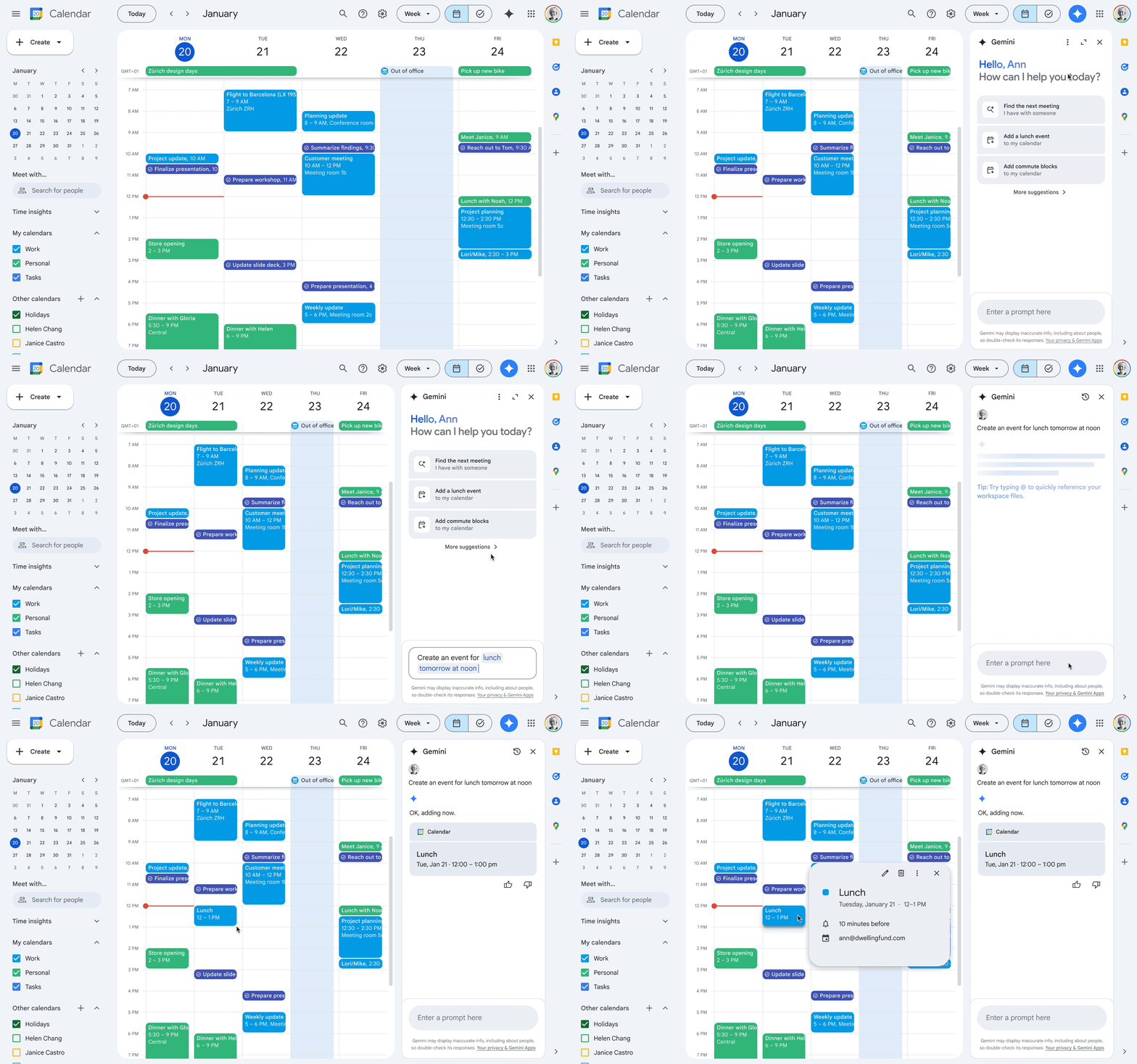
Users can give feedback on the prompts and events created by Gemini to help make them more useful in future, with the idea being to skip the day-to-day scanning for meetings we all go through.
Get instant access to breaking news, the hottest reviews, great deals and helpful tips.
Users can ask how many meetings they have next week, when their next meeting is, or how long a meeting is. It can differentiate between event types, too, letting you know when your next medical appointment is when you ask.
To check out the features, you'll need to sign up to Google Workspace Labs, which you can do here.
More from Tom's Guide
- Google Sheets just got an AI upgrade that analyzes your data and visualizes it
- Google Gemini can now analyze and summarize documents for free — here's how
- Gemini Live major upgrade just revealed by Google

Lloyd Coombes is a freelance tech and fitness writer. He's an expert in all things Apple as well as in computer and gaming tech, with previous works published on TechRadar, Tom's Guide, Live Science and more. You'll find him regularly testing the latest MacBook or iPhone, but he spends most of his time writing about video games as Gaming Editor for the Daily Star. He also covers board games and virtual reality, just to round out the nerdy pursuits.
You must confirm your public display name before commenting
Please logout and then login again, you will then be prompted to enter your display name.
