Last year Google announced that it was getting rid of Google Assistant in cars, and would replace all voice-centric features with the newer, and more advanced, Gemini AI instead. I was thrilled about this news at the time, since my experience with Google Assistant while driving was far from great.
Over a year after that news was first announced, Google finally decided it was time to add Gemini in my car — and completely remove Google Assistant from my life. Given my absolute disdain for Assistant and what it could do, I jumped at the chance to go out and see what it was like to use Gemini out on the open road.
How Gemini works with Android Auto
I should mention that my car is about as dumb as you can get these days. It's an electric Nissan Leaf with an infotainment system that supports both Android Auto and CarPlay, but there's no interaction between infotainment and the functionality of the car itself. This isn't a fancy car that routes everything through a touchscreen menu, and everything you do relies on physical buttons or levers.
In my case, though, these things are all locked into my phone, and have no actual connection to the car. This means Gemini also has no access to any of that information, or control over car systems.
I should make it very clear that I am grateful about this. Sticking essential car features behind a touchscreen is one of the most bone-headed moves the car industry has ever performed, and I'm glad to see that things are starting to go back to the way they were. Still, I am not a luddite and fully expect to be able to use some hi-tech features in my car, like navigation, phone calls, streaming and so on — so long as it's safe to do so.
In theory, voice assistants are a safety tool since they let you control those sorts of features without having to look at, or interact with a touchscreen. Old assistants like Google Assistant were fairly limited, and that meant you had to be fairly precise with what you asked for. Similarly, my Assistant seemed to be quite fond of ignoring me, or refusing to understand what I said.
That led to me virtually shouting at my car to do something simple, because the assistant software was about as robust as a paper towel at the bottom of the Mariana Trench.
Gemini works in much the same way as Assistant did. You can either summon the AI by saying "Hey Google," or by using your car's dedicated voice command button — assuming it has one, that is. Mine does, and probably gets more use than 99% of the buttons on my steering wheel.
And, just like Gemini on your phone or in your Google Home smart speaker, all you need to do is ask Gemini for whatever it is you want.
Gemini outmatches Assistant in every way
At first, I wasn't all that impressed with what Gemini could actually offer me, because I kept thinking of it like Google Assistant. Since Google Assistant was a complete waste of storage space a lot of the time, I learned to only rely on it when absolutely necessary. I didn't really feel like having a shouting match just to get the darn thing to register that I'd said "yes."
I basically had to throw out all my expectations about what assistants can do in the car, and try to rely on Gemini for more than I used to be able to do. Thankfully it didn't take long to flick that proverbial switch, and I was quickly able to start asking Gemini about more detailed and complicated things.
Google Assistant was limited in what it could do and how it would understand your commands. Gemini, being powered by Google's LLM, has no such issues. I found myself able to ask long-winded questions with a bunch of technical details, and the AI was not only able to understand what I was saying, it could actually give me an answer.
At one point I asked how long it would take my car to charge to 100%, making sure to mention the size of the battery, how full the battery was and how fast I expected to be able to charge. Gemini was able to give me an answer, and gave me tips on charging protocol — warning me that charging past 80% slows the whole process down. I can't tell you whether Gemini's estimate of 6 hours was correct, but it's certainly in the right ballpark.
At the same time, Gemini was happy to answer questions about basic things that had no relation to the car. What time is the next England World Cup game? I can't actually tell you because I couldn't care less and immediately forgot what Gemini told me, but Gemini was able to look it up while I was driving.
What I liked the most is that I could ask it about bits of data I knew Google had. What time does X business close today, and how busy is it expected to be right now? These are all things you can see on a business card in Google Maps or Search, and Gemini was able to pass that information along without issue. Even if it didn't have the right facts, such as when I asked how busy the local car wash would be, it pulled information from reviews about wait times and gave me those instead.
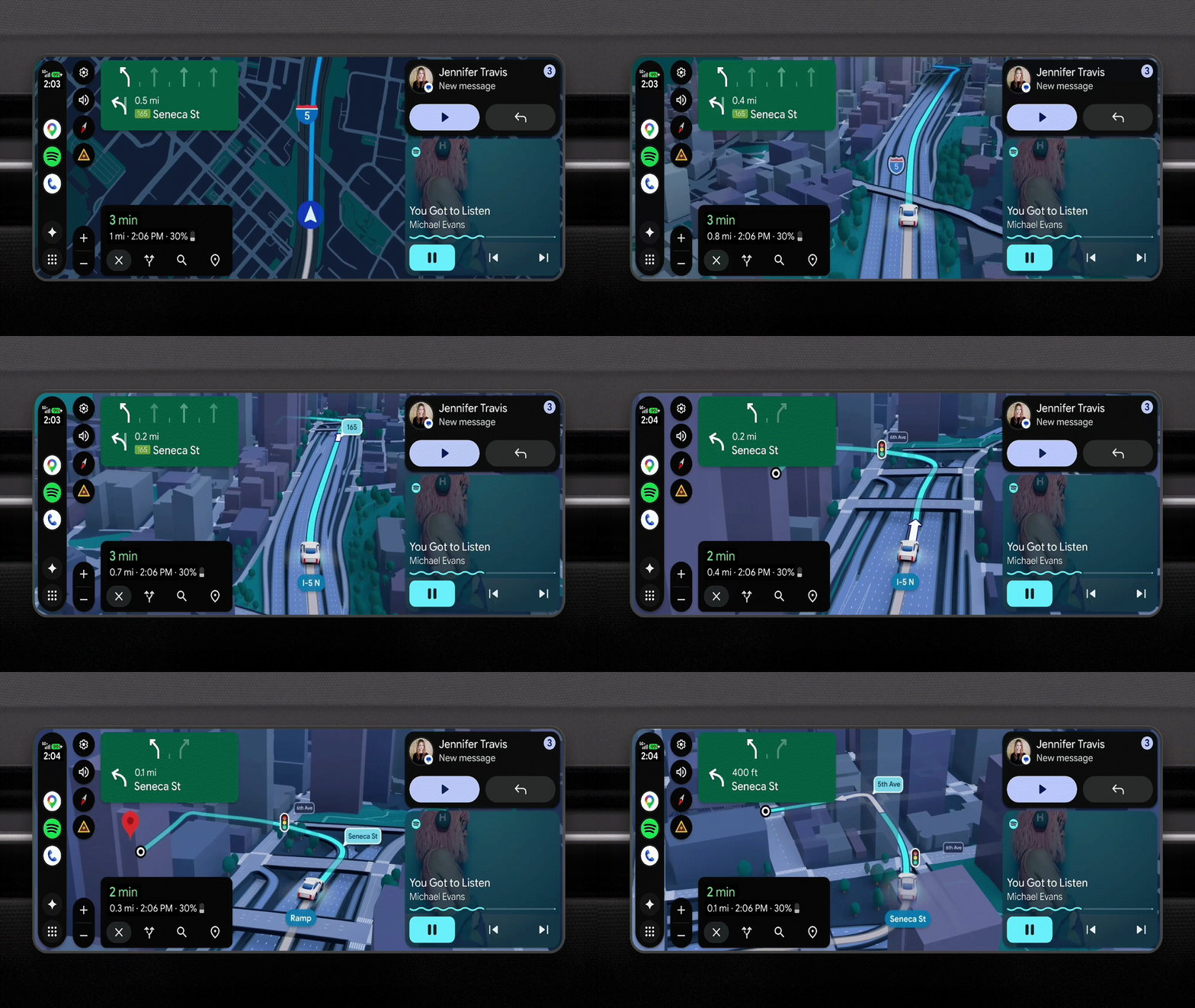
As for navigation, the use of real world language makes the whole thing a lot easier. I was able to ask for the fastest route to a specific location, and later tried to mix things up by asking to be put on the most energy-efficient route mid-drive. Not only was Google able to understand and facilitate that, it also warned me that I was already on the most efficient route — and that it can't do much more than that.
Gemini for Android Auto does need some work

That said, Gemini is not perfect. There are situations where it had no idea what I was talking about, and just shut down. A good example was asking where I could find a CHAdeMO charger for my car, only for Google to completely fail to understand the word in question. But when I mixed my language up, and asked for an "ultra fast charger compatible with the Nissan Leaf" it was able to show me a bunch of nearby locations within a couple of seconds.
It turns out that because Gemini didn't understand the word CHAdeMO, it just spelled the word out letter by letter. The same thing happened to the charging brand GRIDSERVE, and I can only assume it's because the name is all uppercase. Apparently the lack of lowercase letters confused the AI, and meant it couldn't understand my human method of reading out the whole word.
There can be a bit of a delay while it processes the question, though this is true of most AI chatbots. If it can't process what you need on the device, it's going to have to talk to a server somewhere and that obviously means there's going to be delays while information is transmitted back and forth.
However, I have yet to experience Gemini just straight-up not registering that I have spoken to it, which was a near-daily occurrence with Google Assistant. So, regardless of its iffy understanding of certain brand names and proper nouns, Gemini is definitely on the winning team.
Bottom line
I still need to spend some more time with Gemini in my car to get to grips with everything else the AI has to offer in my car. For the most part, though, I'm fairly impressed, especially since the AI is able to work across different Android Auto apps based on the kind of questions and commands it receives. It's a night and day upgrade compared to Google Assistant, which was usually more trouble than it's worth.
It's an upgrade that seems to do what was originally promised. Not only does it offer all the things Google Assistant could accomplish, it's able to provide more information and understanding to the driver. Considering driving is inherently dangerous, and you should not allow anything to distract you, the fact that an AI assistant can handle more of the things that might cause your concentration to lapse can only be a good thing.
Let's just hope that Gemini's uppercase reading comprehension improves a lot over the coming months and years.

Follow Tom's Guide on Google News and add us as a preferred source to get our up-to-date news, analysis, and reviews in your feeds. Subscribe to Tom's Guide on YouTube and follow us on TikTok.
More from Tom's Guide