I preordered the MacBook Neo the day it went up because I wanted an affordable, lightweight MacBook Air alternative I could grab when I didn't need the horsepower of my relatively chunky MacBook Pro 14-inch. Battery life is great; it's speedy enough for basic productivity and content creation, and I absolutely love my Indigo color.
So when Satechi rolled out a set of color-matching accessories for it, the Slim EX Wireless Mouse, the USB-C Snap Hub, and the OntheGo 5-in-1 Multiport Adapter, they caught my attention. I've been testing the Indigo versions of all three, though all four Neo colors are available, as well as silver and black if you prefer. But was I drawn in just because of the color, or would these be accessories I'd actually want to use?
Quick links
- Satechi Slim EX Wireless Mouse: $29 at Amazon
- Satechi OntheGo 5-in-1 Multiport Adapter: $44 at Amazon
- Satechi USB-C Snap Hub: $44 at Amazon
Satechi Slim EX Wireless Mouse

The Slim EX Wireless Mouse's two-tone color matches my Neo's main body and keyboard keys very well. It's just as compact as the Logitech Pebble I've been traveling around with for the past few years, but it's overall a step up with comfort and build quality. Part of that comes down to the more rounded metal top shell, which also looks and feels more premium, and the scroll wheel is a nice upgrade too with its textured metal.

It charges over USB-C instead of needing a battery swap, and it comes with a USB-C dongle for a direct connection when I don't want to deal with Bluetooth. You get three total connections, two over Bluetooth and one through that USB-C dongle, and you toggle between them with a pairing button on the bottom. Interestingly, this mouse is wireless only and can't be connected directly to a device via a wired cable.

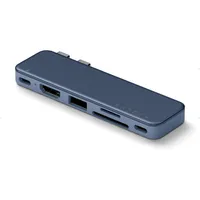
Satechi 6-in-2 USB-C Snap Hub

One of the Neo's biggest limitations of my MacBook Neo is that it has only two USB-C ports, and they're not equal. One runs at full USB 3.2 speeds; the other is capped at a much slower USB 2.0, which is intended only for charging. The Satechi USB-C Snap Hub solves that by giving me every port I actually need: full SD and microSD card slots, which are especially handy when I'm pulling files off my cameras, plus HDMI, USB-A, another USB-C, and pass-through charging up to 45W.

The Snap Hub plugs into both of the Neo's USB-C ports at once and sits flush with the keyboard deck. Other dual-connector hubs have existed for years, including the Anker 7-in-1 I've been using with my MacBook Pro; however, they aren't fully compatible with the Neo because of the unequal port speeds, which cause bottlenecks on some connections and aren't ideal.

The Satechi Snap Hub is one of the first specifically designed around the Neo's mismatched ports, so that you get full speeds across the board. Combine that with how clean it looks attached to my Neo, and this has become my favorite MacBook Neo accessory.
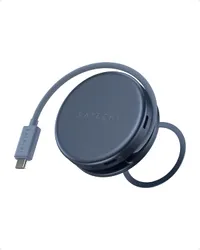
OntheGo 5-in-1 Multiport Adapter

If instead you want a USB-C hub that can be more permanently ready to go, there's the OntheGo 5-in-1 Multiport Adapter. With a magnetic adhesive ring that sticks to the back of your laptop's lid, the adapter can snap on and off quickly. Unravel its hidden cable when you need it, plugging into the Neo's faster USB-C port, and you get HDMI, USB-C, USB-A, a full-size SD reader, and USB-C 60W pass-through charging.

It skips the smaller microSD reader that Snap Hub offers, but it frees up that second, slower port on the Neo entirely, though I'm not sure that's a tradeoff I'd want. I'm personally not a fan of installing a magnetic ring on my Neo's otherwise very clean, symmetrical lid, so this accessory isn't really intended for me. Of course, you can use the adapter without attaching it to the back at all, but at that point I'd always just reach for the Snap Hub instead.

Bottom line
These three accessories are probably marked up a bit because of their color appeal, but still seem fairly priced. The Slim EX and USB-C Snap Hub have both earned their place in my MacBook Neo travel bag.

Color matching is obviously a big reason, but both of these also offer improvements over the accessories I was using before. Are you also drawn to accessories that match your laptop, or do you just care about functionality? Let me know in the comments!

Follow Tom's Guide on Google News and add us as a preferred source to get our up-to-date news, analysis, and reviews in your feeds.
More from Tom's Guide
- I tested the MacBook Neo for 4K video editing and it surprisingly didn't suck — until it did
- I just bought a MacBook Neo and these 15 accessories make this budget laptop feel super charged
- Here's the 5 best accessories I recommend for back to school