

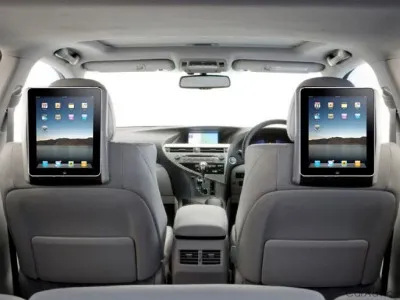
How to: Put an iPad to work, in the car
Here are 9 ways to help you get efficient use out of your tablet while you're traveling by car.
Here at Tom’s Guide our expert editors are committed to bringing you the best news, reviews and guides to help you stay informed and ahead of the curve!
You are now subscribed
Your newsletter sign-up was successful
Want to add more newsletters?
Daily (Mon-Sun)
Tom's Guide Daily
Sign up to get the latest updates on all of your favorite content! From cutting-edge tech news and the hottest streaming buzz to unbeatable deals on the best products and in-depth reviews, we’ve got you covered.
Weekly on Thursday
Tom's AI Guide
Be AI savvy with your weekly newsletter summing up all the biggest AI news you need to know. Plus, analysis from our AI editor and tips on how to use the latest AI tools!
Weekly on Friday
Tom's iGuide
Unlock the vast world of Apple news straight to your inbox. With coverage on everything from exciting product launches to essential software updates, this is your go-to source for the latest updates on all the best Apple content.
Weekly on Monday
Tom's Streaming Guide
Our weekly newsletter is expertly crafted to immerse you in the world of streaming. Stay updated on the latest releases and our top recommendations across your favorite streaming platforms.
Join the club
Get full access to premium articles, exclusive features and a growing list of member rewards.
Tablets Hit The Road
Every few months the open road beckons and I get the insatiably urge to sit behind the wheel, buckle up and take a road trip. This time, though, rather than hitting the open road with just my car, a gas credit card and a few sandwiches, I’m bringing my iPad along for the ride.
The simple fact is that the iPad is particularly well-suited for the car. After all, it has a simple interface, doesn’t require a physical keyboard and is small and thin enough to fit into some of the nooks and crannies of a car. For that matter, an Android tablet can do just about the same thing.
With an iPad along for the ride from Point A to B, you won’t have to do without a digital thing on the road. I’ve set up my car with everything from online video and Internet radio to GPS mapping and even troubleshooting what’s wrong under the hood when the pesky “Check Engine” light comes on.
To do it right requires some special hardware and effort to meld the iPad with the car, including powering the pad, providing it with data and hanging it in a strategic place. All in all, the iPad can makes itself at home on the road.
This time, I’m off to upstate New York on business, but the destination doesn’t matter as much as the journey. Here are 10 tips on for retrofitting a car (I used my old Mercedes station wagon) for an iPad, none of which require much in the way of mechanical aptitude or tools. They’ll work with just about any vehicle.
Before getting started, a word of caution is called for. Regardless of whether you receive an urgent email from your significant other or the latest viral video from a buddy--as the driver, your attention needs to be exclusively on the road and not on the iPad’s screen. That’s where your navigator/shot-gun passenger comes in. Let him or her take care of the technology while you eat up the miles.

Get instant access to breaking news, the hottest reviews, great deals and helpful tips.
Current page: How to: Put an iPad to work, in the car
Next Page Location, Location, LocationBrian Nadel is a freelance writer and editor who specializes in technology reporting and reviewing. He works out of the suburban New York City area and has covered topics from nuclear power plants and Wi-Fi routers to cars and tablets. The former editor-in-chief of Mobile Computing and Communications, Nadel is the recipient of the TransPacific Writing Award.
-
xxplosiv88 Goodbye wholesome family roadtrips. BUT, also goodbye to "Are we there yet? Are we there yet? Are we there yet?". Something I'm sure I'll appreciate when I have kidsReply

