The moment Google’s new smart glasses started to make sense to me, I was talking to a woman I’ve never met before about what she likes to eat in Shenzhen.
She was speaking Mandarin, and I was speaking English. We were having the kind of conversation I’d want to have with someone I’m getting to know: What’s your hometown like? What traditional food should I try? And where in New York might I be able to get a taste of it?
I’ve used live translation on smart glasses (and phones, and earbuds in the past.) But this conversation, part of a demonstration of Google’s new collection of Intelligent Eyewear, felt the most inherently natural. After just a handful of exchanges, both the language barrier and the hardware helping me cross it felt nearly invisible.
That’s a promising start for a product that needs to work hard to give people a compelling reason to wear a camera and AI assistant on their face. Google’s bet combines Gemini’s ability to understand what you’re looking at, connections to the apps you already use and, through Gentle Monster’s and Warby Parker’s fashion footprints, glasses you might actually want to wear.

To that last point, looking good certainly helps. But at a time when people are understandably anxious about how camera glasses could be misused, making them look more ordinary also raises questions about how easily everyone else can recognize them.
After trying Google’s smart glasses (not to be confused with Google Glass) for a few hours, here’s what impressed me, and where I still have questions.
Google Intelligent Eyewear: Pricing and availability
The collections were developed with Samsung, with Warby Parker’s frames starting at $395 and Gentle Monster’s at $449. Preorders open November 12, with in-store and online availability beginning December 10. The glasses work with supported Pixel, Samsung Galaxy and iPhone models, although some features are Android-only at launch.
Stylish smart glasses I’d actually wear
I care about the effectiveness of technology. But I also care very much about how something looks on my face.
With Gentle Monster and Warby Parker involved, Google has a wide selection of frames, colors and lenses that made me feel more like I was choosing eyewear than choosing a gadget and accepting whatever style comes with it.
Some of the frames I tried looked even less obviously like smart glasses than Meta’s. From a style perspective, I appreciate that
Gentle Monster’s collection includes six designs, with colors including dark red, pink, gray and yellow, plus prescription options for most frames. Warby Parker offers three styles — Alden, Reid and Wren — with different widths, prescription options and optical or sun lenses. Google puts all of the frames’ weight at around 41 grams.

I’m already a self-proclaimed Gentle Monster stan, so I was particularly interested in how its distinctive design personality would translate to smart glasses. I found more than a few I could see myself wearing every day.
Some of the frames I tried looked even less obviously like smart glasses than Meta’s. From a style perspective, I appreciate that. From the perspective of someone standing in front of the camera, it’s more complicated. The same design that makes a wearer feel comfortable could make it harder for someone else to recognize that recording is possible. I think both things can be true.
Good looks raise real privacy questions
Google discussed a number of safeguards during my briefing, including restrictions intended to prevent camera use when the recording indicator is covered.
The outward-facing LED lights up when you capture a photo or video for your gallery. Sensors are designed to detect if that indicator is covered or tampered with and prevent capture.
The glasses are also designed to redact bystanders’ faces before sending images to Gemini, and Google says the camera visuals used for those AI interactions aren’t saved in Gemini History or used for AI training or ad targeting.
Unlike Meta, Google’s sphere of influence includes the places people shop for accessories, the ads promoting them and the apps that can access the camera. Its stated protections include banning accessories designed to conceal recording lights from Shopping and Ads, and prohibiting apps that enable real-time facial identification through Google Play. It can also monitor YouTube for any “educational” tampering content.
I wouldn’t say this automatically makes Google more trustworthy in this budding wearable face-off against Meta. But it gives the company more places to intervene and more responsibility to follow through.
Gemini at the forefront
Google’s other advantage over Meta is the quality of its AI assistant. In my demo, I experienced ways to connect what Gemini sees via the camera with information and actions. For example, interpreting a bulletin and helping add an event to a calendar, or translating a cookbook and answering follow-up questions about it.
I could keep a conversation going without repeating a wake word for every question. Furthermore, during instructional interactions such as learning how to throw a football with proper spiral or giving myself a quick tarot reading, Gemini stayed on standby waiting for me to proceed step-by-step.
The connections to Google’s apps could give that convenience more substance. Calendar entries, Gmail and Google Photos are already parts of my day. How reliably the glasses can work across those services is something I’ll need more time to test, including which features depend on your phone and setup.

Live Translation is the standout feature
Of all the Google intelligent eyewear experiences I tried, Live Translation made the strongest impression.
The translated audio had a female-sounding voice and seemed to follow the speaker’s pace and rhythm. It felt more connected to the person standing in front of me than a generic voice reading back a sentence.
Google Translate supports real-time speech translation across more than 70 languages on the glasses. My English-to-Mandarin conversation offered a small but compelling glimpse of what that could mean in practice.
The translated audio had a female-sounding voice and seemed to follow the speaker’s pace and rhythm. It felt more connected to the person standing in front of me than a generic voice reading back a sentence.
Sure, there was still a bit of a delay. At first, we needed a little time to work out when to speak and when to listen. But after a couple of exchanges, that friction became less distracting.
The conversation itself also mattered. This was a demo, and the person helping me was clearly familiar with the experience. But I was able to steer it toward the questions I wanted to ask, including my favorite subject of food.
Overall, the exchange felt responsive and engaging from my side, and I wanted to keep talking. That’s a more meaningful and authentic first impression than successfully translating one rehearsed sentence.
I’d still use these as headphones first
For all the attention on AI features and live translation and cameras, in practice, I mostly use smart glasses as headphones.
In my demo listening to music, vocals sounded clear and I liked how the audio was positioned around my ears. I also tried the swipe-and tap-based music controls located on the right side of the frame, which are part of the less flashy experience I’d expect to use constantly.
Google lists support for YouTube Music, Spotify and Apple Music, along with Audible on Android at launch. You can also take calls and respond to messages hands-free.
That said, I noticed quite a bit of sound leakage at higher volumes, being a demo space with other people testing out the glasses. I don’t yet know whether the amount varies by frame style or fit, but it was noticeable enough during the demonstration to be worth flagging.
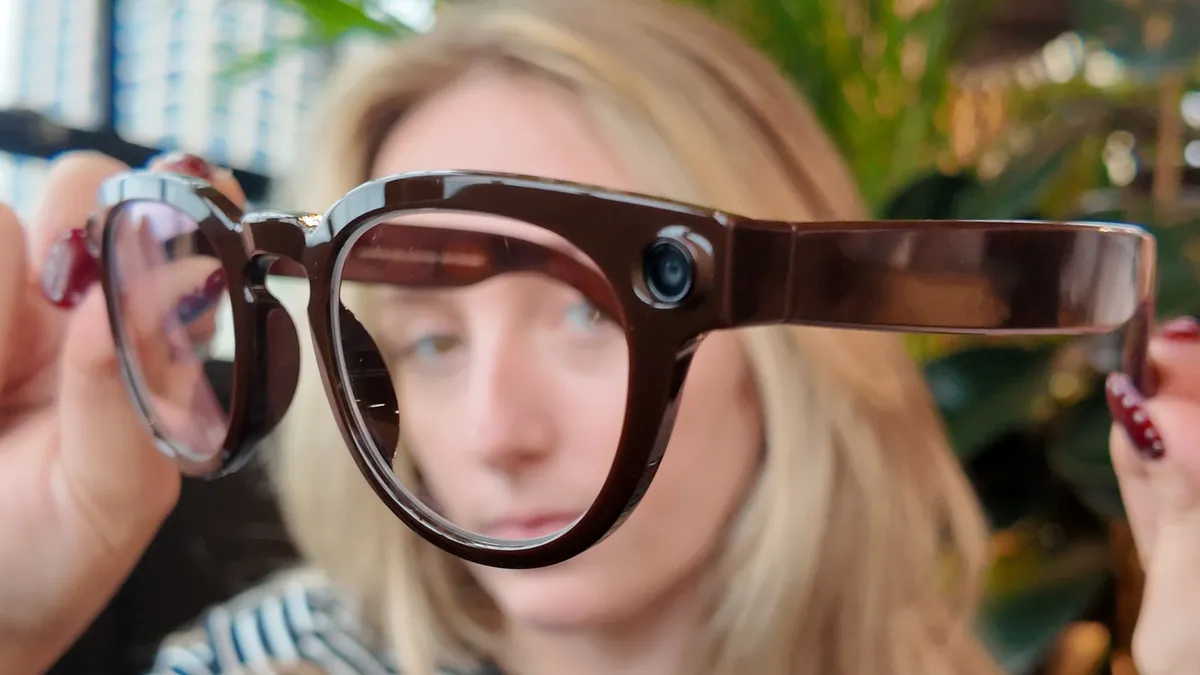
The camera is familiar territory if you’ve used Meta’s glasses. It’s a 12MP ultrawide camera, and you can ask the assistant to take a photo or use the physical capture button.
I tried taking pictures outside around Little Island, and they came out… okay. For my standards, I wouldn’t expect glasses to ever replace a flagship phone camera. But there is attraction to having a hands-free way to capture your perspective without stopping to hold up a phone.
As is the case with Meta glasses, I’d imagine the rated 9 hours of battery life will be cut back by frequent camera usage. There is an included charging case that provides up to seven recharges.
Google smart glasses: Early verdict
Google’s intelligent eyewear has given me reasons to be interested beyond having another camera on my face, hence why it’s one of the last features I got around to detailing.
The frame selection makes the idea of wearing these every day more appealing. Gemini offers a potentially useful connection between what I’m seeing and the apps I use. And translation gave me a glimpse of an experience I’d actively want to repeat.
But there’s plenty unresolved. How battery life, comfort and Gemini reliability hold up in an average day will be extremely telling. Then there’s the question about how the privacy protections work in practice, and who’s even willing to look past the “pervert glasses” of it all.
For now, the conversation about Shenzhen is what I keep coming back to. For a few minutes, I was thinking more about the person in front of me than the technology that was making our conversation possible.
If Google can deliver more smart glasses experiences that feel invisible rather than invasive, it could be exactly the boost this category desperately needs right now.

Follow Tom's Guide on Google News and add us as a preferred source to get our up-to-date news, analysis, and reviews in your feeds.
More from Tom's Guide