Tom's Guide Verdict
The Baseus Security X1 Pro offers two 3K cameras that record crisp footage, but its image recognition capabilities lag behind other brands we’ve tested. If you’re looking for an outdoor dual camera, we recommend models from TP-Link and Eufy.
Reasons to buy
- +
Crisp footage
- +
Simple app
- +
No cloud subscription
Reasons to avoid
- -
Delay between motion and recording
- -
Object recognition isn’t very good
- -
Limited to 2.4GHz Wi-Fi
Why you can trust Tom's Guide Our writers and editors spend hours analyzing and reviewing products, services, and apps to help find what's best for you. Find out more about how we test, analyze, and rate.
The security camera market is crowded, and most of the big companies want you to pay a monthly fee to actually get the most out of your hardware. There are some exceptions to that rule though. One of the latest of those is Baseus, which launched the new X1 Pro dual camera system.
The system offers two independent 3K cameras into a single unit, each capable of tracking its own subject or working together for panoramic coverage. It even has a built-in solar panel, which itself isn't all that unique -- but on this system, the solar panel is attached to a motor and designed to follow the position of the sun over the day, something we haven’t seen from the best home security cameras.
But, it's not necessarily the ultimate system that you might think it could be. To find out why, you’ll have to read the rest of our Baseus Security X1 Pro review.
Baseus Security X1 Pro review: Price and availability
The Baseus Security X1 Pro launched in early 2026. It comes in at $269.99, which gets you the dual-camera unit, the built-in solar panel, and the mounting hardware you'll need to install it. Baseus also runs promotional pricing that drops the cost to $179.99 and includes a microSD card.
What you won't pay is a monthly fee. All of the features are included out of the box, with no subscription required to unlock them later.
Baseus Security X1 Pro review: Design and setup
Video: Dual 3K
Field-of-view: 300 degrees horizontal, 125 degrees vertical
Night vision: Infrared / color
Wireless: 2.4GHz Wi-Fi
Weather resistance: IP65
Lighting: 100 lumen spotlights
Power: Battery, solar panel included
The X1 Pro isn't small, but it's not overly large given what it comes with either. It's IP65 rated for water resistance, so it should handle whatever weather you throw at it.
The build quality of the X1 Pro is fine, but not exactly premium. Some of the plastic parts feel a little cheap, though nothing broke during my testing and everything felt solid enough once mounted. Sure, the camera doesn't necessarily need to look like a piece of jewelry on the side of your house, and its overall look is pretty similar to other outdoor security systems.
The system combines a solar panel with a relatively large built-in battery. Baseus says the 7,800 mAh battery will last up to 150 days on a charge, and the 3W solar panel on top is self-adjusting, with a 120° coverage angle (60° left and 60° right).

The ability for the solar panel to rotate is a pretty smart idea, but I'm not sure it's really all that necessary. I've never had problems with static solar panels keeping a security camera powered. I have a EufyCam 2C Pro (which I use for its HomeKit Secure Video support) in my backyard that never dips below 90% battery with its static panel. The rotating design could be more useful in areas with spotty sun coverage, but even then, with a 150-day battery, your sun coverage would have to be pretty rough for it to make much of a difference.
Setup is straightforward. You physically install the mount to a wall, then attach the solar panel and camera assembly to the mount. From there, you open the Baseus app and follow the on-screen instructions to add the camera. It's no different than setting up any other security camera — the app walked me through the whole process without any major hiccups.
As a whole, the Baseus X1 Pro's design is...fine. It doesn't stand out all that much, and it could be built a little better, but most will be perfectly happy with it.
Baseus Security X1 Pro review: Video and audio quality

The X1 Pro captures video at 3K (3072 x 1536) per camera, with F2.0 lens apertures. In good lighting, the footage is solid. Details are crisp, colors are vibrant enough, and dynamic range is good enough that you'll get detail in both shadows and highlights, within reason.
The two cameras can work either independently or together. When independent, they can track up to two subjects at once — useful if you've got a large area with multiple potential points of interest. When stitched together, they provide a 300° horizontal field of view, which covered my entire backyard on its own. Baseus will "stitch" the two feeds into a single panoramic view, but it's not great at this — there's a noticeable seam between the two camera feeds where they join. It's not a huge deal, but it's not invisible either.
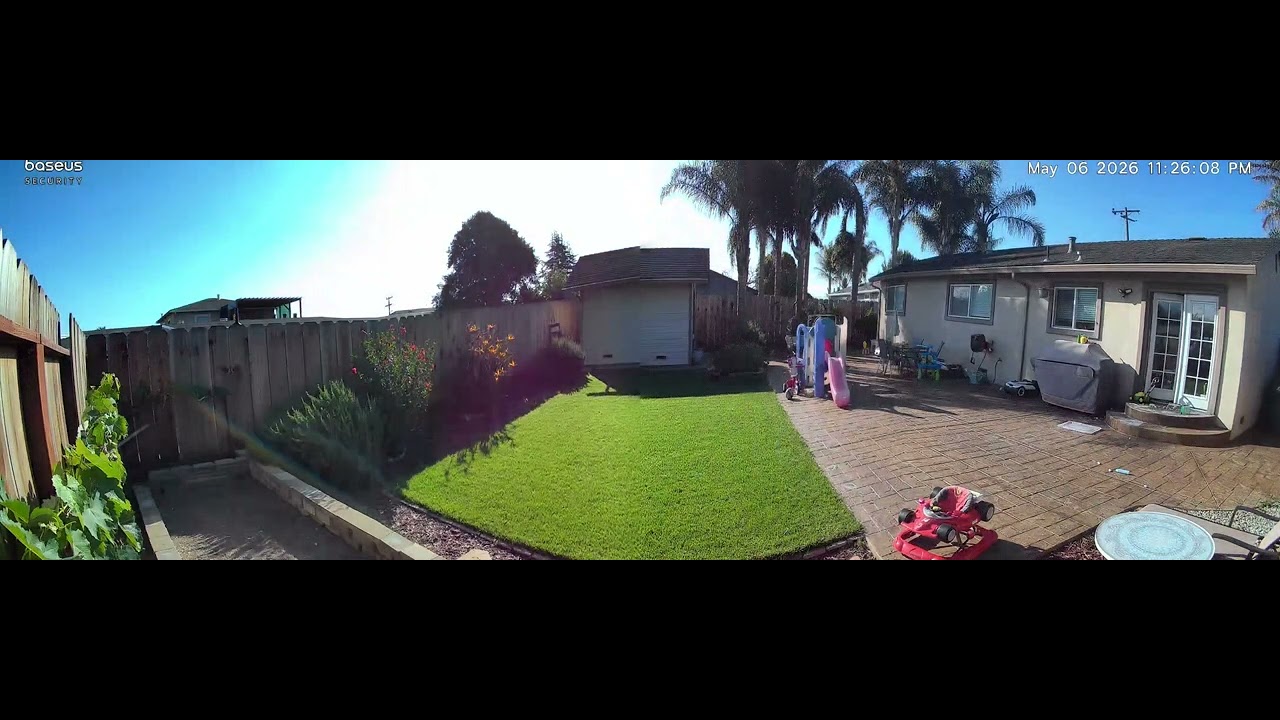
The camera supports up to 8x digital zoom, but there's no optical zoom. In other words, while the reasonable resolution means you can zoom a little when you need to, you'll lose detail the more you zoom in.
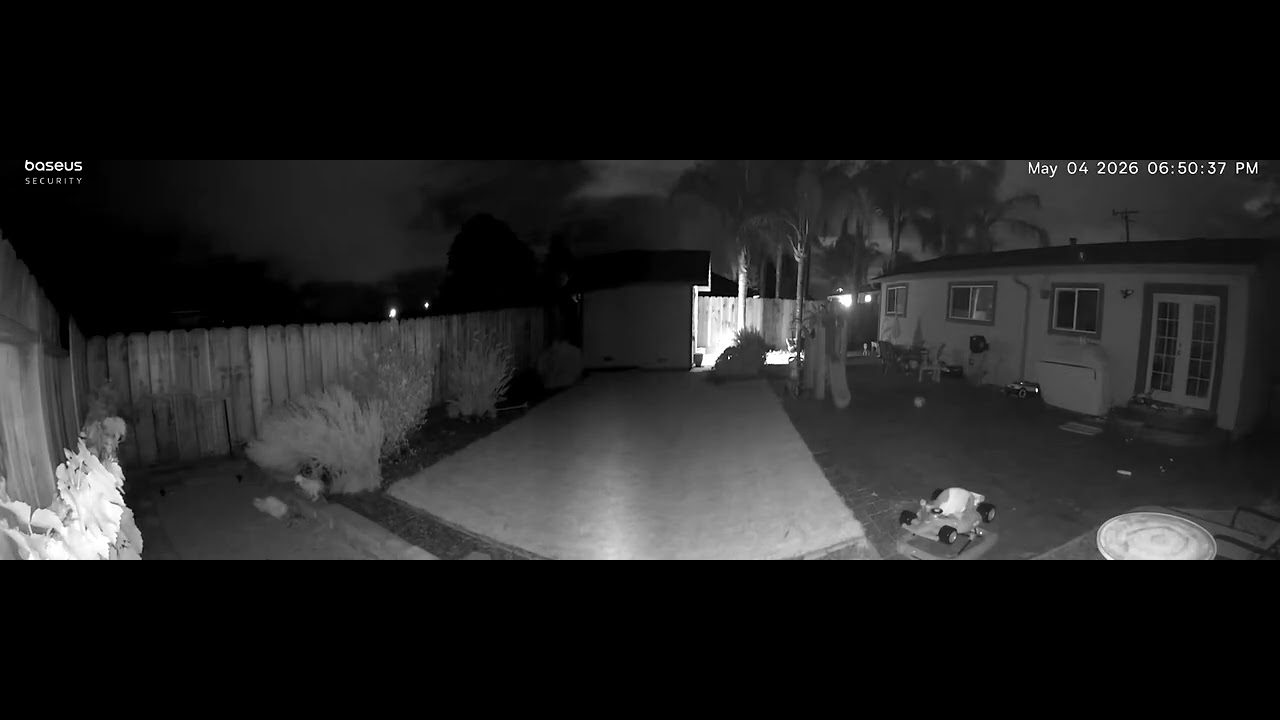
Night vision is handled by 12 IR LEDs plus two 100-lumen LED spotlights for full-color night vision. Infrared night vision worked pretty well in my testing, and the camera actually did a better job triggering on motion at night than the Eufy camera I have installed in the same backyard. It captured three kittens walking through my yard one night that I'd never seen before.
The spotlights are there for color night vision, but their reach doesn't match the use-case of the camera itself — the camera's designed to be able to see large areas, but the spotlights won't illuminate areas anywhere near as large. If you do use the cameras to cover more than a small area, you'll need to rely on external lighting or the infrared night vision.
Motion detection and audio
Motion detection is a mixed bag. Motion detection itself seemed to be fine -- even smaller movements, like the aforementioned kittens triggered recording. But, it took some time for recording to actually begin. The camera could see my entire backyard, including around 100 feet from my back door to a garden shed.
However, in recordings of me walking from the door to the shed, I was already mere steps from the shed before the beginning of the recording. That represents a good three or four seconds of movement before recording, which could be the difference between catching a significant event or missing it.
The camera supports two-way audio, but it's not great at actually picking up that audio. The microphone is sensitive enough to pick up audio near it, but not super consistently, and you can forget about audio that's further away -- again, representing a mismatch between the purpose of the camera and its actual tech.
Baseus Security X1 Pro review: App

The Baseus app is available on both iOS and Android, and it covers the basics you'd expect. You get a live view of the camera, an Events tab for captured recordings (including being able to see a split view or a stitched view), and settings for the alarms and night recordings.
It's not the slickest security camera app I've used, but I could find what I needed without much hunting. There are also some handy features, like an automatic patrol mode that has the two cameras rotate out and back at a pre-set time interval -- though unfortunately you can't use this feature when you've set the footage to be stitched. I don't see why -- there's no reason the footage from patrol mode can't just be un-stitched, and have other footage stitched.

The object detection is where the app, and system as a whole, falls down. In theory, it differentiates between people, pets, and vehicles. In practice, it's not super accurate. Several times when motion was triggered by an animal, it just registered as generic "motion" with no classification. One time, it registered a cat as a person.
Facial recognition was also inconsistent, and a pain to use. Unlike other security cameras that automatically record faces and have you classify them as you go, you have to manually add familiar faces using either the camera itself or by uploading an image. Even after you do that, it often doesn't properly recognize the face you uploaded.

In other words, while the camera can record footage when it detects motion, it's not very good at actually classifying that motion or differentiating between people and other movement.
The camera is heavily marketed as a no-cloud option, but there's actually a 30-day cloud storage backup feature in the app, offered for free. It's disabled by default, and even after I enabled it, I couldn't access clips that were marked as being backed up in the cloud. I could only play back clips stored locally. I'm not sure why, and it's possible this is a bug or something that'll get ironed out in a firmware update — but as of now, cloud backup exists but doesn't really work, at least in my testing.
Baseus Security X1 Pro review: Smart home compatibility
Smart home support is limited to Google Home and Amazon Alexa. That's it. No Apple HomeKit, no Matter, no SmartThings. If you live in the Apple ecosystem, you'll be stuck using the Baseus app exclusively.
The other connectivity limitation is Wi-Fi. The X1 Pro only supports 2.4 GHz — no 5 GHz option. In practice, this means streaming can lag if your signal is weak or if you're in a congested area with lots of 2.4 GHz interference. I found that footage streamed through the Baseus app regularly needed a second to load, which isn't a dealbreaker but is noticeable.
Baseus Security X1 Pro review: Storage and subscription plans
The Baseus X1 Pro is designed to be completely subscription-free. In other words, even with a 30-day cloud backup (supposedly), you won't need to pay anything to use the system after actually buying it. That's a double-edged sword, of course -- what if you want a cloud system instead of local recording. If that's you, it's worth looking elsewhere.
Local storage supports up to a 512 GB microSD card, which is plenty of capacity for weeks or months of footage depending on your settings.
As mentioned, there's also a free 30-day cloud storage backup option — but it's meant to supplement local storage, not replace it. You'll still need a microSD card to get the most out of the camera. And in my testing, I couldn't actually access video events stored in the cloud even after enabling the feature, so I wouldn't factor cloud backup into your buying decision at this point. The X1 Pro also works with Baseus' own hub, if you happen to own one, though you don't need one to use the camera. I didn't test the hub integration.
Baseus Security X1 Pro review: Verdict

The Baseus Security X1 Pro is a solid camera overall, but it falls short in a few key areas. Image quality is good, the dual-camera design gives you genuinely wide field-of-view coverage from a single unit, and the no-subscription model is always helpful. For basic security monitoring, it does what you need it to.
Where it falls short is on the smart features. Don't expect to rely on the AI-powered classification — motion detection can be delayed, facial recognition is unreliable, and the app will sometimes misidentify what it's looking at. Zoom clarity isn't great past a few times magnification, and the 2.4 GHz-only Wi-Fi can cause occasional stream lag.
If you're looking for a wide-angle dual-camera setup without recurring fees and can live without elite AI smarts, the X1 Pro is a compelling option. But, it's worth considering subscription-free security cameras from the likes of Reolink and TP-Link. For example, the TP-Link Tapo C246D is another dual camera system with a slightly lower resolution, though it doesn’t have the ability to track two subjects at once. But, it can track one subject faster.