




I’ve tested a lot of AI tools over the past year, but this is the first one that genuinely felt like I wasn’t part of the process anymore. Anthropic just rolled out a new set of features for Claude AI called Dispatch and computer use, and together they unlock something very different from a typical chatbot.
So I tried it.
I sent Claude a task from my phone — and by the time I got back to my laptop, it was already done. No clicking. No prompting. No back-and-forth.
Here's what happened and how you can try it for yourself.
Raising the AI bar
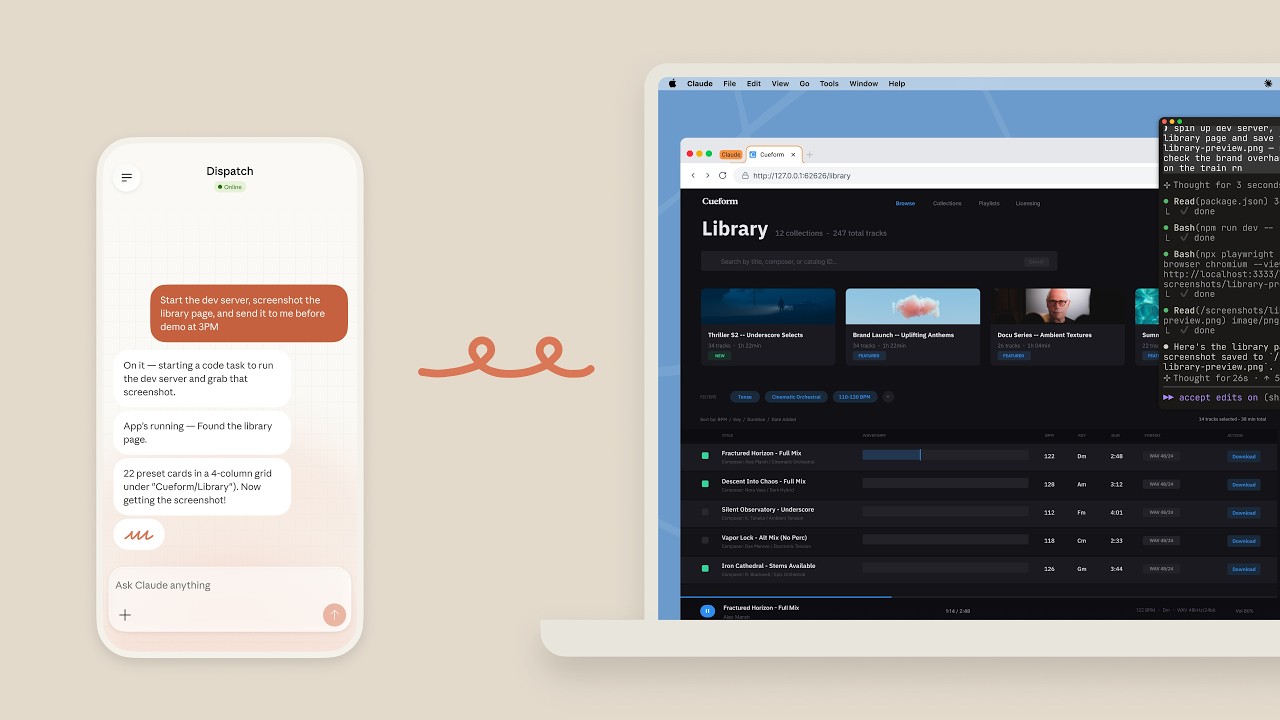
It's safe to say that Claude is hardly just a chatbot. At a basic level, here’s what changed with this new rollout.
Claude can now use your computer like a human — moving the cursor, opening apps, typing, navigating websites and tools. With Dispatch, you can assign tasks from your phone that run on your desktop while you’re away
Put those two together, and you get something that feels less like AI assistance and more like delegation. So instead of tell me how to do this, the AI does all the work for you.
You must be on a Claude Pro or Marx plan to use this program and have the most recent version of Claude Desktop installed and running on your computer (macOS or Windows x64). You can download or update it at claude.com/download.
Additionally, you need the most recent version of the Claude mobile app installed on your phone. I noticed that although I have had the Claude app on my iPhone for months, I needed to update it to be sure I was using the latest version. From there, everything was fairly easy and intuitive.
It's also worth noting that you can use Cowork without Dispatch, but for the full experience, it's worth checking out the two together at the same time.
Getting started with Cowork and Dispatch is easy

Dispatch turns Claude into a remote worker that uses your computer while you’re not there. Essentially, you have one continuous conversation with Claude that lives across your phone and your computer. From your phone, you can:
- Ask Claude to pull data from files on your computer
- Have it search emails, Slack or Google Drive
- Generate reports, spreadsheets or presentations
- Organize folders or process documents
Then Claude runs the task on your actual desktop, uses your apps, files and integrations and sends you the results when it's done.
Dispatch lives inside Claude Cowork and is still in research preview. As such, it's still rolling out, so even with a paid plan you may not see it yet. It's also not a separate app or button like a ChatGPT app.
When Cowork is enabled, you can send a message and the message then becomes a "dispatched task." Remember, there is no "Dispatch" button — it just happens when you assign work.
How to try Claude’s “computer use” and Dispatch features

Right now, this isn’t something you can just turn on with one click — but if you fullfill all the requirements listed above and have access, here’s how to get started.
Start by setting up your computer for "computer use." This is the key step. Claude needs permission to interact with your machine, which may include:
- Access to your files and folders
- Permission to control your mouse and keyboard
- Access to apps like your browser, email or documents
Once enabled, Claude can perform actions on your computer just like you would. So, start a task from your phone (this is Dispatch). Within the app, you can send a request like:
- “Pull last month’s receipts and organize them into a spreadsheet”
- “Summarize my latest documents and draft a report”
- “Find 3 vacation options and create a plan”
That request is sent to your desktop session — and Claude starts working there. Keep your computer on and let it run. Be sure your computer stays awake (no sleep mode). Claude will then carry out the task in the background and notify you when it’s done.
You'll want to review the results too and definitely don't skip this step.
Even though Claude can click, type, generate documents and move files it can still make mistakes. So double check for accuracy, review anything sensitive and make final edits as needed.
The takeaway
Claude’s new Dispatch feature is so much more than an AI upgrade — it’s a shift in how work gets done. You’re no longer just using AI in real time, you’re assigning it tasks and walking away.
That said, I'm still on the fence about how often I will use this feature. Yes, it saved me some time, but I really don't trust the accuracy of AI completely. I'm not sure it's worth letting AI do the task just to go back and review the work afterwards.
It’s still early and far from perfect, but from what I've seen, the idea that AI can work on your computer while you’re not there is hard to ignore — and once you try it out for yourself, it will completely change how you think about productivity.

Follow Tom's Guide on Google News and add us as a preferred source to get our up-to-date news, analysis, and reviews in your feeds.
More from Tom's Guide

