Tom's Guide Verdict
The X By Xreal a01+ just about delivers on the promise of being the MacBook Neo of AR glasses — cheap thrills that ditch all the spatial features in favor of just putting a screen on your face. There are moments where you can feel and see the cost cutting, but for what you pay, these are solid specs.
Reasons to buy
- +
Slick, lightweight design
- +
Bright, sharp display
- +
AI HDR amps up the vibrancy
- +
Customizable front frame
Reasons to avoid
- -
Stabilization mode is weird
- -
Colors are a little drained
- -
Edges are blurred
- -
No IPD adjustment
Why you can trust Tom's Guide Our writers and editors spend hours analyzing and reviewing products, services, and apps to help find what's best for you. Find out more about how we test, analyze, and rate.
I really enjoy testing AR glasses — stretching the spatial computing possibilities of premium specs to their limit to see whether my display can wonder away. But I’m also aware that most of you reading this probably couldn’t care less about that. Screw the X1 chip and 3DoF tracking, because all you want is a dirt cheap external monitor strapped to your eyes on-the-go.
Previously, the answer for that has been the RayNeo Air 4 Pro. But now, a new $299 competitor has entered the ring: the X by Xreal a01+. And yes, the MacBook Neo-ification of AR glasses has arrived…but it’s a little odd sometimes.
Because yes, I’m a big fan of the ultra lightweight design, the screen quality is nice and bright and the AI SDR-to-HDR converter does work well in adding more of a flourish to the picture. Plus the swappable front gives me serious Nokia 3210 levels of fun customization opportunities.

But while this does have the design and ease-of-use advantage over the RayNeos, there are some areas where the Air 4 Pros do excel, such as the audio quality, vividness and the raw sharpness of the panel. Plus this stabilization mode of the XBX is good on paper, but leads to a picture that warps slightly with some ghosting around objects.
All in all, these are some solid AR glasses that do the essentials well. It will ultimately come down to what your priorities are — RayNeo for the better picture and sound quality, but XBX for the improved comfort while giving you most of that pretty screen.
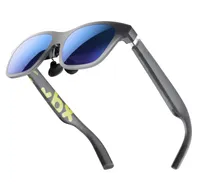
X By Xreal a01+: Cheat Sheet
- What is it? These are budget AR glasses.
- Who is it for? They are ideal for first-time buyers of AR glasses and those who want a good value-for-money option.
- What does it cost? These cost $299.
- What do we like? The super lightweight design feels great on your face, the display is nice and bright, and I do love that customizability of just snapping off the front frame.
- What don’t we like? Keep that stabilization mode turned off, as it does weird things to the picture, colors are a little drained if you don’t use HDR, and there is some edge blurring around the sides.
X By Xreal a01+: Specs
Display |
1080p micro-OLED screens, 1,600 nits peak perceived brightness with HDR10 support, 50 degree field of view, up to 120Hz refresh rate |
Audio |
Stereo speakers |
Price |
$299 |
Dimensions (when open) |
5.8 x 6.7 x 1.7 inches |
Weight |
2.1 ounces |
X By Xreal a01+: The ups
It’s about time we had some competition on the lower end of AR glasses — RayNeo’s been snapping it all up! And Xreal does introduce some new ideas here that are rather great.
Super lightweight and comfortable

Beyond looking like a swanky oversized pair of wayfarers on your face (the usual affair for AR glasses), that 62g weight makes them like a feather atop your ears. Yes, that’s dramatic, but compared to more premium, heavier glasses, these were a breath of fresh air.
And whether it’s the rocket-shaped box it’s packed in (why? No idea) or the bright logo emblazoned on the inside, there’s just something fun about this design. The build quality definitely feels like cheap plastic, which makes me nervous about their longevity. But there is a chaotic upside to this budget design: you can physically rip the front lenses off. It gives me serious Nokia 3210 vibes, and people are already 3D-printing their own custom mods for it.
Just the picture quality you need

When it comes to basic budget glasses, you just need something that’s sharp and bright. The XBXs deliver on that nicely with 1080p micro OLEDs that may be a little less colorful out the box as you’d get from a RayNeo (that’s always been Xreal’s color tuning) but largely matches the sharpness in the center with slightly less edge-blurring than the Air 4 Pro, and they’re much brighter at 1,600 nits peak.
With support up to 120Hz, I had a blast with some high refresh rate gaming when connected to my MSI Claw 8 EX AI+ on several journeys, and the HDR10 support is huge for those moments when you've downloaded content from a service like Apple TV+ on your Mac.
Oh, and shout-out to the AI SDR-to-HDR converter too. The differences are subtle, but the pop of color is definitely noticeable alongside the improved contrast ratio — all while adding very little additional latency to the pipeline. Though to quickly note a couple of things in the features menu:
- HDR options turn the refresh rate down to 60Hz or 90Hz — not a world-ending problem at all, but if you notice a reduced smoothness, that’s why.
- Stabilization works at 120Hz — more on this feature later.

Don’t get me wrong. You’re not getting the cream of the crop (as you should expect in cheap AR glasses). But for the price you’re paying, it’s a solid panel for gaming and entertainment.
X By Xreal a01+: The downs
With budget products, everyone always has one question on their lips: what are the compromises? The XBXs do have a couple worth noting, and a feature that may sound good on paper, but is a little awkward in execution.
Cheap thrills?

Don’t get me wrong. The super lightweight construction does feel good on the face, and there’s a decent amount of flex in the arms to make them fit. But the plastic does feel cheap across the body, which given some of the hinge cracking problems I’ve noticed on more premium Xreal glasses, does make me a bit nervous about the longevity of them.
On top of that, there is no IPD adjustment here. This seems to be par for the course with cheaper AR glasses, so take stock of the XBX’s pupillary distance window (54.5mm to 74.5mm) and measure your own IPD to be doubly sure.
For iOS users, get the EyeMeasure app, and for Android users, OptoExpert does the trick!
Some picture woes - aggravated by Stabilization

So I’ll be upfront and say if your sole purpose is gaming and bingewatching, you’ll be mostly OK with the screen setup here. There’s some edge blurriness that’s definitely noticeable in that 50-degree field of view, but nothing that’s going to take you out of the immersion of what you’re watching or playing.
But two things can break that illusion. First is productivity — these seem to struggle a little with text legibility. If you’re on a word processor or coding, there can be a bit of fuzziness around small text, so make sure you change the magnification of the UI to break through that (something I didn’t have to do with the Air 4 Pros).
And second is that Stabilization mode. On paper, it does exactly what it promises, which is smoothing out the motion of a display if you’re in a bumpy situation (like turbulence on a flight over the Pacific Ocean like I went through). However, to get there, it’s doing some weird things to the image.
To make it do the thing, you can see the picture warp and bend a little, while ghosting a little around fast-moving artifacts like a person sprinting. If motion sickness is something you need to accommodate for, then this is the trade-off for it, but I’d recommend keeping it turned off for the best picture. Plus, I applied the firmware update that was said to fix this, and while lessened, the problem of warping and slight ghosting continued.
Maybe this is the cost of doing business this way? Hopefully something can be done about this feature because it’s a great idea.
X By Xreal a01+: Verdict

And that’s the story of the XBX a01+ — a solid pair of AR glasses that does trade blows in some areas with the kings of budget in the RayNeo Air 4 Pros.
There are some areas where Xreal takes the lead, such as in design, comfort, display brightness and ease of use. But RayNeo shows some maturity in the cheaper tiers with more color and improved sharpness for productivity.
But I must admit, there’s something charming about the design and ease of use, and for the budget-conscious crowd, scrapping the spatial features does cut to the core functionality in a way that makes them feel a lot more focused.
If your main aim is to just have a screen you can play games and watch movies on without the neck pain while traveling, XBX has got your back.