







Whether you're launching a side project or setting up shop for a growing business, if you're looking to create a new site, the thought of building one yourself can be daunting. However, by using one of the best website builders, you can save weeks of frustration. Using the wrong one, however, will just waste your time and money.
I've tested the top website builders hands-on, so you don't have to. Following all this testing, I've come to the conclusion that Wix is the best website builder overall. Its editor gives you creative freedom, its AI tools speed up the build process, and its e-commerce capabilities are strong enough for serious sellers.
However, every builder included in this guide has a niche worth knowing about, so read on to find the best fit for your project. Check out all of the options below to find the best website builder to suit your particular needs.
The quick list
Here's a snapshot of my top picks, with direct links to more comprehensive reviews so you can dig deeper into the builders that interest you.

Wix gives you hundreds of templates, a genuinely powerful drag-and-drop editor, and AI-assisted design tools that speed up the process without sacrificing quality.

Squarespace's templates are some of the best-looking in the business: polished, modern, and hard to mess up. Strong blogging tools, solid e-commerce, and advanced SEO features make it a complete package.

Bluehost's WonderSuite turns WordPress into a guided, beginner-friendly experience with AI-powered setup and a flexible block builder.

GoDaddy's builder is the simplest on this list. If you want a clean site live in under an hour with zero technical fuss, this is the one, though you'll trade in template depth and advanced customization.

Shopify is built for selling, period. If your primary goal is running an online store with serious inventory management, multi-channel selling, and thousands of apps, nothing else here comes close.

Weebly keeps things affordable and approachable, with clean templates and solid Square Online-backed e-commerce. It's great for a simple store or small site, though advanced flexibility is limited.

IONOS offers a massive template library organized by industry, with built-in AI copywriting and email hosting on every plan. Pricing is attractive, too.

Zoho Sites is a smart pick if you're already in the Zoho ecosystem. It's affordable, scalable via add-ons, and the interface is cleaner than you'd expect.

WordPress.com remains the most powerful option for content-heavy sites. The plugin ecosystem is unmatched, but the learning curve is steeper than drag-and-drop builders.
The best website builders of 2026
Why you can trust Tom's Guide Our writers and editors spend hours analyzing and reviewing products, services, and apps to help find what's best for you. Find out more about how we test, analyze, and rate.
The best website builder overall

I keep coming back to Wix because it delivers on creative control. There's a reason why it tops not only this list, but our lists of the best e-commerce website builders and best small business website builders, too.
With over 900 templates and an editor that lets you place elements wherever you want, it's the closest thing to freeform design you'll get without writing code. The drag-and-drop interface enables pixel-perfect placement, and I've built everything from restaurant menus to membership sites without hitting a wall.
If you'd rather skip the blank-canvas approach, Wix ADI (Artificial Design Intelligence) asks a few questions and generates a custom starting point you can publish in hours. I've found it impressively good at matching business type to design. It won't replace a designer, but it gets you 80% of the way there fast.

For those who want to push further, Wix Studio opens up custom forms, dynamic pages, and database-driven content, features that usually require a developer. E-commerce tools cover inventory management, multi-channel selling, subscriptions, and digital products, making Wix a serious contender for online stores, too.
The free plan gives you the full builder to experiment with, and paid plans come with a 14-day money-back guarantee. Support includes 24/7 ticketing and callbacks, plus an in-app help center with guides and video walkthroughs. The SEO Wiz walks you through meta tags and sitemaps step by step.
Wix's Ascend platform ties it all together with lead capture, workflow automation, and email marketing, positioning it as a full business toolkit, not just a page builder.
The catch is cost. Pricing starts with Light at $17 a month (annual billing), which includes a free domain for the first year and 2GB of storage. Core jumps to $29 per month, Business to $39 per month, and Business Elite to $159 per month for priority support and significantly more resources.
- Check out our full Wix review
The best value website builder

Squarespace's templates are, hands down, the most visually polished I've tested. The library is smaller than Wix's, but every design feels professionally crafted and targeted, whether you're building a portfolio, a restaurant site, or a fashion brand. The Blueprint AI system can generate a personalized site from a prompt, which I found usable as a starting point.
I really like the blogging tools here. You get multiple authors, post scheduling, and mobile content creation, with many templates designed specifically for blog-first sites. Monetization options include videos, podcasts, paid newsletters, and Member Areas for premium subscriber content, making Squarespace much more than just a page builder for creators.

The Mobile View feature lets you preview and adjust layouts specifically for phones and tablets, which is a thoughtful addition I appreciate when building for real-world audiences.
My main gripe is the editor. It can be confusing to navigate, especially for beginners, and I still trip over it occasionally despite having used it dozens of times. There's also no free-forever plan; you get a 14-day trial, and that's it.
All four paid plans include a free domain for the first year, unmetered bandwidth and storage, and built-in SSL. Prices range from $16 per month for an annual Personal subscription to $99 per month for the Advanced plan. Make sure you check our Squarespace promo codes page for discounts.
- Read our full Squarespace review.
The best budget website builder

Bluehost has been officially recommended by WordPress.org since 2005, and WonderSuite is the company's answer to the "WordPress is too complicated" criticism. It layers a guided, AI-enhanced experience on top of real WordPress, and I was surprised by how well it smooths out the rough edges.
WonderStart kicks things off by asking about your site's purpose and style, then generates a foundation with relevant images and copy suggestions. WonderHelp provides in-builder step-by-step support without making you leave the page, which I found useful when navigating WordPress for the first time.
The building experience uses WonderTheme (a flexible block-based theme) and WonderBlocks (pre-designed patterns and full-page templates). These blocks auto-populate with your setup info and are fully customizable via drag-and-drop. For e-commerce, WonderCart integrates with WooCommerce and adds promotion tools like "Buy One, Get One Free" offers.

The biggest caveat is pricing transparency. Introductory rates are very attractive (Starter begins at $3.99 per month, with Business at $6.99 and eCommerce Essentials at $14.99), but renewal rates are more than double. Make sure you factor in the long-term cost before committing to a term.
The real strength here is that you're building on actual WordPress. That means full data ownership, the ability to migrate to any host, and access to the entire WordPress plugin ecosystem as your site grows. Unlike proprietary builders, you're never locked in.
- Read our full Bluehost review
The best in-house website builder

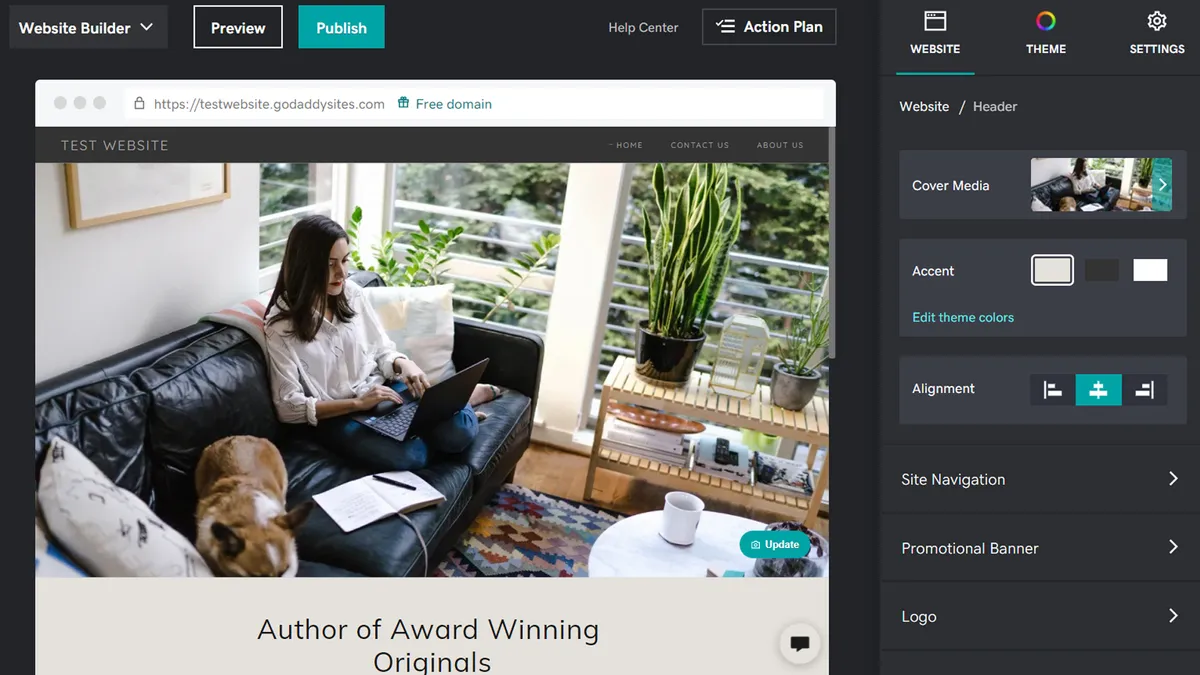
GoDaddy's builder is the one I recommend when someone just wants a site live with the least possible friction. There's no third-party app market or add-ons to navigate. Everything is built in-house, which keeps things clean and ensures compatibility.
The drag-and-drop interface is the most approachable I've tested. Novices can configure a site to their liking using pre-built templates without ever feeling lost. The analytics and support tools are solid, too. GoDaddy offers 24/7 live chat and phone support, extensive tutorials, and an active community forum.
Built-in e-commerce functionality allows you to sell physical and digital goods through GoDaddy Payments, PayPal, Apple Pay, Google Pay, and Venmo. Marketing tools include email campaigns (100 to 25,000 sends per month, depending on plan), social media integration, and an SEO wizard, though for deep optimization, you'll want a more advanced platform.
The template library is small, the designs are functional rather than inspiring, and the online store tools are basic compared to Shopify or even Wix. GoDaddy is the easiest builder on this list, but it's not the most powerful.
Three plans range from $9.99 to $20.99 per month with annual billing. All plans include a free SSL certificate, custom domain connection, a free business email for the first year, and analytics. Advanced plans add marketing, e-commerce, and expanded business features. Prices are significantly higher for shorter subscriptions.
- Read our full GoDaddy website builder review.
The best website builder for e-commerce

If your primary goal is to build a website for e-commerce, Shopify is the best choice for you, hands down. Millions of merchants across 175 countries use it, and having compared the e-commerce tooling across every builder on this list, Shopify's is in a different league.
You can get an online store running in minutes, and Shopify's library of over 8,000 apps allows you to add exactly the functionality you need, from multi-platform selling on Facebook, Instagram, Amazon, and eBay to advanced inventory management and subscription handling. Plus, it supports more than 100 payment options out of the box.

The backend is built for growth. Shopify's inventory system and order management are robust enough for serious scaling, and hundreds of mobile-responsive premium themes ensure your storefront looks professional on any device. Security is strong, too, so you can be assured that any personal information your customers input will be kept safe and secure. Shopify is Level 1 PCI DSS-compliant, which is the highest standard for e-commerce safety.
The current plan lineup is Starter ($5 per month), Basic ($39 per month), Grow ($105 per month), Advanced ($399 per month), and Plus ($2,300 per month). Annual billing is available on the core plans at lower monthly rates. The Starter plan is limited to social selling and link-in-bio setups, so for a full online store, Basic is the real entry point, making Shopify pricier than it first looks.
If you're looking to build a traditional website or blog, Shopify isn't the right tool. Additionally, you should keep in mind that a transaction fee applies to each sale unless you use Shopify Payments, which is worth factoring into your margins.
- Read our full Shopify review.
The best low-cost e-commerce builder

Weebly has been around for a long time, and its partnership with Square Online means e-commerce is baked into the experience. What I like about it is the low barrier to entry. A large chunk of the available templates include a store by default, so getting started is as simple as adding your products and publishing.
The interface is what I'd call simple in the best sense. Templates are well-designed enough that it's hard to build something that looks bad. The editor uses drag-and-drop, but elements snap into pre-coded positions rather than floating freely. If pixel-perfect control matters to you, this will likely feel limiting. However, if you just want a clean site without design mistakes, it'll probably suit your needs.

Weebly's e-commerce tools include a shopping cart, product pages, and integrations with PayPal and Stripe. SEO features and Weebly Promote (an email marketing tool) round things out, though abandoned cart emails require the highest-tier plan, unlike with Shopify.
There's a free-forever plan that lets you create a site and store, though you can't connect a custom domain. Personal ($10 per month) adds domain support, Professional ($12 per month), and Performance ($26 per month) open up more advanced features. All prices reflect annual billing.
- Read our full Weebly review.
The best website builder for EU websites

IONOS is one of Europe's largest web hosts, and its website builder packs an impressive template library organized neatly by industry and genre. What caught my attention is the built-in targeted content system, which lets you display specific messages to different visitor demographics, a feature I don't see on many competing builders.
The drag-and-drop editor requires no coding knowledge, and there's an AI text generator for creating website copy, which is helpful if you struggle with writing compelling content for your pages. Email hosting is included on every plan, too, with options from 2GB to 50GB of storage.

In testing, I found that its performance was solid. IONOS guarantees 99.99% uptime and includes a free Wildcard SSL certificate on all plans. However, some themes may not be fully responsive to screen size, which is something to watch for.
Pricing requires careful attention. The standard Starter plan is $6 per month, and Pro is $17 per month. You'll see the Plus plan promoted at $1 per month, but that's a first-year promotional rate, so expect higher renewal pricing afterward. E-commerce options range from $6 to $44 per month, depending on the tier. There's no free plan, although a paid one-month trial is available.
- Read our full IONOS MyWebsite website builder review.
The best website builder for scaling businesses

Zoho Sites makes the most sense if you're already using Zoho's productivity suite, where the integrations are seamless, and the whole ecosystem works together in ways third-party tools can't match. Even if you're not in that ecosystem, I'd say it's worth a look. It's a solid, affordable builder with 190+ templates and a surprisingly clean interface.
The code editor is a nice touch for those with technical chops who want to tweak things behind the scenes. Add-ons for marketing and customer management are all in-house, which means fewer compatibility headaches but also limited support for external tools, for example, non-Zoho analytics or email platforms.

Communication tools (comment boxes, contact forms), SEO tools, and sitemaps are included, along with password protection and SSL. Zoho Sites also integrates with Google Analytics and Mailchimp for those who need outside connections.
Pricing is straightforward. Starter is $5 per site per month (billed annually) with limits on storage (500MB), bandwidth (10GB), and page count, which is sufficient for a simple site. Pro is $17 per site per month with higher limits and extras like newsletter subscriptions and blog scheduling. Monthly billing is available at $8 per month (Starter) and $23 per month (Pro). Paid add-ons let you scale pages, contributors, and member portals as you grow.
- Read our full Zoho Sites review.
The best website builder for blogging

WordPress.com started as a blogging platform and it still excels at content-heavy sites like blogs, news sites, portfolios, and anything where publishing is the core activity. If your site is primarily about putting out content, this is where I'd start looking. The ecosystem of over 50,000 plugins is unmatched.
The Gutenberg block editor gives you structured drag-and-drop customization, and Premium plans unlock CSS editing for finer control. During testing, I found the interface had a steeper learning curve than Wix or GoDaddy, especially for absolute beginners, but the payoff in flexibility is real once you're comfortable.

When I used it during testing, I was pleased with the way its built-in SEO tools, social media integration, and monetization options (ads on Premium+, payment blocks on all plans) functioned. Its e-commerce functionality is handled via WooCommerce on Business and Commerce plans, with automatic tax calculation and multiple payment gateways.
Support varies by tier: all users get the knowledge base and community forums, while paid plans add email and live chat (24/7 on Premium+).
Pricing starts with Personal at $3.25 per month (billed every two years) with 6GB storage. Premium is $6.50 per month with 13GB and advanced design tools. Business at $20 per month unlocks the plugin ecosystem with 50GB storage. Commerce at $36 per month adds dedicated e-commerce tools. The lower tiers are limited, but the scalability makes WordPress a strong contender for sites planning serious growth.
- Read our full WordPress review.
The best website builders, compared
Website builder |
Lowest pricing plan |
Storage |
Bandwidth |
|---|---|---|---|
$17 a month |
2GB |
Unlimited |
|
$16 a month |
Unlimited |
Unlimited |
|
$3.99 a month |
10GB |
Unlimited |
|
$10.99 a month |
Unlimited |
Unlimited |
|
$5 a month |
Unlimited |
Unlimited |
|
$10 a month |
Unlimited |
Unlimited |
|
$1 a month |
Unlimited |
Unlimited |
|
$5 a month |
500MB |
10GB |
|
$3.25 a month |
6GB |
Unlimited |
Website builders FAQs
What is a website builder?
A website builder offers end-to-end site creation, via templates, a visual editor, and extra advanced tools. They are extremely beginner-friendly and often provide a drag-and-drop editing interface.
No prior coding or technical experience is required, and they're a great option for creating a simple site quickly. Some offer significantly more design flexibility, and can even provide coding access for advanced editing.
How much do the best website builders cost?
With website builders, there’s no one set price. From free plans for simple sites up to professional, advanced services, most platforms charge per month. For basic sites, you can expect to pay around $5 to $20 per month, and around $30 per month for ecommerce sites.
It’s important to remember that any additional tools, plugins, and features will cost extra. Consequently, it’s worth researching what you need, what’s included, and what to budget for. It's also handy to look into scalability tools, should your site need to grow.
What's the difference between a website builder and web hosting?
Traditionally, web developers had to create code for a new site, then upload this to a web host’s servers, where it would be delivered to visitors. The same principles still apply, and many high-end sites are still built like this.
However, the best website builders offer all-in-one site creation solutions that simplify things significantly, with various tools, an editor, and web hosting included.
Should I use a free website builder?
If you're wondering whether to choose a free website builder, a premium plan is best if you want to utilize ecommerce or marketing. However, a free builder will be more than good enough for simpler sites or smaller personal projects.
Wix’s free-forever plan, for example, provides access to the entire builder, so you can create a site without spending a cent. However, limitations include ads, the inability to connect a custom domain name, and restricted storage and bandwidth. If you're looking for ecommerce or marketing features, or want a professional business site, a premium plan is always best.
This is a great example of the contrast when comparing free website builders vs paid: a free builder will often be good enough for small personal projects, but business users should pay for a premium subscription, or look for the best cheap website builder deals to find a top service for less.
WordPress vs website builders: which is better?
WordPress and website builders design, create, and publish sites. Builders offer site creation, technical management, hosting, security, and a domain. You only have to worry about design and maintenance; most require no coding knowledge, and they're designed to be used by those with limited technical backgrounds.
WordPress can’t be used without a third-party hosting provider, as it's an open-source CMS. It provides more technical freedom, and effectively gives you control over every aspect, though its complexity can mean common website mistakes are made. In general, use a website builder if you’re thinking about putting together your own site.
How to choose the best website builder for you
With so many different factors to consider, choosing from the best website builders can be difficult. The learning curve is key, and most users opt for builders because CMSs are too complex or time-intensive.
We recommend considering your level of experience: some builders require a high level of technical knowledge to use properly, while others are extremely intuitive and designed specifically for beginners. Experienced users have options including WordPress, for which you'll need plugins and WordPress hosting from the best web hosting services.
Develop a clear plan of your site's look, purpose, and budget before you start. Most builders offer free trials or free plans, which makes them easy to test. Pay careful attention to tools: look for strong ecommerce support for online stores. Similarly, look for templates when building a portfolio site.
Don't compromise on quality for ease of use: the best builders have strong template collections and powerful drag-and-drop editors. After-sales support is key, as you might find it difficult to diagnose and fix issues. Most come with extensive knowledge bases and resource libraries, but live support options vary extensively. Pay careful attention before you buy: look out for good live chat and phone support, to ensure you’ll bounce back quickly.
Ultimately, consider the specific nature of your business: a small business website builder might be what you're looking for, or you may need to build an enterprise website. You can then decide which providers are best for the site you want.
How we review the best website builders
When we review website builders, we test the site editor to judge its difficulty level, so that we can notify potential users whether it's suitable for beginners or if it's designed for those with more website creation experience.
Via trial access to leading platforms, we test out each builder comprehensively and study each given service's tools and features, such as any AI tools or unique elements that might set it apart from the competition. We then trial the provider's customer service knowledge and support response times, as these factors are key to a site's successful operation and a service's suitability for customers.
A significant element of any website builder's offerings is price: we establish how a service's pricing and payment plans work because very often, initial monthly costs can increase after your first term. Finally, we compare builders against one another so as to give you the best possible chance of finding the best website builder for you in a crowded market.
See our testing methodology page for further information.
Next steps with website builders and web hosting
At the end of the day, every builder is different. It's important to understand that they can be powerful and easy-to-use, and are often suited to different needs. It's important to remember that powerful and easy-to-use aren’t mutually exclusive when building a website.
We recommend that you take some time to discover the differences between web hosting, WordPress, and website builders. Learn more about what web hosting is, and how to choose a web hosting service.

