How to Turn on Color Blind Mode in Android 5.0
If you're like one of the millions of color deficient tech users, here's how to turn on the color blind modes in Android 5.0.
Here at Tom’s Guide our expert editors are committed to bringing you the best news, reviews and guides to help you stay informed and ahead of the curve!
You are now subscribed
Your newsletter sign-up was successful
Want to add more newsletters?
Daily (Mon-Sun)
Tom's Guide Daily
Sign up to get the latest updates on all of your favorite content! From cutting-edge tech news and the hottest streaming buzz to unbeatable deals on the best products and in-depth reviews, we’ve got you covered.
Weekly on Thursday
Tom's AI Guide
Be AI savvy with your weekly newsletter summing up all the biggest AI news you need to know. Plus, analysis from our AI editor and tips on how to use the latest AI tools!
Weekly on Friday
Tom's iGuide
Unlock the vast world of Apple news straight to your inbox. With coverage on everything from exciting product launches to essential software updates, this is your go-to source for the latest updates on all the best Apple content.
Weekly on Monday
Tom's Streaming Guide
Our weekly newsletter is expertly crafted to immerse you in the world of streaming. Stay updated on the latest releases and our top recommendations across your favorite streaming platforms.
Join the club
Get full access to premium articles, exclusive features and a growing list of member rewards.
There are three types of color blindness, which encompasses the inability to perceive color differences. Approximately 8 percent of men and 0.4 percent of women of Northern European decent suffer from color blindness or some sort of color deficiency. That means in the U.S. alone, around 12 million people don’t see the same shades. To help address this problem, Google added a color correction feature to Android 5.0 Lollipop to help people with color blindness better use their mobile devices. Here’s how to enable those settings.
MORE: Android 5 Lollipop: A Guide to the Best New Features

1. Open up the Settings menu.
2. Tap System > Accessibility.
3. Tap the Color correction option.
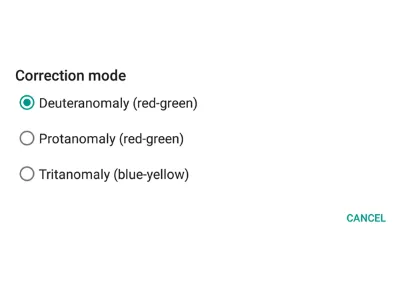
4. Select from one of three color blind modes.
Deuteranomaly (red-green) is the most common type of color blindness, and is characterized by a decreased sensitivity to green light. Protanomaly (red-green) is a reduced sensitivity to red light. Tritanomaly (blue-yellow) is extremely rare, and is cased by an inability to perceive blue light.
Get instant access to breaking news, the hottest reviews, great deals and helpful tips.
5. Tap the slider in the top right corner of the screen to activate this feature.
Visit the Tom's Guide Android Forums to find even more Android news, tips and help.
- How to Search for a Setting in Android 5.0
- How to Block Interruptions in Android 5.0
- How to Add a New User or Guest Account in Android 5.0
- How to Turn on Smart Lock in Android 5.0
- How to Turn on Battery Saver Mode in Android 5.0
- How to Hide Info on the Lock Screen in Android 5.0
- How to Stop Apps from Auto-updating in Android 5.0
- How to Turn on High Contrast Mode in Android 5.0
- How to Increase Text Size in Android 5.0
- How to Set Google Now to Always On in Android 5.0
Sam Rutherford is a staff writer at Tom’s Guide. Follow him @SamRutherford on Twitter, and Tom’s Guide on Twitter, Facebook and Google+.
Sam is a Senior Writer at Engadget and previously worked at Gizmodo as a Senior Reporter. Before that, he worked at Tom's Guide and Laptop Mag as a Staff Writer and Senior Product Review Analyst, overseeing benchmarks and testing for countless product reviews. He was also an archery instructor and a penguin trainer too (really).