



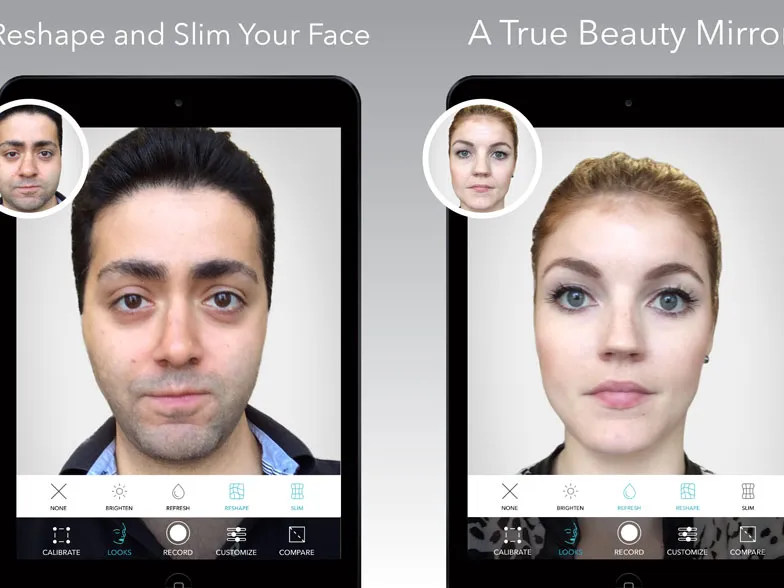

Forget apps that beautify your selfies. This free iOS app is like watching yourself get plastic surgery in a flash. The Beauty Mirror app reshapes an image of your face in real-time so you can see what you would look like if your nose were smaller or your eyes were bigger.
All too familiar with Adobe Photoshop and the plethora of selfie-beautifying apps, I am rarely impressed or surprised by yet another face-perfecting program. But Beauty Mirror's 3D and real-time features were intriguing, if poorly executed.
MORE: Best Augmented Reality Apps
Touting itself as a "true beauty mirror," the new app lets you test out a number of plastic surgery-like facial adjustments. After you install and start the app, you'll have to frame your mug in an oval and tap the screen to start scanning. The process took less than a second.
You get to choose from four "Looks" or 14 filters (under the Customize tab) that adjust parts of your face such as jaw line, eye and nose size, and lip plumpness. Each "Look" is applied to your overall face while each "filter" fixes a specific facial element. I tried each of them out and found the Reshape and Slim looks to be the most dramatic. To me, my face looked like it had caved in from the sides, but to someone who hadn't met me before, my new face would have looked normal.

You can also stack the filters and effects on top of each other, applying all of them at once (although I found that results in a pseudo human-looking face). Freak your friends out by recording a clip of yourself testing out these looks. There's no limit on the length of video you can record, so it only depends on how much storage you have on your device.
As I moved my head to check out other angles, I was amused by the app struggling to keep the effects in place. It was actually quite creepy to see my face look like it was being punched by invisible goblins as I turned my head left and right.
For the most part, I found the filters limited. You can pay to unlock sliders to adjust the level of each fix. In the free version though, you can only choose to have each effect on or off. A door frame behind me became crooked when I applied the Reshape and Slim looks. Hopefully, these effects will get better over time as the developers improve their algorithms.
For now Beauty Mirror is only available for iOS devices, but the makers aim to bring it to Android in August. The team is working with brands, such as fashion and cosmetics labels, to bring this feature to more consumers.
- Essential iPhone Security Tips to Keep Your Data Safe
- 15 Best Apps Only on iOS
- Best Smartphones Available Now
Follow Cherlynn Low @cherlynnlow and on Google+. Follow Tom's Guide at @tomsguide, onFacebook and on Google+.

