




Nintendo's Switch Joy-Cons are a masterstroke of controller design, but if you really want to get into those Switch games, you'll want one of the best Nintendo Switch controllers. Customizability, a more comfortable experience and nicer buttons under your finger — there are plenty of reasons you might want to pick up a different interface.
We've spent hours and hours testing all the best Nintendo Switch controllers we could get our hands on, from premium options to budget controllers that won't break the bank. We even plug them into a Hardware tester to really check them out — they've been through the wringer by the time we're done.
The best controller? Nintendo's very own Switch Pro Controller, thanks to great buttons and a comfortable layout. Want something cheaper? Pick up the Gamesir T4 Kalied.
Got a switch 2? All of these controllers will work, but don't forget to check out the best Switch 2 controllers to get a brand new gamepad with more tailored features.
With all that said, here's our pick of the best Nintendo Switch controllers that you can find right now below.
The best Nintendo Switch controller overall
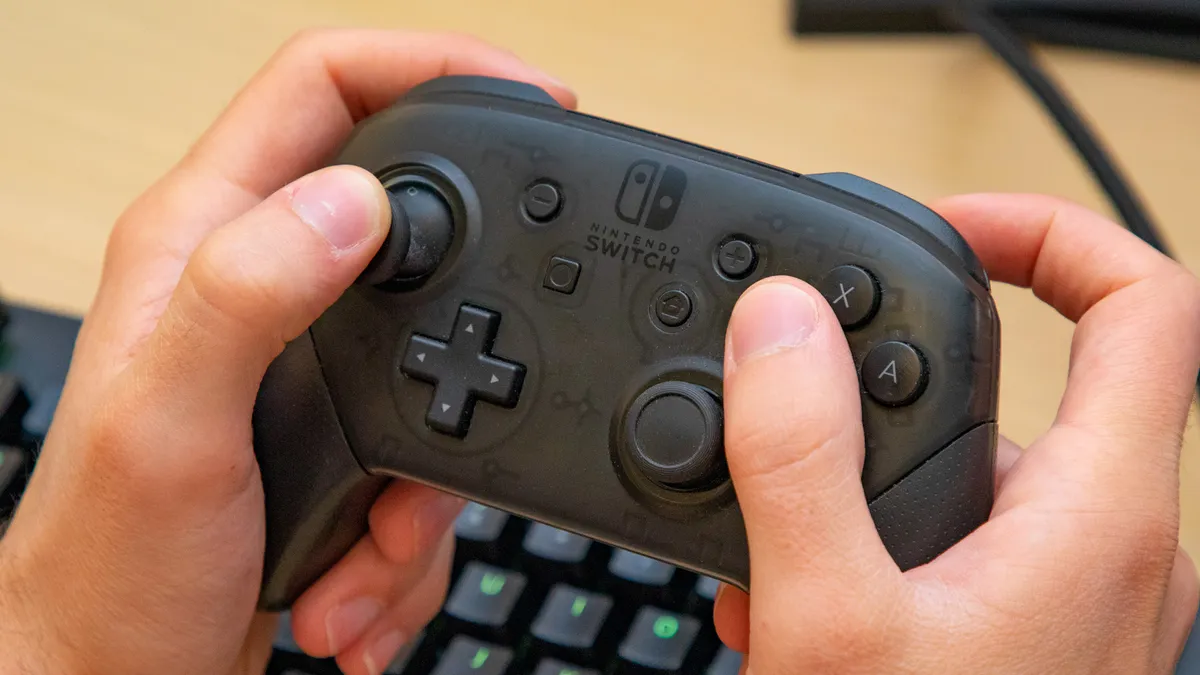
Even by The Big N’s standards when it comes to creating first-class, first-party gamepads, the Nintendo Switch Pro Controller sets new standards. It’s pretty much the perfect pad to pair with the handheld hybrid when playing your favorite games in either docked or tabletop mode. Unlike some of the other controllers on this list, it also includes the same HD Rumble seen in the Joy-Cons. It supports motion controls, too. Meaning you can aim by moving the pad, which can come in handy for precision targeting in a game like Splatoon 3.
I’ve been using the Pro Controller since the first day I bought my Switch, and I honestly think it’s the greatest gamepad the company has ever made. Its stick and button placement feel natural, I’ve never once suffered from the dreaded stick drift on my Pro and every button on the controller feels as snappy to press down as the day I held it for the first time. I like it so much, I own two of them.
$70 does feel a little on the high, though, a matter that’s even more frustrating when you realize Nintendo almost never puts the Pro Controller in a sale. Still, you get what you pay for and there’s no question this gamepad feels premium. If you’re looking for something cheaper with a similar design, the Power A Enhanced Wireless Controller starts at $50 and is also frequently discounted.
If you’re a big PC player, the Pro works brilliantly with many Steam games. Valve has even given you the option to switch to the Pro Controller’s layout, via the “Use Nintendo Button Layout” under controller settings. The Nintendo Switch Pro Controller is a phenomenal gamepad. I just wish it cost $20 less.
- Read the full Nintendo Switch Pro controller review
The best Nintendo Switch controller on a budget

The GameSir Super Nova is one of the cheapest Switch controllers featuring Hall Effect triggers and thumbsticks, and it's our new pick for gamers on a budget. That's not a huge surprise, either, as another GameSir pad previously occupied this spot on the list: the GameSir T4 Kaleid.
At around $45, the Super Nova is a budget-conscious but seriously responsive of hardware, one that offers plenty of features at a more reasonable price point than the official Switch Pro controller. Plus, it has the added benefit of being a wireless controller and one which can be used across the Switch family, PC and Android devices, making it a great way to level up your gaming experience across your systems.
Even though the reprogrammable back buttons are slightly awkward to reach, and the battery life is a little disappointing, it comes with a dedicated charging dock to mitigate against any battery woes. Plus, the range of features, customizability options, the user-friendly companion software, and the comfortable design (which includes textured grips) meant it scored very highly during our review process.
If you can contend with the asymmetrical, Xbox-style layout and remember to plug it in regularly, the GameSir Super Nova is a great pick-up for any Switch gamers who don't want to break the bank.
- Read our full GameSir Super Nova review
The best Nintendo Switch controller for features

The 8BitDo Ultimate Bluetooth can often be found at Amazon for as little as $60, making it a cheaper alternative to the Nintendo Switch Pro Controller and a rival that also packs in a few extra features to justify its higher price. As someone who likes to save money when buying gamepads, I know that makes the 8BitoDo Ultimate an enticing prospect.
So what exact additional features do you get here that the official Pro Controller doesn’t offer? For starters, you get a charging dock that you can use to store the Ultimate when you’re not playing. Likewise, there are two remappable buttons on the backside of the 8BitDo Ultimate Bluetooth. 8BitDo uses Hall Effect sensors for its joysticks, which means this controller won’t develop stick drift. And trust me, you do not want stick drift.
Besides connecting this controller to your Switch using Bluetooth, the charging dock also includes a 2.4 Ghz USB dongle, which is a handy additional extra I appreciate. This dongle can be plugged directly into the Switch’s dock or you can use a USB-C cable to connect the 8BitDo Ultimate Bluetooth’s charging dock to the Switch itself since it also has a USB port for the dongle.
If the price of this controller is a bit too high for you, 8BitDo also sells a wired version of its Ultimate controller for the Switch for just $35. Either way, you’re getting an extremely comfortable Switch controller with an excellent D-pad, programmable rear buttons — I have an almost unhealthy love of back buttons on gamepads — and multiple profiles that you can swap on the fly.
- Read our full 8BitDo Ultimate Controller review
The best customizable Nintendo Switch controller

If you’ve ever used Microsoft’s Elite Series 2 Controller with your Xbox or PC and want a similar experience on the Switch, then let me introduce you to the PowerA’s Fusion Pro. This smart and stylish controller comes with a carrying case, two swappable magnetic faceplates, short and tall analog sticks and a Pro Pack with four remappable buttons. The PowerA Fusion Pro’s injected rubber grips make it comfortable to hold for long periods of time — something I’ve definitely found to be the case. Those anti-friction rings in the faceplates prevent wear and tear on its analog sticks, which is another feature I appreciate as a guy who has lost too many pads to said tears over the years.
The PowerA Fusion Pro connects to your Nintendo Switch wirelessly over Bluetooth but you’ll need to plug in the included 9.8 foot braided USB-C cable if you want to plug headphones into the controller’s 3.5mm audio jack. While you do get plenty of customization options and four programmable back buttons, you are missing out on rumble and NFC.
There’s no denying the lack of rumble is a bitter pill to swallow, yet I actually prefer the analog sticks on the FusionPro over the official Pro Controller’s ones, as they feel considerably smoother. When you boil it down, there’s no other Switch controller out there quite like the PowerA Fusion Pro. So if you’re looking for a more hardcore Switch gamepad and can live with the loss of rumble, then you should definitely consider this highly customizable peripheral.
- Read the full PowerA Fusion Pro review (Xbox version)
The best Nintendo Switch controller for designs

If you’re not willing to pay $70 for either the Nintendo Switch Pro Controller or the 8Bitdo Ultimate Bluetooth, then the PowerA Enhanced Wireless Controller is a great choice. It features a similar layout to both of these controllers and also has two programmable back buttons you can remap on the fly.
The PowerA Enhanced Wireless Controller is also worth considering if you want a controller with a design to match your favorite Nintendo Switch game since there are Mario, Zelda, Animal Crossing, Pixachu and plenty of other variants to choose from.
Another thing worth noting about the PowerA Enhanced Wireless Controller is that it’s extremely lightweight. This is likely due to the fact that it’s powered by two AA batteries instead of a built-in battery pack. As a result, it’s easy to swap in new batteries quickly and you can also rechargeable batteries with it if you want.
The PowerA Enhanced Wireless Controller starts at $60 and frequently goes on sale. However, there’s also a cheaper wired-only version as well as a Nano version for children and those with smaller hands.
- Read our full PowerA Enhanced Wireless Controller review
The best GameCube Nintendo Switch controller

You really can’t come much closer to a WaveBird 2.0 than this. The NYXI Wizard is another unique controller on this list for several reasons. Like I just mentioned, it has a GameCube style button layout with a larger A button in the center. And said layout instantly brings back fond memories for me of playing Luigi’s Mansion and Wave Race: Blue Storm the night Nintendo’s purple little box launched back in 2002.
The Nyxi Wizard can also be used wirelessly as a full-sized controller or attached to either side of my Switch in handheld mode. The NYXI Wizard even packs in some Pro-level features like backlit face buttons, two programmable back buttons and Hall Effect joystick sensors to prevent stick drift.
If you grew up playing GameCube games or are an avid Super Smash Bros. Ultimate player, not only will you appreciate the NYXI Wizard’s button layout but also the fact that it comes with swappable joystick rings. This way, you can have octagonal joysticks like on the GameCube or circular ones like those found on all modern controllers.
It’s worth noting that with the NYXI Wizard attached to the Switch, the console feels a lot larger and is almost the same size as Valve’s Steam Deck. Likewise, when used as a wireless controller, it’s a lot larger than a traditional GameCube controller. Still though, if you prefer the GameCube’s controller layout or have larger hands, the NYXI Wizard is a very unique controller with plenty of interesting features. The perfect gift for that GameCube fan in your life.
- Read our full NYXI Wizard review
Also Tested
How to choose the best Nintendo Switch controller
Although the Nintendo Switch’s Joy-Cons are excellent controllers right out of the box, they can be a bit small for playing in docked mode and have a habit of developing stick drift over time. This is why you may want to pick up one of the best Nintendo Switch controllers from this list instead.
When it comes to picking the right Nintendo Switch Controller for you, there are a few things you want to consider first. Are you okay with a wired controller or do you want to play wirelessly while sitting on your couch? Do you prefer playing in handheld mode or do you like playing your Switch on one of the best TVs instead? Button layout is another important factor but fortunately, you can choose between Switch style or GameCube style controllers. The same goes for your controller’s joysticks as some people prefer staggered joysticks while others prefer asymmetrical ones. The best thing about the Nintendo Switch though is that you have plenty of different controller options to choose from.
How we test the Best Nintendo Switch controllers
Just like with the best PC game controllers, we put all of the Nintendo Switch controllers on this list and the ones we review through extensive hands-on testing. This includes using them to play a variety of different types of games in handheld, tabletop and docked mode. We also use and test out their special features like programmable back buttons, motion controls and see whether or not they can wake up the Nintendo Switch from sleep.
Besides hands-on testing, we also plug in the best Nintendo Switch controllers to a PC and use Hardware Tester’s Gamepad Tester to make sure that all of their buttons and joysticks work as they should. When it comes to multiplatform Switch controllers, we also test them out on all of the systems they support. For more information, check out our how we test page for Tom’s Guide.

