







The best Wi-Fi 6 and Wi-Fi 6E routers are an affordable and high-value upgrade that can take your home network to the next level with faster speeds, lower latency and support for more connected devices. If you’re using an older router or one rented from your internet provider, these devices will eliminate Wi-Fi dead zones and give you greater control over your home network.
At Tom's Guide, our team of Wi-Fi experts tests routers of all kinds in real-life conditions, including in a multi-story house, to accurately test throughput, range and more at multiple distances and locations. We have all the data needed to help you find the Wi-Fi 6 or 6E router for you, and I'm here to guide you to the right purchase.
Right now, the Asus RT-AX86U, with its excellent close-range speeds, is our top pick, but there's more to fit different needs. So, let's dive in to find the best Wi-Fi 6 routers you can buy right now
Should I upgrade to Wi-Fi 7?
In case you missed it, you can now choose the best Wi-Fi 7 routers, offering next-gen connectivity for even faster speeds and far-reaching range. However, Wi-Fi 6 and Wi-Fi 6E routers are still well worth considering. These offer tremendous value and will still be a major upgrade, especially if you've yet to see the benefits these have to offer.
Wi-Fi 6 connectivity first started to appear in 2019, while the first Wi-Fi 6E routers started appearing in 2021. With 6E, we were getting access to the faster 6 GHz band, along with both the 5 GHz and 2.4 GHz bands. 6 GHz offers even faster speeds than 5GHz at around 15 feet away.
Now, with Wi-Fi 7 debuting in 2024, the next generation of connectivity has found its feet, meaning you can find a Wi-Fi 7 router easily and make even more use of its connections with compatible devices. Take note, though, that Wi-Fi 7 also offers the same tri-band connectivity as Wi-Fi 6E, so you're still getting plenty of benefits.
However, not only can you have more devices connected to a Wi-Fi 7 router, but they can also go a lot faster. Wi-Fi 7 has a bigger bandwidth and a higher max speed at 46 Gbps, while Wi-Fi 6E reaches 9.6 Gbps. And yes, Wi-Fi 6 is fully backwards compatible with Wi-Fi 6 and older standards. That said, if your internet plan doesn't reach the heights of Wi-Fi 7, and you don't require the higher bandwidth, then Wi-Fi 6 or 6E routers are fantastic, value-driven options (they're more affordable now, after all). Want to learn more? Find out the difference between Wi-Fi 6 and Wi-Fi 7.
Meet our testers

As someone who's been working from home for the past six years, Anthony Spadafora has tried everything from Wi-Fi extenders to powerline adapters to get the most out of his home network before finally upgrading to a mesh Wi-Fi system. Along the way, he's tested out loads of different routers and network configurations. Based on what he's learned, Anthony tries to highlight the critical role Wi-Fi routers play in our day to day lives and how a mesh network can help solve the most common connectivity issues like Wi-Fi dead spots.

With experience in testing, using and evaluating wireless data from before Wi-Fi was even a word, Brian Nadel has tried out and reviewed every major router available in his home networking lab. A LAN nerd, his philosophy is to use the router the way you would, testing networking gear for ease of setup, performance, security and above all for value. The result is peace of mind when it comes to choosing the right router.
The best Wi-Fi 6 routers you can buy today
Why you can trust Tom's Guide Our writers and editors spend hours analyzing and reviewing products, services, and apps to help find what's best for you. Find out more about how we test, analyze, and rate.
The best Wi-Fi 6 router overall


The Asus RT-AX86U is my top recommendation for anyone who needs a powerful dual-purpose Wi-Fi 6 router, excelling at both general connectivity and dedicated gaming performance.
Even though it is an older model and lacks Wi-Fi 6E, this router delivers great wireless speeds and exceptional wired performance, thanks to its multi-gig input port, which also serves as a dedicated gaming port. With its unique vertical design and inclusion of built-in security software, the RT-AX86U will serve you well for years to come.
In his review, the RT-AX86U served Brian Nadel well as both a general-purpose and gaming router, demonstrating excellent throughput up close. It hit a max speed of 929.7 Mbps at close range (15 feet), and impressed with a usable 250.1 Mbps all the way out at 75 feet, proving its respectable total range of 95 feet.
Where the RT-AX86U truly shone was its wired performance: you can combine two of its Ethernet ports to enable link aggregation for even faster multi-gig speeds to a single device, and it also excelled at signal penetration, pushing 698.5 Mbps through a wall at 25 feet.
The vertical-only design of the RT-AX86U sets it apart from standard flat routers, making it ideal for placement on a bookshelf and easier cable management. As for physical connectivity, you get the aforementioned multi-gig input port along with four gigabit Ethernet ports and two USB ports for easy data sharing across your network. Beyond hardware, Asus includes its excellent AiProtection Pro security software for free, offering comprehensive network protection and robust parental controls without an extra subscription fee.
If you want a fast Wi-Fi 6 router that doubles as a gaming router, the Asus RT-AX86U certainly delivers and then some, thanks to its unique design and extra features.
Read our full Asus RT-AX86U review.
The best budget Wi-Fi 6 router
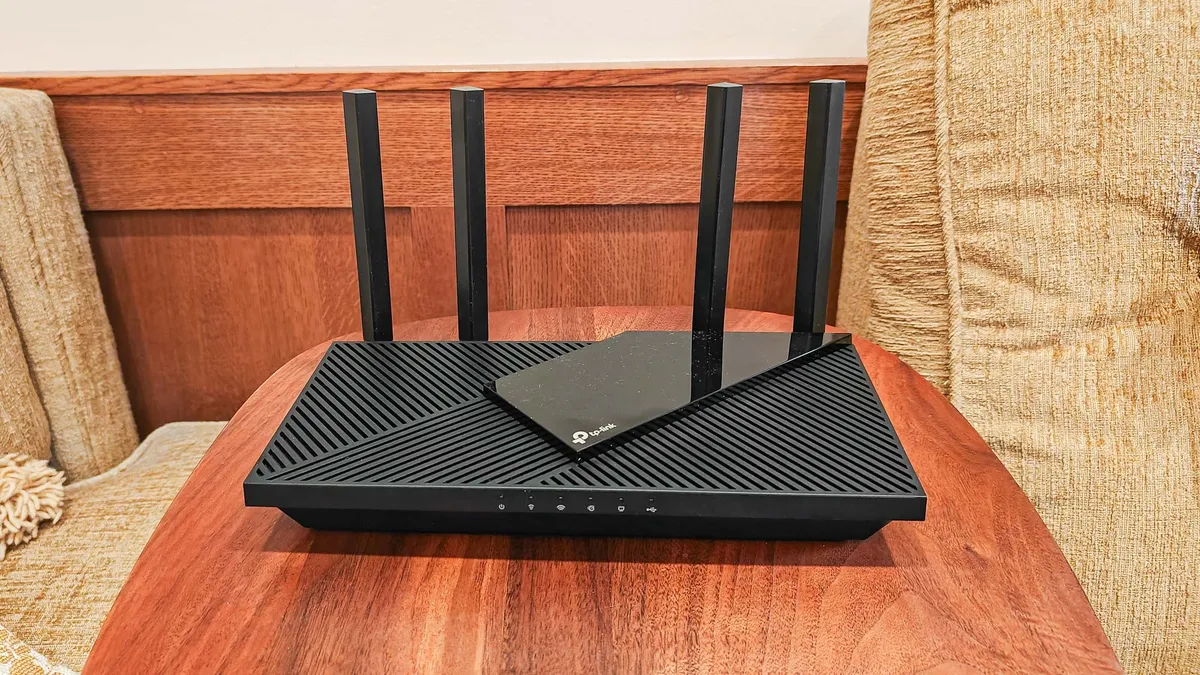


The TP-Link Archer AX55 is our favorite budget Wi-Fi 6 router, proving you don’t have to spend a fortune to get a fast and capable device. Despite costing just over $100, this wallet-friendly router delivers great speeds close up and at middle distances for those with gigabit internet plans.
While it may not be the flashiest option on this list, it provides enough ports for all of your wired devices and stays cool under pressure thanks to the extra air vents on the top of the device.
During his tests, Brian recorded an excellent max download speed of 823.7 Mbps at close range (15 feet). Then at 50 feet, the AX55 was able to hit a very respectable 288.4 Mbps, which put it above the similarly priced Reyee RG-E5. The router also showed surprising longevity in our range tests: while speeds dipped to 89.6 Mbps at 75 feet, it actually managed to beat the more powerful TP-Link Archer AX6000 gaming router at 90 feet, which was offline at that distance.
The AX55 features a classic design that isn’t overly flashy, but I really like how those vents at the top are arranged in a geometric pattern. In terms of ports, you get a gigabit input and four additional gigabit Ethernet ports, plus a USB port to easily share data across your network. Beyond the hardware, I’m also happy that TP-Link offers great user flexibility with both app and browser-based setup for the AX55 — a feature you typically don’t see with other budget routers.
If you want a reliable Wi-Fi 6 router that won’t put a dent in your wallet, the TP-Link Archer AX55 is easy to recommend, especially for those in smaller homes or apartments who don’t have a multi-gig internet plan.
Read our full TP-Link Archer AX55 review.
The best Wi-Fi 6 router for large homes



The TP-Link Deco XE75 is our top recommendation for a Wi-Fi 6E mesh system as it offers an affordable way to eliminate dead zones around your home for good.
At $300 for a three-pack and with the ability to cover up to 7,200 square feet with a strong Wi-Fi signal, it makes for an inexpensive upgrade that can be a true game changer for your entire household. In fact, when expert Anthony Spadafora first upgraded to one of the best mesh Wi-Fi systems, this is the exact model he chose, and it served him well without issues for years.
Since the Deco XE75 is a tri-band device which gives you access to the faster 6 GHz band (along with the standard 2.4 and 5 GHz ones), it’s no surprise that it performed quite well at short range in Brian’s tests. At close range (15 feet), he saw a max download speed of 1.22 Gbps. As Brian moved further away from the router during testing, it switched back to the 5 GHz band and still managed to hit a respectable 299.1 Mbps at 50 feet. Then at 75 feet, the Deco XE75 actually picked up speed to 318.5 Mbps, beating out the more expensive Linksys Atlas Max 6E and even the Netgear Nighthawk RAXE500.
Design-wise, the cylindrical Deco XE75 units are interchangeable, so any one of them can serve as your main router while the others act as satellites to carry your Wi-Fi signal further. Around back, you get three gigabit Ethernet ports, which should be enough for most people with gigabit or lower internet speeds.
The Deco XE75 is a fantastic and affordable choice, and we found the Deco app to be incredibly simple to use for setup and management.
Read our full TP-Link Deco XE75 review.
The best Wi-Fi 6 router for gaming


The Asus ROG Rapture GT-AXE11000 is our recommendation for a blazing-fast Wi-Fi 6E gaming router. I like that Asus sweetens the deal with free, built-in security software, excellent customization options and loads of useful gaming features.
While the GT-AXE11000 was priced over $500 at launch, it’s since come down to a more affordable $399, which means it's still one of the best gaming routers, but for even less.
In his testing, Brian was absolutely blown away by the GT-AXE11000’s download speeds up close. For instance, at close range (15 feet), it managed to hit a max speed of 2.96 Gbps, which makes it faster than some of the best Wi-Fi 7 routers he’s tested since this review.
As Brian tested the GT-AXE11000 at further distances, though, speeds quickly fell off as the router switched from the faster 6 GHz band to the 5 GHz and then the 2.4 GHz bands. Still, it kept up a respectable 267.9 Mbps at 50 feet, which was better than Netgear’s Nighthawk RAXE500 at the same distance.
Given that most gamers would rather plug their PC or console in via Ethernet, the GT-AXE11000 is packed with ports. Not only do you get a 2.5 GbE input port — which I like that it doubles as a dedicated gaming port — but you also get four standard gigabit Ethernet ports and two USB ports for data sharing. Design-wise, the router features its iconic angular chassis and built-in RGB lighting, which you can customize.
With Asus’ useful AiProtection security software and its wide suite of ROG gaming features, you’re getting a complete package here.
Read our full Asus ROG Rapture GT-AXE11000 review.
The best Wi-Fi 6 router for VPN


The ExpressVPN Aircove is my recommendation for VPN users who want a hassle-free way to encrypt and anonymize every device in their home. This small, compact Wi-Fi 6 router is actually a VPN router that makes it a breeze to connect multiple devices to ExpressVPN — which is one of the best VPN services overall based on our testing.
Even without a VPN subscription (you get one year of ExpressVPN free with it), it’s still a speedy Wi-Fi 6 router with all the ports you could need.
During his testing, Brian found the Aircove to be a relatively fast Wi-Fi 6 router that hit a max download speed of 788.3 Mbps at close range (15 feet). It kept up the pace at 50 feet, beating the TP-Link Archer AX55 by over 100 Mbps at 419.7 Mbps. The Aircove continued to perform well at 75 feet with a 216.8 Mbps download speed. Likewise, it was still online at 90 feet with speeds of 15 Mbps with a total range of 105 feet.
Just like the AX55, the Aircove sports a standard, all-black router design. However, at 8.3 x 5.9 x 1.4 inches, it’s quite compact, which I think makes it a great travel router, too. In terms of ports, you get a gigabit input port and four gigabit wired ports — a sufficient number for a device this size.
Although the ExpressVPN Aircove is more expensive than a traditional router, if you’re a VPN user looking for the extra convenience of quick connections on the go or at home, I believe this specialized router is definitely worth the price.
Read our full ExpressVPN Aircove review.
Testing results
| Header Cell - Column 0 | 15 Feet |
50 Feet |
75 Feet |
90 Feet |
|---|---|---|---|---|
929.7 Mbps |
285.3 Mbps |
250.1 Mbps |
7.4 Mbps |
|
823.7 Mbps |
288.4 Mbps |
89.6 Mbps |
15.0 Mbps |
|
1.22 Gbps |
299.1 Mbps |
318.5 Mbps |
23.7 Mbps |
|
2.95 Gbps |
267.9 Mbps |
98.3 Mbps |
N/A |
|
788.3 Mbps |
419.7 Mbps |
216.8 Mbps |
15.7 Mbps |
Also tested
Frequently Asked Questions
When should I replace my old router?
A high-quality Wi-Fi router generally lasts three to five years, but you might want to upgrade sooner depending on your usage. If you are a power user who relies on 4K streaming, online gaming or has numerous smart home devices, I recommend upgrading closer to the three-year mark.
This is especially true if you want to adopt the latest Wi-Fi standard. However, choosing a device from the previous generation — like picking up a Wi-Fi 6 or 6E router now instead of a Wi-Fi 7 one — is a smart strategy if you plan to invest in something more powerful later. You can tell your router needs replacement when you start experiencing frequent connectivity drops, slower speeds even with a fast internet plan, or constant problems that require a reboot to fix. Likewise, if your router is no longer supported by its manufacturer, it won't receive critical security updates, which puts it and the devices on your home network at risk.
Where should I put my Wi-Fi router?
Given that Wi-Fi signals radiate outward in a 360-degree sphere-like shape, I always recommend putting your router in the most central location possible in your home or apartment. For the best coverage, you need to place it high up on a shelf or table and out in the open. At the same time, you must keep your router away from objects that can disrupt its signal and cause interference. This includes metal objects, large appliances (especially microwaves), mirrors, or large bodies of water (like a fish tank).
What’s the difference between Wi-Fi 6 and Wi-Fi 6E?
Wi-Fi 6 and Wi-Fi 6E are based on the same technologies, but they have one major difference: the radio bands they support. Wi-Fi 6 provides dual-band connectivity (2.4 GHz and 5 GHz bands). Wi-Fi 6E builds on this by adding support for the much faster 6 GHz band, which is why these devices are referred to as tri-band routers. The biggest reason I recommend spending more on Wi-Fi 6E is that the 6 GHz band is significantly less congested. Since only newer devices like modern laptops, tablets, and smartphones use the 6 GHz band, your high-priority devices won't experience a bottleneck from older traffic. This dedicated, clear channel, combined with the band's faster speeds, can make a real difference for latency-sensitive activities on your work laptop or primary gaming device.
Do I need a mesh Wi-Fi system or is a single router enough?
When deciding between a mesh Wi-Fi system and a traditional router, I recommend you first carefully examine the space you’ll be using it in. If you have a large home with areas where you can’t get a Wi-Fi signal — known as dead zones — then a mesh router is absolutely the way to go. If you have a smaller home or live in an apartment, a mesh system might be overkill and not worth the extra expense. While you can easily hide a single router, remember that mesh systems are made up of multiple devices that need to be set up throughout your house to carry your wireless signal to every corner. It’s also worth noting that some traditional routers can be paired with devices from the same manufacturer to build your own mesh network; however, this can be complicated, and you’ll likely have a better experience just buying a complete mesh Wi-Fi system instead.
How to choose the best Wi-Fi 6 router for you
Choosing a new Wi-Fi router can feel daunting, but it doesn't have to be. As an expert who covers these devices, I can tell you that by answering just three simple questions, you can figure out exactly what type of router will work best for you and your household.
What is your true internet speed?
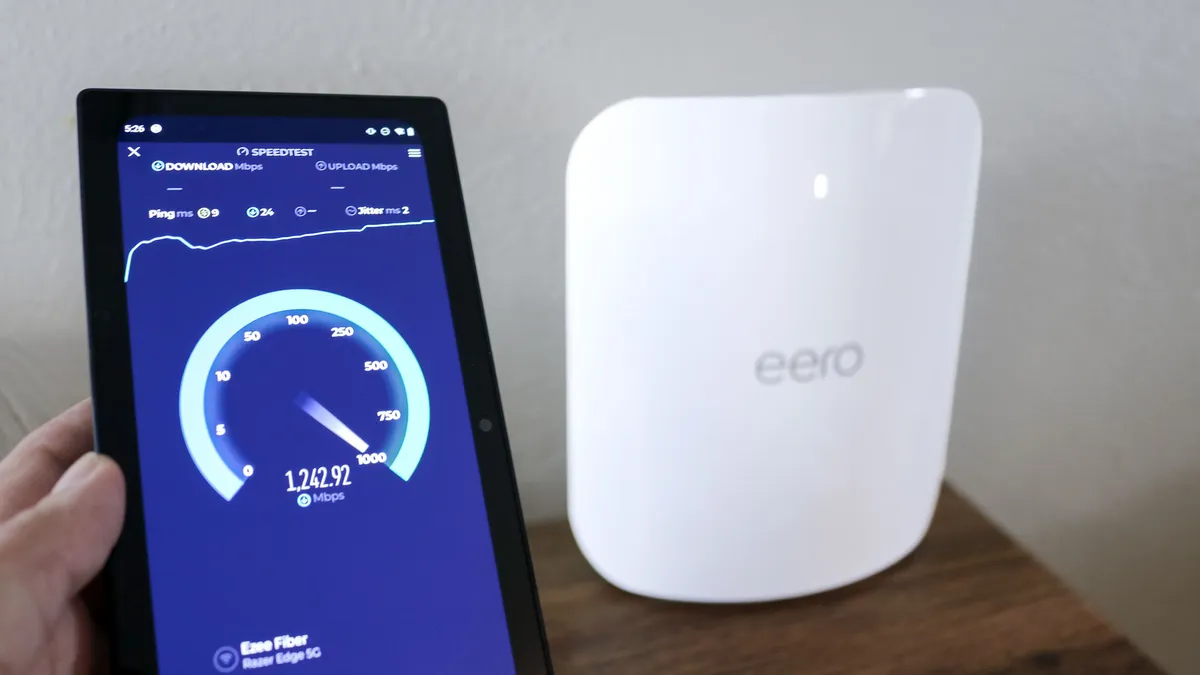
Before buying a new router, you must find out your true, real-world internet speed to ensure the router you buy is a seamless match. First, check your latest bill to see the maximum speed you're paying for (e.g., "up to 1,000 Mbps"). The speed you actually receive will fluctuate based on network congestion.
To establish a realistic baseline, I highly recommend you plug your computer directly into your current router using an Ethernet cable and run several speed tests using a service like Ookla’s speedtest.net or Netflix’s fast.com. Next, use your phone to run more speed tests — either in your browser or using one of the best speed test apps — throughout different areas of your home. This process helps you determine your current Wi-Fi speeds and will immediately flag any dead zones, which is your cue to consider a mesh Wi-Fi system over a traditional router.
How many devices will you connect?
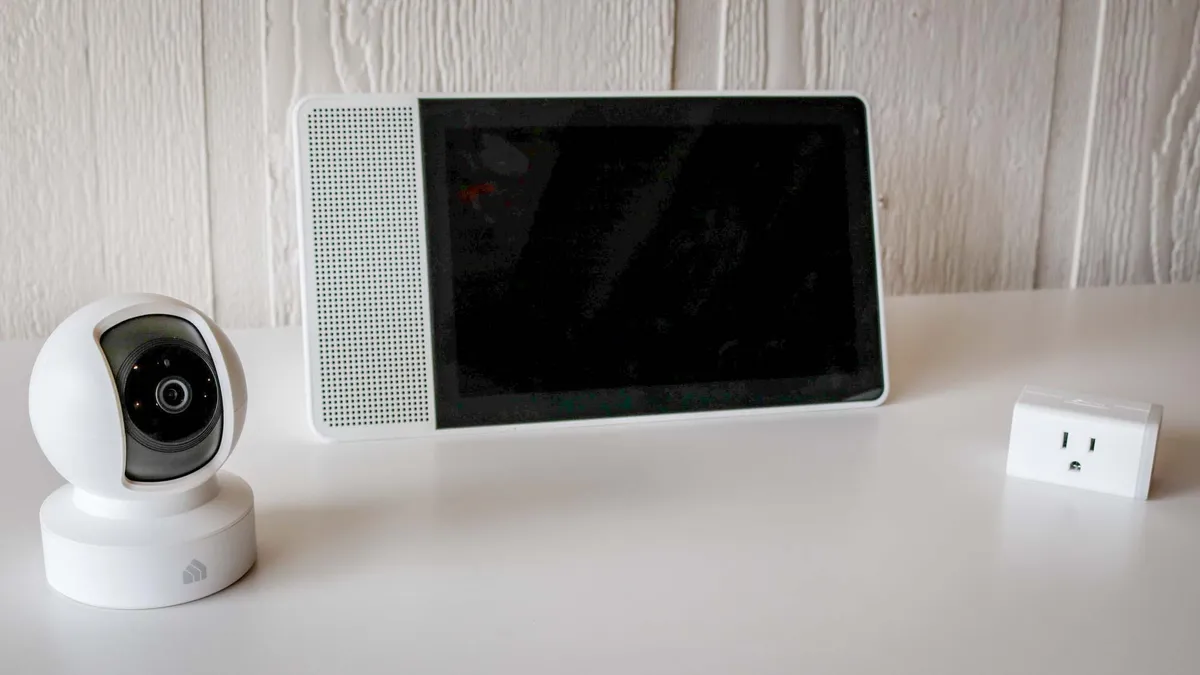
One thing people often overlook is the number of connected devices they have. If you only have a few devices — say, your phone, a laptop, a tablet, and your TV — then a less powerful router may be fine. However, if you have multiple people in your home, plus smart devices like a video doorbell, smart speakers, and security cameras, then a powerful router is necessary to support all those connections simultaneously. Making a quick list of all your connected devices will prevent slowdown and ensure your new router can handle the total traffic load.
Is this a long-term or short-term upgrade?

If your current router suddenly fails and you just need a new one to get you back online quickly, spending less may make sense, but you might need to upgrade again soon.
This is why I highly recommend taking the time to plan out your next upgrade and potentially even the one after that. For example, if you currently live in an apartment but plan to buy a larger home within the next year, a basic traditional router is a good option for now, knowing you’ll likely switch to a mesh Wi-Fi system to cover the larger area later. Likewise, if you don’t plan on upgrading beyond a gigabit or 500 Mbps internet plan, getting a blazing-fast multi-gig router doesn't make sense as you won't be able to use it to its full potential.
How we test the best Wi-Fi 6 routers
In order to determine which Wi-Fi 6 and Wi-Fi 6E routers are truly the best, we put them through a rigorous gauntlet of both real-world and benchmark testing. This balanced approach allows us to measure their performance for both typical daily use and ideal testing conditions.
In our real-world tests, our expert team sets up each Wi-Fi router or mesh system in a challenging 100-year-old, multi-story home. This allows us to determine exactly how well they can send data through floors and walls. During the review period, we use each router as our daily driver for demanding tasks like transferring large files, 4K video streaming, and online gaming.
As for our benchmark testing, we use Keysight’s IxChariot software to simulate complex network traffic in a repeatable and controlled way with 10 active users simultaneously. This allows us to measure the quality and stability of a network powered by a router or mesh system, moving beyond just peak download speeds. IxChariot then provides us with the key performance metrics that form the basis of the testing data you see throughout this guide.
Finally, we test each Wi-Fi router's download speeds at 15, 50, 75 and 90 feet. This gives us a clear picture of how well they perform up close and at a distance, while also allowing us to determine a router’s maximum range.
Since we use the same testing process for each router we review, we can then compare speed test results between models to tell you exactly why one router is better in certain situations and households than another. For more information on how we test networking devices, check out our guide on how we test Wi-Fi routers, along with our more general how we test page for Tom's Guide.
Check out all of our home networking coverage:
Best Wi-Fi routers | Best mesh routers | Best Wi-Fi 7 routers | Best gaming routers | Best Wi-Fi extenders | Best powerline extenders | Best cable modems

