







You can now download iOS 17 public beta 2 onto your iPhone, and try out the latest tweaks Apple's made to the upcoming iOS 17 update that will find its way onto iPhones this fall.
While developers are already on iOS 17 developer beta 4, regular users are better off sticking with the public beta, or not downloading one at all in case unexpected bugs cause you to lose your data. But if you are curious to see what's new, we've rounded up the five most interesting changes for you to take a look at once everything's installed.
Also, the iPadOS 17 and macOS Sonoma public betas have just been updated, so take a look at our guides to these operating systems if you're interested in what's new for iPads and Macs.
iOS 17 public beta 2: The big changes
StandBy notification options

StandBy mode, the smart display-style feature that turns on when you start charging your iPhone in a horizontal position, by default shows your notifications as they pop up. If you'd rather not have previews of your messages and emails appear like this, the new Preview on Tap Only toggle means you won't see any unless you touch the screen.
New Apple TV remote icon in Control Center

Apple's remembered that it's updated the look of its Apple TV 4K remote, and so the Control Center shortcut that takes you to the virtual remote on your iPhone now looks like the latest remote. It's a small change but one I can imagine has brought relief to Apple TV users.
New animations in Apple Health Mental Wellbeing check-ins
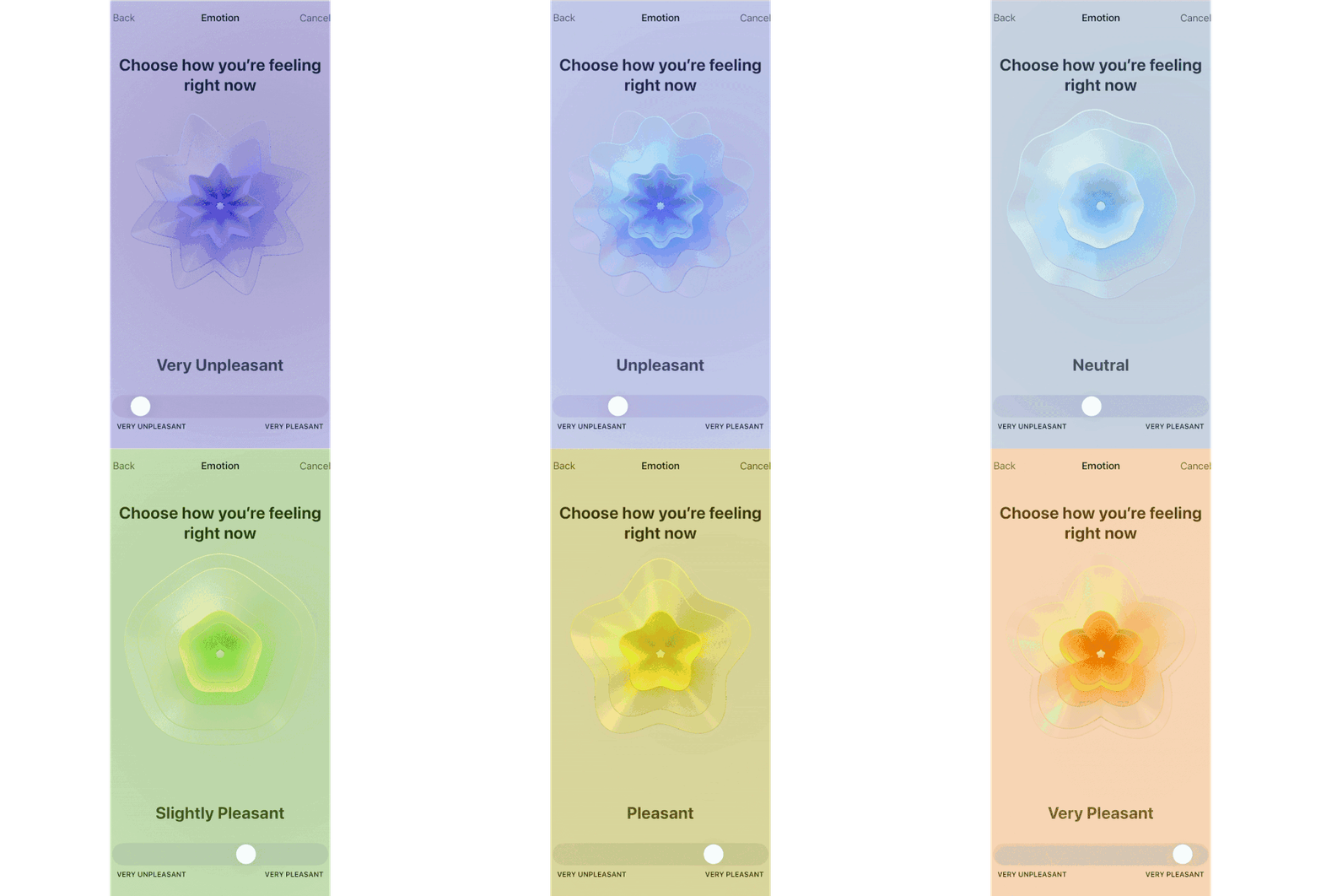
The iOS Health app is gaining new Mental Wellbeing tracking abilities in iOS 17, including a tracking interface that lets you describe your current mood with a slider. This slider's gained a new interface that assigns a smoothly animating shape and color to your mood, to help you figure out exactly how pleasant or unpleasant you're feeling in the moment.
Disable NameDrop/AirDrop proximity sharing

iOS 17 introduced NameDrop, a new AirDrop function for sharing contact details, and the ability to begin sharing by moving one iPhone close to another. But Apple's now realized that this isn't always a helpful thing to have begin automatically, so now there's a toggle to switch off the automatic sharing. You can still leave regular AirDrop on for swapping files, photos and so on in the old-fashioned way though.
iMessage in-app icons redesign

iMessage has moved its collection of special features like camera access, photos, stickers, your location and more into a new dedicated menu with iOS 17. The new public beta hasn't altered this too much, but the icons are now redesigned for a more unified look.
More from Tom's Guide
- Samsung Galaxy S24 Ultra tipped to steal iPhone 15 Pro's biggest design upgrade
- Apple Watch Ultra 2 vs Apple Watch Ultra: Biggest rumored upgrades
- iPhone 15 Pro Max periscope zoom just ran into problems — here’s what we know

