Bluetooth
While Bluetooth may not yet be a standard feature in notebook PCs, it's become a big favorite among business users. Whether users seek to synchronize address book data with a PDA or a cellphone, or to break the wire tether for a VoIP headset, Bluetooth is the technology of choice. You can even use it with a mobile phone or an access point for basic surfing, or simply use it to move data from device A to device B.
Because our Dell Latitude D610 notebook test system includes no built-in Bluetooth interface, we used a USB Bluetooth adapter for our testing. That said, it makes very little difference whether you use a built-in Bluetooth module or a USB Bluetooth adapter. That's because even internal BT components use a USB link to communicate with the chipset and the system.

GN-BTD02: Gigabyte BT USB adapter

The adapter consumes a maximum of 100 milliwatts (mW)
Using the adapter we made a connection to another Bluetooth equipped PC. We used this Personal Area Network (PAN) connection with our Network Analyzer tool to transfer the same compressed 1.2 MB file in an endless loop as in our other network tests.
Discussion
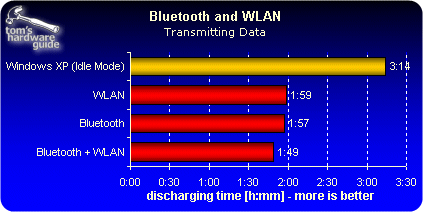
Although the power consumption we measured directly on the port registered at 70 mW, the battery lifetime for this test declined by 28% as compared to our standard office usage scenario! This hefty increase in power consumption versus our office test (19 watts vs. 27 watts) is not just the work of the BT module. In this case, the biggest portion of the increase must be attributed to the chipset, RAM and the CPU, all of which play a role in handling the data transfers involved.