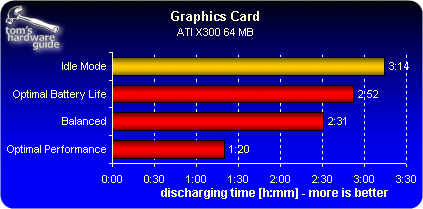
Battery Lifetime As A Function Of Graphics Card Clock Rates
To load the graphics card sufficiently, we used the D3D Fortune program to impose a heavy load on the graphics card while making only minimal simultaneous use of the CPU.

The 3D program D3D Fortune loads the mobile graphics card to the max.
In this test, CPU utilization stayed under 8%. That helps us to be sure that those differences in battery life that we measure are directly attributable to energy consumption in the graphics subsystem.
Our test system, the Dell Latitude D610, is equipped with an ATI X300 graphics chip, along with 64 MB of dedicated video RAM. The following table shows the range of clock settings for the GPU and the video RAM that the driver supported.
| Dell Latitude D610 (ATI X300 - 64 MB) | ||
|---|---|---|
| Energy Save Options | GPU | Ram |
| Optimal Performance | 297 MHz (100%) | 216 MHz (100%) |
| Balanced | 209 MHz (70%) | 182 MHz (84%) |
| Optimal Battery Life | 104 MHz (35%) | 121 MHz (56%) |
Optimal Battery Life: This setting results in maximal reduction of GPU and video RAM clock rates. Working with Office applications or DVD playback is entirely tolerable, even at these relatively low performance levels. Dell provided these minimal clock rate settings for the graphics card and RAM.
Balanced: This option clocks the graphics card and RAM somewhat faster. Simple games and flicker-free playback of HDTV films work well at this setting.
Optimal Performance: GPU and graphics RAM run at maximum speed. How high the maximum possible clock rates for the graphics subsystem actually go depends primarily on the thermal design of the cooling system in the notebook. The absolute values for maximum clock rates come from the notebook vendor in this case as well.