Persuading Mobile CPUs To Conserve Energy
Source: Tom's Guide US | Keywords: squeezing, more, life, out, of, your, notebook | Themes: Business Notebooks
- 1. Introduction
- 2. Battery Life Under Heavy Graphics Load
- 3. Battery Lifetime As A Function Of Graphics Card Clock Rates
- 4. 3D Games Drain The Battery Dry
- 5. Mobile CPUs Are Always Faster, But Not Noticeably More Energy-efficient
- 6. Persuading Mobile CPUs To Conserve Energy
- 7. Best Practice: How Power Scheme Selection Affects Battery Lifetime
- 8. Effects Of Display Brightness On Battery Lifetime
- 9. Repeated Data Copies To An External Hard Drive
- 10. Continuous File Reads From An Internal Hard Drive
- 11. Discussion
- 12. Working With An Optical Mouse
- 13. Discussion
- 14. DVD Video: The Right Player Software Extends Battery Lifetime
- 15. Discussion
- 16. Use Of The Optical Drive For Data Storage
- 17. Bad-quality Optical Media Shortens Battery Lifetime
- 18. Mobile TV Cuts Battery Lifetime In Half
- 19. Use Of WLAN, LAN, And PAN Components
- 20. Use Of WLAN, LAN, And PAN Components, Continued
- 21. LAN And WLAN: Which One Consumes More Power?
- 22. Bluetooth
- 23. Audio Playback: Best On A Headset Or On The Built-in Speakers?
- 24. Audio Playback, Continued
- 25. Webcam
- 26. USB Devices: Power Consumption Levels Depend Mostly On The Application Is Use
- 27. USB Devices, Continued
- 28. MobilityGuru's 10 Tips To Extend Battery Life
6. Persuading Mobile CPUs To Conserve Energy
Windows allows users to adjust CPUs' use and power savings. The interface for such controls appears under the Power Schemes tab in the Power Options section in Control Panel.
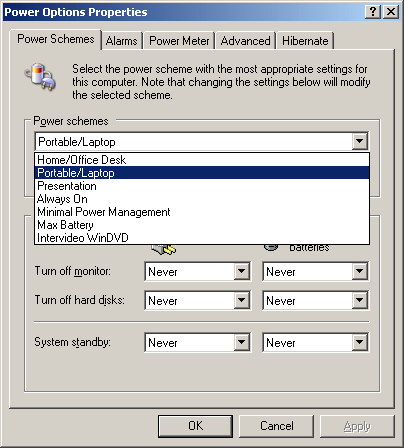
Windows XP gives users various ways to control CPU behavior.
The following table presents an overview of how the individual settings work on CPU clock rates, and thus also exert an indirect influence on energy consumption and battery lifetime.
| Windows XP Power Schemes
Operating mode: AC Power |
||
|---|---|---|
| Name of power scheme | Clock control | Clock rate |
| Home/Office Desktop | fixed | (1860 MHz) |
| Portabel Laptop | adaptive | (800 <> 1860 MHz) |
| Presentation | adaptive | (800 <> 1860 MHz) |
| Always on | fixed | (1860 MHz) |
| Minimal Power Management | adaptive | (800 <> 1860 MHz) |
| Maximum Battery | adaptive | (800 <> 1860 MHz) |
| Operating mode: Battery | ||
| Name of power scheme | Clock control | Clock rate |
| Home/Office Desktop | adaptive | (800 <> 1860 MHz) |
| Portable Laptop | adaptive | (800 <> 1860 MHz) |
| Presentation | Degrade | (800 MHz) |
| Always on | fixed | (1860 MHz) |
| Minimal Power Management | adaptive | (800 <> 1860 MHz) |
| Maximum Battery | Degrade | (800 MHz) |
Overview of the effects of various power schemes when operating from AC power or the battery using the Pentium M750 as an example.
We assume that the user has the option to choose if the CPU runs with:
A fixed maximum clock rate A fixed minimum clock rate, or Automatic, dynamic adjustment of the clock rate to meet current demand.- Previous page Mobile CPUs Are Always Faster, But...
- Next page Best Practice: How Power Scheme...