USB Devices, Continued
Although the power consumption for the two devices are in the same general range, battery lifetime for the Bluetooth adapter is nearly one hour shorter, despite otherwise identical conditions.
The reasons for this difference are many and varied. We assume that the protocols used for data transfer with Bluetooth are considerably more CPU-intensive and involve more motherboard components compared to a mouse's power drain.
A final word about the power data for the USB devices themselves: Don't pay too much attention to these values, because they say nothing about the power needs for other system components involved in using that device. This mysterious relationship can thus represents the most telling factor in determining battery lifetime..
Dell Quickset offers a quick-and-easy way to select power saving settings.
Our Dell Latitude D610 test system comes equipped with a special power management tool that offers two important settings that Windows XP does not offer. One setting permits management of display brightness within individual power schemes. The other permits wireless components to be enabled or disabled within individual power schemes. The big impact these two parameters can have on battery life is conclusive in these revealing tests.
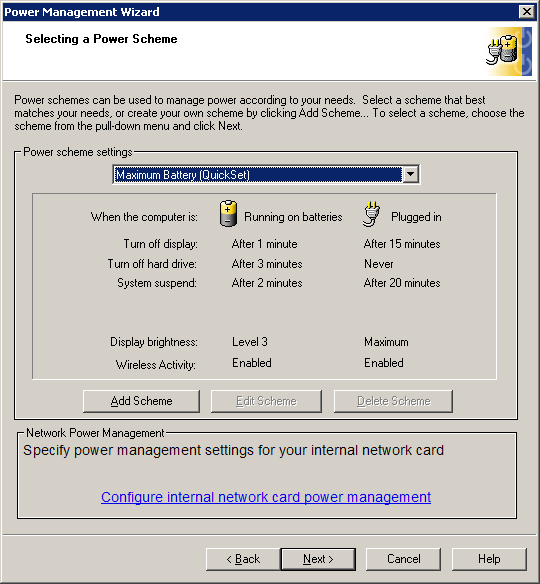
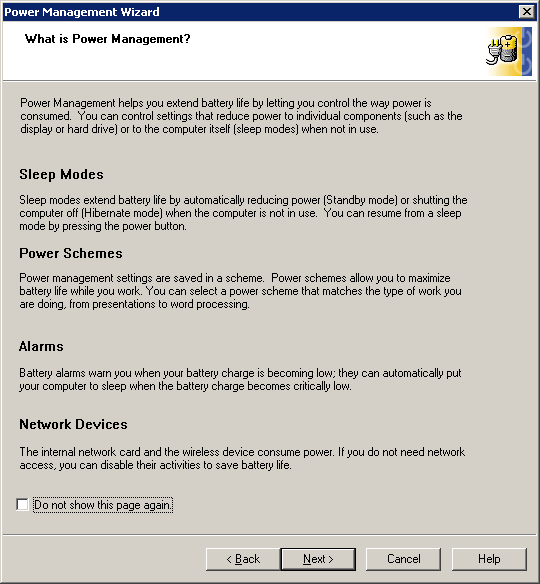
The ability to configure power consumption for specific system components is a big deal. Dell also explains the whys and wherefores of these settings for notebook newbies, as the screenshot below shows.
In addition to providing a number of usage scenario presets, known as Quicksets, the notebook offers users the ability to select their own custom-power settings as well.
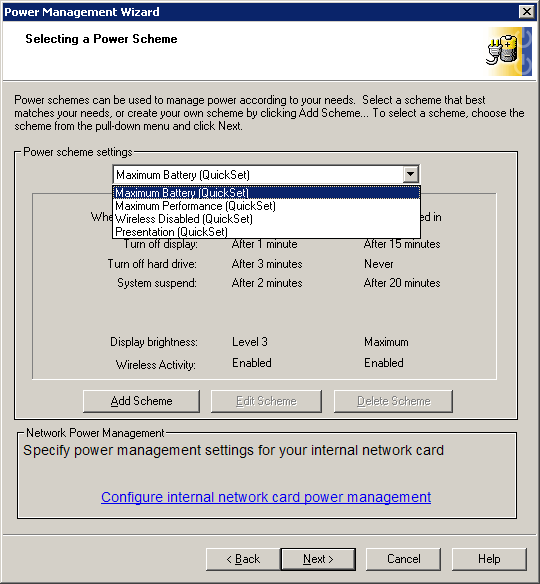
The predefined settings in the tool are adequate, but users can also create their own power schemes.
Dell's power management tool is called Quickset, and the utility really lives up to its name. Although Windows XP power schemes deliver fairly comprehensive power management controls, one click on the Quickset logo in the system tray is all that is needed to access this utility. Users can immediately select a Quicksetting, alter its settings or simply turn wireless notebook components on or off.
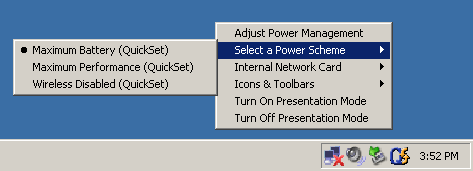
Instant access increased user acceptance and boosts productivity.