LAN And WLAN: Which One Consumes More Power?
For several years, a built-in LAN interface has become stock equipment in most notebooks. As a rule, this is usually a 100 Mbps Ethernet chipset. Since then, there hasbeen a progressive move toward faster, but more power-hungry LAN interfaces that can theoretically handle network bandwidth of up to 1 Gbps. These faster varieties generally also impose a heavier load on the CPU than 100 Mbps offerings because of the enormous data rates involved. When wireless connections are used instead, their relatively more modest 54 Mbps maximum throughput places much less demand on the CPU as well.

An RJ-45 port is typical for Gigabit Ethernet devices
We used the same custom-built "Network Analyzer" tool for this series of tests as in the preceding series, along with the same 1.2 MB compressed file. In two sequential sets of measurements we determined the battery lifetime at maximum network throughput with the integrated Gigabit LAN chip. After that we disconnected the cable from the Gigabit port and switched over to a 100 Mbps PC Card in the reference notebook linked to our dedicated server, and measured battery lifetime yet again.

D-Link's 100 Mbps DFE-690TXD PC Card
Discussion
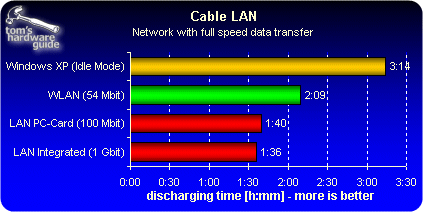
By comparison with the simple office usage scenario (2h43 min) intensive LAN usage reduces battery lifetime by up to 40%. Our tests also showed system utilization during network data transfer ranging from 30 up to 50%. As compared to the 100 Mbps PC Card, the CPU suffered from higher utilization when using the Gigabit port, and battery lifetime was consequently somewhat reduced. This is more than offset, however, by much higher data transfer rates. At the much more leisurely data rate for the 54 Mbps WLAN module, the notebook's battery lifetime held up for an additional half hour.
In practical terms, these results demonstrate that wireless surfing lasts longer when running a notebook on battery power. That said, those who need to transfer large amounts of data quickly will be better served by a wired network instead.
In the face of pending faster WLAN standards that will replace 802.11g, it's not unreasonable to assume that they will also further reduce battery lifetime. How hardware developers balance the obvious contradiction between increasing data rates and minimizing power consumption remains to be seen.